Compiling MVC Views In A Build Environment

ASP.NET MVC project templates include support for precompiling views, which is useful for finding syntax errors within your views at build time rather than at runtime.

In case you missed the memo, the following outline how to enable this feature.

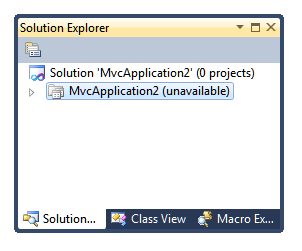
  • Right click on your ASP.NET MVC project in the Solution Explorer
  • Select Unload Project in the context menu. Your project will show up as unavailableunavailable-project
  • Right click on the project again and select Edit ProjectName.csproj.

This will bring up the project file within Visual Studio. Search for the entry <MvcBuildViews> and set the value to true. Then right click on the project again and select Reload Project.

Compiling in a build environment

If you search for MvcBuildViews on the web, you’ll notice a lot of people having problems when attempting to build their projects in a build environment. For example, this StackOverflow question describes an issue when compiling MVC on a TFS Build. I had an issue when trying to deploy an ASP.NET MVC 3 application to AppHarbor.

It turns out we had a bug in our project templates in earlier versions of ASP.NET MVC that we fixed in ASP.NET MVC 3 Tools Update.

But if you created your project using an older version of ASP.NET MVC including ASP.NET MVC 3 RTM (the one before the Tools Update), your csproj/vbproj file will still have this bug.

To fix this, look for the following element within your project file:

<Target Name="AfterBuild" Condition="'$(MvcBuildViews)'=='true'">
  <AspNetCompiler VirtualPath="temp" PhysicalPath="$(ProjectDir)\..\$(ProjectName)" />
</Target>

And replace it with the following.

<Target Name="MvcBuildViews" AfterTargets="AfterBuild" Condition="'$(MvcBuildViews)'=='true'">
  <AspNetCompiler VirtualPath="temp" PhysicalPath="$(WebProjectOutputDir)" />
</Target>


After I did that, I was able to deploy my application to AppHarbor without any problems.

Going back to the StackOverflow question I mentioned earlier, notice that the accepted answer is not the best answer. Jim Lamb provided a better answer and is the one who provided the solution that we use in ASP.NET MVC 3 Tools Update. Thanks Jim!

What others have said

Requesting Gravatar... Aaron Weiker May 09, 2011 2:55 AM
# re: Compiling MVC Views In A Build Environment
Is there a way to make the asp.net compiler run in 64 bit instead of 32?
Requesting Gravatar... Michael G May 09, 2011 9:59 PM
# re: Compiling MVC Views In A Build Environment
This is the area which is somehow neglected - automated builds. You have created many awesome tools recently - MVC Scaffolding, Web Publishing mechanisms, etc., but they all so Visual Studio IDE-centric! (Scott Guthrie promised a post about automation but never did one). How can I leverage all this goodness in the Continuous Integration (and not only TFS, but Team City/NAnt for example)?
Requesting Gravatar... Dan Martin May 09, 2011 11:07 PM
# re: Compiling MVC Views In A Build Environment
Nice, thanks for this post. I couldn't get my views to compile with AppHarbor without my build dying, so I just said screw it and turned it off. I was using an mvc2 project that I upgraded to 3, so I'll have to edit the project file. Thanks again.
Requesting Gravatar... Eric Amodio May 09, 2011 11:22 PM
# re: Compiling MVC Views In A Build Environment
Thanks for the post! Now that I've enabled this, is there any way to limit building to files included in the .csproj file? Or is there at least a way to exclude certain folders from being built?

For example in our project folder structure we have a \Mocks folder which contains lots of mocked up .aspx and .cshtml files, and while the \Mocks folder isn't included in the .csproj file, it seems that all the files in that tree are getting built. This of course generates LOTS of build errors.

Any help would be greatly appreciated.
Requesting Gravatar... Marnix van Valen May 10, 2011 12:19 AM
# re: Compiling MVC Views In A Build Environment

If you're also building deployment packages on your build server you may want to add


&lt;RemoveDir Directories="$(BaseIntermediateOutputPath)" /&gt;

This circumvents a problem caused by the deployment package build leaving it's intermediate output (including web.config) in the intermediate output folder. There's more on this at StackOverflow here and here.

Requesting Gravatar... haacked May 10, 2011 3:54 PM
# re: Compiling MVC Views In A Build Environment
@Aaron not that I know of.
@Michael what problems are you having using Team City/NAnt with MVC? I have automated builds with MVC projects just fine.
@Eric not using the MvcBuildViews feature. You could use AspNet_Compiler.exe directly to do that.
Requesting Gravatar... Ben Page May 18, 2011 10:47 AM
# re: Compiling MVC Views In A Build Environment
phil - this works for me until i change the build from debug > release, then i get the dreaded 'machinetoapplication' error message again..
Requesting Gravatar... Manish Jain Jun 13, 2011 2:33 AM
# re: Compiling MVC Views In A Build Environment
It didn't fix for me. I turned off MvcBuildViews for publish.
Requesting Gravatar... Josh Jun 26, 2011 11:42 AM
# re: Compiling MVC Views In A Build Environment
This did not work for us when switching back and forth between web deploys and VS builds. The easiest solution was simply to delete the obj\ folder whenever we needed to switch back and forth.
Requesting Gravatar... Josh Jun 26, 2011 12:41 PM
# re: Compiling MVC Views In A Build Environment
Fixed ... we just added the following to our msbuild command-line:

/p:BaseIntermediateOutputPath=c:\temp\ourapp.web\
Requesting Gravatar... Keith Dahlby Aug 11, 2011 6:07 AM
# re: Compiling MVC Views In A Build Environment
Thanks for this fix, Phil. One question though... I have .NET 3.5 MVC 2.0 project in VS2010. Everything works beautifully except one view fails to compile with the following:

error CS0433: The type 'System.Web.HttpRequestWrapper' exists in both 'c:\Program Files (x86)\Reference Assemblies\Microsoft\Framework\.NETFramework\v4.0\System.Web.dll' and 'c:\Windows\assembly\GAC_MSIL\System.Web.Abstractions\3.5.0.0__31bf3856ad364e35\System.Web.Abstractions.dll'


I'm able to fix it using the hack suggested here, but it seems wrong to put the tool path directly in the .csproj. Is there a better way?
Requesting Gravatar... Dan M Sep 16, 2011 3:53 PM
# re: Compiling MVC Views In A Build Environment
Hi Phil, This solution didn't work for me (I encountered this problem even though I was already using the revised/fixed template). I needed to do <BaseIntermediateOutputPath>[SomeKnownLocationIHaveAccessTo]</BaseIntermediateOutputPath>. Any idea why that might be? Could it be that I have my WebProjectOutputDir set incorrectly?
Requesting Gravatar... Dan M Sep 16, 2011 4:03 PM
# re: Compiling MVC Views In A Build Environment
Followup: I was able to solve the problem by using this modified Target block:


<Target Name="MvcBuildViews" AfterTargets="AfterBuild" Condition="'$(MvcBuildViews)'=='true'" DependsOnTargets="CleanWebsitesPackage;CleanWebsitesPackageTempDir;CleanWebsitesTransformParametersFiles;">
<AspNetCompiler VirtualPath="temp" PhysicalPath="$(MSBuildProjectDirectory)" />
</Target>
Requesting Gravatar... John Hughes Sep 28, 2011 8:14 AM
# re: Compiling MVC Views In A Build Environment
Phil, the fix also does not work for me. The DependsOnTargets solution recommended above also did not work for me, nor did Jim Lamb's solution.

The error is:

Error 193 It is an error to use a section registered as allowDefinition='MachineToApplication' beyond application level. This error can be caused by a virtual directory not being configured as an application in IIS.
Requesting Gravatar... Paul Marsh Oct 16, 2011 11:35 AM
# re: Compiling MVC Views In A Build Environment
@John Hughes

The fix for that problem is what Marnix mentioned up a few comments up. Marke sure you have this


<Target Name="AfterBuild">
<RemoveDir Directories="$(BaseIntermediateOutputPath)" />
</Target>
Requesting Gravatar... Greg B Nov 04, 2011 4:19 AM
# re: Compiling MVC Views In A Build Environment
I have a simple file named Error.aspx in the Views/Shared folder.

When I do the steps in the blog post, I get errors such as: Circular file references are not allowed. C:\temp\Views\Shared\Error.aspx

My project source is NOT stored in C:\temp.

What do you have to say?

(will show your gravatar)
Please add 5 and 5 and type the answer here: