Copying Files Over Remote Desktop

Here’s a handy tip I just recently learned from the new intern on our team (see, you can learn something from anyone on any given day). I’ve long known you could access your local drives from a remote machine.

For example, start up a remote desktop dialog.
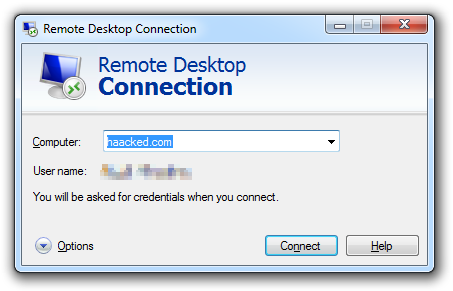
remote-desktop-dialog

Then expand the dialog by clicking on Options, then check the Local Resources tab.

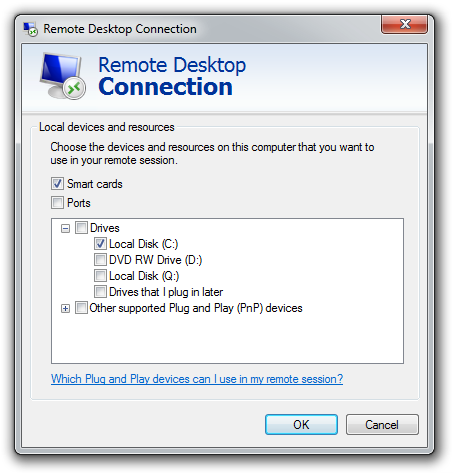
remote-desktop-options Make sure Clipboard is checked, and then hit the More… button.
remote-desktop-drives

Now you can select a local disk to be shared with the remote machine. For example, in this case I selected my C: drive.
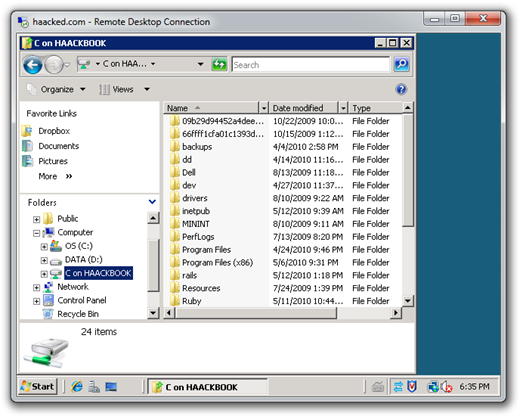
local-drive-on-rdAs you can see in the screenshot, the file explorer has another drive named “C on HAACKBOOK” which can be used to copy files back and forth from my local machine to the remote machine.

But here’s the part I didn’t know. Let’s take a look at the desktop of my remote machine, which has a text file named info.txt.
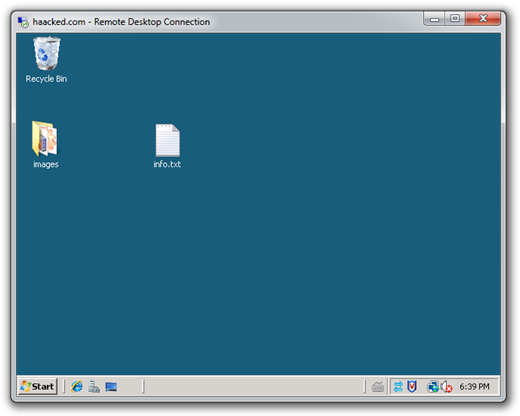
remote-desktopOne way I can get that file to my local machine is to copy it to the mapped drive we saw in the previous screenshot.

Or, I can simply drag and drop the info.txt from my remote desktop machine to a folder on my local machine.
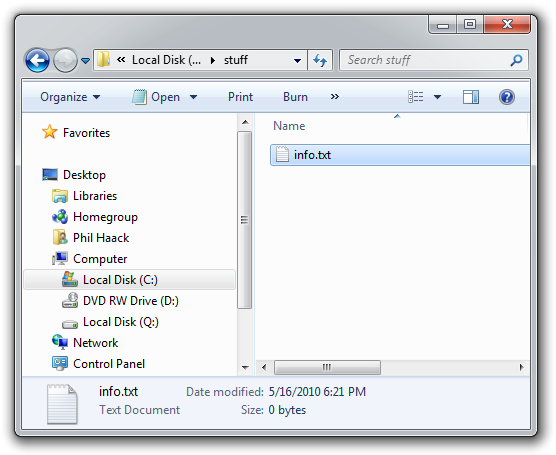
stuff

So all this time, I had no idea cut and paste operations for files work across remote desktop. This may be obvious for many of you, but it wasn’t to me. :)

What others have said

Requesting Gravatar... Kevin Connolly May 17, 2010 4:13 PM
# re: Copying Files Over Remote Desktop
Funny timing, recently posted about the dangers of copy/paste over remote desktop. Worth a read.
Requesting Gravatar... Bertrand Le Roy May 17, 2010 4:30 PM
# re: Copying Files Over Remote Desktop
Actually, even though the drive mapping is neat, you don't even need it in order to be able to copy and paste files back and forth between remote and local. I've been using it as my main file transfer tool with remote machines.
Requesting Gravatar... Chris Airey May 17, 2010 4:47 PM
# re: Copying Files Over Remote Desktop
Known that ever since the feature was included. Many remote desktop apps can access the clipboard! But sometimes the smallest things go easily missed!
Requesting Gravatar... Lb May 17, 2010 4:59 PM
# re: Copying Files Over Remote Desktop
This is the kind of thing that you're most likely
to learn from pairing with other people.
It's useful but hard to discover and hard to imagine
how they could advertise the feature better.
Requesting Gravatar... Artiom Chilaru May 17, 2010 5:00 PM
# re: Copying Files Over Remote Desktop
Well, this is a bit surprising.. While I knew about copy/pasting.. I never knew that I could drag&drop files like this.

Then again, testing this between Win7 and Server2008 R2... it didn't work! :(
Is there something I missed?
Requesting Gravatar... Thanigainathan May 17, 2010 5:08 PM
# re: Copying Files Over Remote Desktop
Hi,

very nice tip. Thanks Hackked. Long time I worked in remote desktop and does not know this secret.

Thanks,
Thanigainathan.S
Requesting Gravatar... tracker1 May 17, 2010 5:55 PM
# re: Copying Files Over Remote Desktop
I think the better question... is it possible to. Dissable these features on the server via group policy? Since it is a security risk for remote work.
Requesting Gravatar... Bunter May 17, 2010 7:31 PM
# re: Copying Files Over Remote Desktop
Select some number of large files on a local computer and do copy. Then move to remote desktop and right-click something in explorer. Can you spot the most annoying feature of remote desktop?
Requesting Gravatar... msuarz May 17, 2010 8:12 PM
# re: Copying Files Over Remote Desktop
really haacked? this has been around for years ... anyways ... try mstsc /w:5000 /h:1600 to expand the rd across multiple monitors (5000 & 1600 were just sample resolutions)
Requesting Gravatar... Josh May 17, 2010 9:01 PM
# re: Copying Files Over Remote Desktop
I was able to use this when I remoted into Win2K3 servers, but couldn't do it on a Win2k8 server. I'm assuming it's a buried security setting.
Requesting Gravatar... Zacho May 17, 2010 11:01 PM
# re: Copying Files Over Remote Desktop
Really? Running out of things to blog about eh? Please tell me this is some sort of tasteless joke! :)
Requesting Gravatar... Hashname May 17, 2010 11:10 PM
# re: Copying Files Over Remote Desktop
Wow..this is cool..
Thanks for sharing..
Requesting Gravatar... Peter Kellner May 18, 2010 12:06 AM
# re: Copying Files Over Remote Desktop
I can't believe I did not know this! I have done this so many times without this trick. I feel like I've been robbed of 20 seconds times about 1000! Now, I have to wonder what else don't know. SUBSCRIBED!
Requesting Gravatar... McConnell Group May 18, 2010 1:27 AM
# re: Copying Files Over Remote Desktop
I guess you can always learn something new no matter the source. Thank you for Posting it
Requesting Gravatar... Sebastien Lachance May 18, 2010 4:35 AM
# re: Copying Files Over Remote Desktop
You saved me a lot of time today with this trick. Thank you!
Requesting Gravatar... Shlomo May 18, 2010 5:09 AM
# re: Copying Files Over Remote Desktop
In related news, you can also bring up the start menu by pushing the Windows button...
Requesting Gravatar... andi May 18, 2010 8:01 AM
# re: Copying Files Over Remote Desktop
Finally! there's something I know and you didn't know! :)
Requesting Gravatar... alamode May 18, 2010 8:30 AM
# re: Copying Files Over Remote Desktop
Great tip, but I prefer TurboMeeting for remote desktop. Gets the same thing done but much easier. Just click and drag.
Requesting Gravatar... Justin May 18, 2010 11:10 PM
# re: Copying Files Over Remote Desktop
I've been doing something similar with mapped network drives but I didn't know you could actually copy and paste between and RDP seesion and your local machine. Thanks.
Requesting Gravatar... Chris May 19, 2010 4:14 AM
# re: Copying Files Over Remote Desktop
Can't remember when I first did that it's so long ago, probably in the 90's.
Since drag and drop is a core functionality of the GUI environment (ever heard of the Xerox Star system released in 1982?) I assume any semi-sophisticated application makes use of it. It's the first thing I try when trying to move something from A to B. It's only when that fails that I begin looking at the alternatives.
You'd be amazed at some of the objects that can be dragged from one environment into another. Try it sometime.
Requesting Gravatar... Jack May 19, 2010 11:51 AM
# re: Copying Files Over Remote Desktop
I like this feature, and we can also map the CD drivers to the remote connection :)
Requesting Gravatar... Shan May 19, 2010 12:49 PM
# re: Copying Files Over Remote Desktop
One thing with remote desktop sessions that leaves me completely gobsmacked is how the heck do I disable my local PC speaker from beeping! It is terrible! Sometimes I remote in late i.e. when the wife is sleeping and when I'm laying in bed and all of a sudden a huge loud PC speaker beep emanates from my laptop, which kind of disturbs her. I have never been able to figure out how to suppress my local PC speaker from making it's obligatory beep!
Requesting Gravatar... Crawl About May 20, 2010 7:40 AM
# re: Copying Files Over Remote Desktop
Doesn't work for me with Windows 7 --> Windows 7 connections.
Am i missing something?
Requesting Gravatar... Colin May 21, 2010 12:44 AM
# re: Copying Files Over Remote Desktop
Yes, this is nice, but be careful... I think when using the clipboard to copy files between machines, if you are copying a big file, and then happen to copy something else to your clipboard, it will cancel the original file copy!

(I haven't proven this yet, but having had several files mysteriously stop copying for no apparent reason recently, this appears to be the problem)
Requesting Gravatar... Mike May 22, 2010 9:19 PM
# re: Copying Files Over Remote Desktop
I use MyGreenPC (http://www.mygreenpc.com)...its basically a wrapper around Remote desktop and you don't have to setup firewalls or open ports to use it.

It also automatically maps all drives - which is pretty convinent.
Requesting Gravatar... gerleim May 23, 2010 5:03 AM
# re: Copying Files Over Remote Desktop
... and now somebody should investigate that why is file copying soooo slow in remote desktop.
Requesting Gravatar... Parag May 24, 2010 1:56 PM
# re: Copying Files Over Remote Desktop
@gerleim : Slow speed is because of Encoding I believe. Probably BASE64 inflating size by 30% or so and probably coupled with a verify algorithm that checks files again!
Requesting Gravatar... Rich May 25, 2010 2:32 AM
# re: Copying Files Over Remote Desktop
The question is how secure is the file transfer with this method?
Requesting Gravatar... Doug Rathbone May 25, 2010 12:43 PM
# re: Copying Files Over Remote Desktop
I thought this was a very well known feature.

It is the same as \\tsclient being the hostname mapping for the clients pc in explorer etc.

The problem you'll have with the automatically mapped drives is that a lot of installers and programs etc check to see if they are loaded from this "drive" over RDP and will complain

you can get around this by surfing to the shares on \\tsclient in explorer and mapping a drive. This is also how the local printers get mapped when you connect via RDP so that you can still print locally.

basically anything that relies on network traffic gets sent back to the client using the network sharing over \\tsclient hostname

Requesting Gravatar... Doug Rathbone May 25, 2010 12:45 PM
# re: Copying Files Over Remote Desktop
Additionally:

- I'm pretty sure that files/copy&pastes are sent through the RDP tunnel and therefore are encrypted

- The above is probably also why it is slow - as it's encrypted
Requesting Gravatar... setiri Oct 12, 2010 5:24 AM
# re: Copying Files Over Remote Desktop
Use this feature a lot, but it is sooooooo incredibly slow. Im talking an order of magnitude slower than it should be. This is really frustrating.
Requesting Gravatar... Gani Jan 19, 2011 12:36 PM
# re: Copying Files Over Remote Desktop
In using Remote Acess the operation of Copy ,paste from Windows 7 to Win Xp, file copy is performed but from Win Xp to Win 7 file copy cannot be done. Does anyone knows the answer? if do, please send a mail to gani.spanco@gmail.com
Requesting Gravatar... Ravi Jan 31, 2011 6:48 PM
# re: Copying Files Over Remote Desktop
thanks for the help
@gani...it can easily be done with above settings in windows xp..just copy from one and paste to another..
Requesting Gravatar... Steve Feb 22, 2011 12:45 PM
# re: Copying Files Over Remote Desktop
Also, printing can be done locally during RDP session (2008 SR2). If member of Print Operators, all local printers beccome available to Server....no matter where you VPN and RDP from... Nice!
Requesting Gravatar... Putra Eka Apr 08, 2011 2:00 PM
# re: Copying Files Over Remote Desktop
Great tutorial, I've searched several tutorials about copying files from remote desktop to local computers but don't work. Now It's works. Thanks
Requesting Gravatar... shakar May 31, 2011 4:42 AM
# re: Copying Files Over Remote Desktop
THank you. This was a real helpful tip. Solved my problem of transferring files from RDP.
Requesting Gravatar... lucky Jun 15, 2011 4:56 PM
# re: Copying Files Over Remote Desktop
great tech. now i m relax ... thank u very much team..
Requesting Gravatar... John Jun 16, 2011 3:50 AM
# re: Copying Files Over Remote Desktop
Great feature, but retarded slow. Even more slow if you're RDP'ing over an encrypted connection (e.g. you're on VPN that's encrypted, and then the RDP is encrypted on top of that). At that point, it's almost faster for me to drive to the office, throw a thumb drive in, get the files, then drive home than it is to wait for them to finish (granted, I'm talking about large files).

Either way, it works and it's easy to use. MS doesn't do a good job of advertising it's features. I mean, they've had *great* voice recognition since XP and built into Windows since Vista. Mac comes out with it and everyone's like OMG, that's so innovative, you can talk to it and it does stuff. When I broke my arm that feature saved me, yet, you don't ever hear about them touting features like that. MS has one of the worst marketing teams in existence (like, remember the bomb that was the Jerry Seinfeld commercials where they spent like 100 million dollars and people were burnt out on the commercials before they were even released). I mean, they over advertised the advertisement like it was something revolutionary.
Requesting Gravatar... Mr_47snake Jul 18, 2011 5:09 PM
# re: Copying Files Over Remote Desktop
this is very cool
Requesting Gravatar... Shyam Jul 26, 2011 11:38 PM
# re: Copying Files Over Remote Desktop
I tried all steps abd once i connect to remote desktop i was not able to see my local drive on remote machine which i slected for my local.
Requesting Gravatar... Kayal Aug 23, 2011 7:27 PM
# re: Copying Files Over Remote Desktop
Good Tips....GAve me Answer for my long time R&D ;)
Requesting Gravatar... rg Aug 29, 2011 12:07 AM
# re: Copying Files Over Remote Desktop
thanks it s useful
Requesting Gravatar... jc Sep 01, 2011 8:56 PM
# re: Copying Files Over Remote Desktop
The reason that works is more an accident than a feature. See, the clipboard is what enables drag-and-drop functions in Windows. The path to your file is translated to a RD path by the RD window when you drop it. By enabling the sharing of the clipboard, Microsoft enabled drag-and-drop features.

I do not remember them making a lot of noise about this feature either.
Requesting Gravatar... Kingo Sep 21, 2011 12:21 AM
# re: Copying Files Over Remote Desktop
Is there a security setting in Group Policy on Server 2003 that disables copying from a RDP session to a local PC? If I try to copy a file this way i get a access denied message.

I can quite happily copy files from my Local PC to the same RDP Session by mapping the drives.
Requesting Gravatar... Saravanan Oct 18, 2011 11:32 PM
# re: Copying Files Over Remote Desktop
This very help to me!! now i am teach to my friends thank you very much !!!
Requesting Gravatar... Jeff Borg Nov 14, 2011 10:09 PM
# re: Copying Files Over Remote Desktop
This is fantastic, thanks!
Requesting Gravatar... Sy Nov 30, 2011 12:04 PM
# re: Copying Files Over Remote Desktop
I can't do any of that. I used to be able to copy files from remote computer to my old computer (Windows 7 Professional). On the new computer (running Windows 7 premium) I have been unable to copy or to drop and past the files i need from the remote computer.
Just wondering if the operating system might have something to do or if i needed to set up something else on the Remote computer
Thank you
Requesting Gravatar... frank Jan 07, 2012 3:55 AM
# re: Copying Files Over Remote Desktop
Didnt know if anyone had posted this.. too many comments...

try this in future

Run > \\IP\\(drive)e.g. C then $ you can then navigate where you gotta go.

\\192.168.0.1\c$
Requesting Gravatar... jbw Jan 21, 2012 5:41 PM
# re: Copying Files Over Remote Desktop
Funny how all the smarta**es who made sarcastic remarks about the triviality of the post were unable (surely not just unwilling?) to answer the questions from several posters about why this functionality isn't working for them.
Requesting Gravatar... Ashok Jan 22, 2012 10:32 AM
# re: Copying Files Over Remote Desktop
Great to see these posts!!!
Requesting Gravatar... Naveen Feb 21, 2012 8:52 AM
# re: Copying Files Over Remote Desktop
thanks for the wonderful tip :)
Requesting Gravatar... Marc Feb 22, 2012 1:57 AM
# re: Copying Files Over Remote Desktop
While I knew about the local resources option I never expose my local disks to a machine I'm remote-desktopped into. There's too much of a security risk as usually the reason I'm even connected to someone's machines is because there's a problem with it and that problem may well be caused by a virus.

I'd love to be able to just copy/paste a single file. It's happened thousands of times that I'll need to move one file, usually a text file at that to or from a machine I'm remote-desktopped to. Dealing with this is nearly always a time-wasting adventure.
Comments have been closed on this topic.