Globalizing ASP.NET MVC Client Validation

One of my favorite features of ASP.NET MVC 2 is the support for client validation. I’ve covered a bit about validation in the following two posts:

However, one topic I haven’t covered is how validation works with globalization. A common example of this is when validating a number, the client validation should understand that users in the US enter periods as a decimal point, while users in Spain will use a comma.

For example, let’s assume I have a type with the RangeAttribute applied. In this case, I’m applying a range from 100 to 1000.

public class Product
{
    [Range(100, 1000)]
    public int QuantityInStock { get; set; }

    public decimal Cost { get; set; }
}

And in a strongly typed view, we have the following snippet.

<% Html.EnableClientValidation(); %>
<% using (Html.BeginForm()) {%>

    <%: Html.LabelFor(model => model.QuantityInStock) %>
    <%: Html.TextBoxFor(model => model.QuantityInStock)%>
    <%: Html.ValidationMessageFor(model => model.QuantityInStock)%>

<% } %>

Don’t forget to reference the necessary ASP.NET MVC scripts. I’ve done it in the master page.

<script src="/Scripts/MicrosoftAjax.debug.js" type="text/javascript">
</
script> <script src="/Scripts/MicrosoftMvcAjax.debug.js" type="text/javascript">
</
script> <script src="/Scripts/MicrosoftMvcValidation.debug.js"
type="text/javascript"></script>

Now, when I visit the form, type in 1,000 into the text field, and hit the TAB key, I get the following behavior.

valid-range

Note that there is no validation message because in the US, 1,000 == 1000 and is within the range. Now let’s see what happens when I type 1.000.
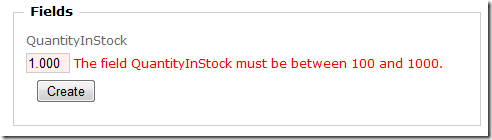
invalid-range

As we can see, that’s not within the range and we get an error message.

Fantastic! That’s exactly what I would expect, unless I was a Spaniard living in Spain (¡Hola mis amigos!).

In that case, I’d expect the opposite behavior. I’d expect 1,000 to be equivalent to 1 and thus not in the range, and I’d expect 1.000 to be 1000 and thus in the range, because in Spain (as in many European countries), the comma is the decimal separator.

Setting up Globalization for ASP.NET MVC 2

Well it turns out, we can make ASP.NET MVC support this. To demonstrate this, I’ll need to change my culture to es-ES. There are many blog posts that cover how to do this automatically based on the request culture. I’ll just set it in my Global.asax.cs file for demonstration purposes.

protected void Application_BeginRequest() {
  Thread.CurrentThread.CurrentCulture 
= CultureInfo.CreateSpecificCulture("es-ES"); }

The next step is to add a call to the Ajax.GlobalizationScript helper method in my Site.master.

<head runat="server">
  <%: Ajax.GlobalizationScript() %>
  <script src="/Scripts/MicrosoftAjax.debug.js" type="text/javascript">
  </script>
  <script src="/Scripts/MicrosoftMvcAjax.debug.js" type="text/javascript">
  </script>
  <script src="/Scripts/MicrosoftMvcValidation.debug.js" type="text/javascript">
  </script>
</head>

What this will do is render a script tag pointing to a globalization script named according to the current locale and placed in scripts/globalization directory by convention. The idea is that you would place all the globalization scripts for each locale that you support in that directory. Here’s the output of that call.

<script type="text/javascript" src="~/Scripts/Globalization/es-ES.js">
</script>

As you can see, the script name is es-ES.js which matches the current locale that we set in Global.asax.cs. However, there’s something odd with that output. Do you see it? Notice that tilde in the src attribute? Uh oh! That there is a bona fide bug in ASP.NET MVC.

Not to worry though, there’s an easy workaround. Knowing how discriminating our ASP.NET MVC developers are, we knew that people would want to place these scripts in whatever directory they want. Thus we added a global override via the AjaxHelper.GlobalizationScriptPath property.

Even better, these scripts are now available on the CDN as of this morning (thanks to Stephen and his team for getting this done!), so you can specify the CDN as the default location. Here’s what I have in my Global.asax.cs.

protected void Application_Start()
{
  AjaxHelper.GlobalizationScriptPath = 
"http://ajax.microsoft.com/ajax/4.0/1/globalization/";
AreaRegistration.RegisterAllAreas(); RegisterRoutes(RouteTable.Routes); }

With that in place, everything now just works. Let’s try filling out the form again.

This time, 1,000 is not within the valid range because that’s equivalent to 1 in the es-ES locale.
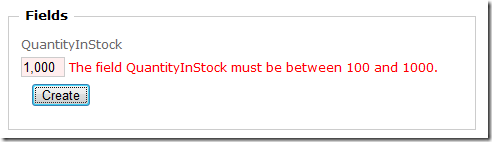
invalid-range-es-ES

Meanwhile, 1.000 is within the valid range as that’s equivalent to 1,000.

valid-range-es-ES

So what are these scripts?

They are simply a JavaScript serialization of all the info within a CultureInfo object. So the information you can get on the server, you can now get on the client with these scripts.

In Web Forms, these scripts are emitted automatically by serializing the culture at runtime. However this approach doesn’t work for ASP.NET MVC.

One reason is that the scripts themselves changed from ASP.NET 3.5 to ASP.NET 4. ASP.NET MVC is built against the ASP.NET 4 version of these scripts. But since MVC 2 runs on both ASP.NET 3.5 and ASP.NET 4, we couldn’t rely on the script manager to emit the scripts for us as that would break when running on ASP.NET 3.5 which would emit the older version of these scripts.

As usual, I have very simple sample you can download to see the feature in action.

What others have said

Requesting Gravatar... Jake May 10, 2010 5:11 AM
# re: Globalizing ASP.NET MVC Client Validation
I think you meant
I’m applying a range from 100 to 1000.
public class Product
{
[Range(100, 1000)]
public int QuantityInStock { get; set; }

Otherwise it doesn't make sense why you would get the validation that you are talking about...

Other than that, very cool!
Requesting Gravatar... Adam May 10, 2010 5:35 AM
# re: Globalizing ASP.NET MVC Client Validation
Is it safe to assume that the standard way of setting a preferred language (the Language Preference in IE for instance) will still automatically set the server-side culture like it does in non-MVC ASP.NET?

As opposed to your explicitly setting it in BeginRequest.
Requesting Gravatar... David May 10, 2010 6:23 AM
# re: Globalizing ASP.NET MVC Client Validation
How would you handle min and max ranges that are localized? For instance $1000 is equivalent to 93,200 Yen. So a max $1000 in en-US might be a max of 100,000 for ja-JP.
Requesting Gravatar... Sharbel (Wired Solutions) May 10, 2010 6:42 AM
# re: Globalizing ASP.NET MVC Client Validation
Great article, just a small typo, you have Setting up Globalization for ASP.NET MVC 3 where I think you mean MVC 2?
Requesting Gravatar... McConnell Group May 10, 2010 10:53 PM
# re: Globalizing ASP.NET MVC Client Validation
Please verify that this is MVC 2 Otherwise awesome post as always!
Requesting Gravatar... Justin May 11, 2010 2:01 AM
# re: Globalizing ASP.NET MVC Client Validation
Another excellent post. It is good to see that it is relitively painless to handle this situation.
Requesting Gravatar... Raphael Cruzeiro May 11, 2010 2:10 AM
# re: Globalizing ASP.NET MVC Client Validation
What about setting the error message for invalid data, is there anyway to override the default message so I can pass a string from my resource?
Requesting Gravatar... haacked May 11, 2010 5:44 AM
# re: Globalizing ASP.NET MVC Client Validation
@Jake yep! I corrected my post. Thanks!

@Adam locale is not set automatically by default. There's a web.config setting to do that and yes, it should work with MVC.

@David that would require doing some sort of currency exchange rate lookup. We don't have a currency type so that's something you'd have to roll yourself.

@Sharbel,@McConnell Ha! That's a typo which I corrected. You can see where my mind is lately. ;)

@Raphael to localize error messages, see my post on Localizing ASP.NET MVC validation
Requesting Gravatar... Andy May 11, 2010 5:54 AM
# re: Globalizing ASP.NET MVC Client Validation
Thanks a ton! Your timing couldn't be better, I'm in the middle of globalizing and MVC app right now, having just done a bunch of DataAnnotation attributes.

(I had to check for a hidden Phil behind the deck, just listening in)
Requesting Gravatar... sadomovalex May 11, 2010 11:09 PM
# re: Globalizing ASP.NET MVC Client Validation
Phil,
what about "The field must be a number" validation message which is shown when you enter non-numeric data in control for view model field of numeric type? There are many posts in internet which suggest to add custom resx file in App_GlobalResources and override DefaultModelBinder.ResourceClassKey. But it is not solution actually for this particular case.

Because "The field must be a number" message is added inside default ClientDataTypeModelValidatorProvider (its internal class NumericModelValidator). And there is no simple way to localize it without copy/paste of ClientDataTypeModelValidatorProvider class from mvc sources, modify NumericModelValidator.MakeErrorString() method and replace ClientDataTypeModelValidatorProvider by your own:

private static string MakeErrorString(string displayName)
{
return string.Format(CultureInfo.CurrentCulture, CustomMessages.NumberField, displayName);
}

(this solution is described here also: http://tinyurl.com/2vy5d3p)
Requesting Gravatar... Thanigainathan May 17, 2010 10:12 PM
# re: Globalizing ASP.NET MVC Client Validation
Hi Phil,

I have one general doubt. In our application we saw that 1.10 is converted as 1,10 for spain culture. So we used invariant culture to format these type of strings. Is that correct or we should adjust our scripts accordingly ?

Thanks,
Thanigainathan.S
Requesting Gravatar... Felix May 21, 2010 5:19 AM
# re: Globalizing ASP.NET MVC Client Validation
I was wondering, if there is a way to do similar thing using JQuery instead of MicrosoftAjax...
Requesting Gravatar... King Wilder May 22, 2010 2:29 AM
# re: Globalizing ASP.NET MVC Client Validation
Phil, I just need to make sure I'm understanding localization of applications correctly... if I build an app for a client that requires localization, then essentially I cannot create it in such a way as to allow them to update text on the pages, correct? Because every new piece of text in the application should be localized for every included language, and that would be my responsibility. Am I understanding this correctly?

Thanks,
King Wilder
Requesting Gravatar... peelmicro May 24, 2010 2:44 PM
# re: Globalizing ASP.NET MVC Client Validation
Phil,

I live in Spain and I'm trying your example. I think it works properly in client side but it doesn't in server side. When I press the tab key I don't receive any error, but I receive "The value '1.000' is not valid for QuantityInStock." error when I press the Create Button.

How can I avoid this error?.

Thanks in advance.

Juan
Requesting Gravatar... Luca Jul 14, 2010 6:13 AM
# re: Globalizing ASP.NET MVC Client Validation
I agree peelmicro.
I am Italian (same currency formatting as Spain), and I receive that exception too. It works on client but not on server. How can I avoid it?
Requesting Gravatar... Mikael Henriksson Jul 18, 2010 4:06 PM
# re: Globalizing ASP.NET MVC Client Validation
Hey,

You guys are sure moving along quickly! Now I don't have to wait for you to provide stuff I need instead you are ahead of me! Great stuff indeed! :)
Requesting Gravatar... Criação de Site Aug 04, 2010 1:12 PM
# re: Globalizing ASP.NET MVC Client Validation
i'm with the same error in server side :/
Requesting Gravatar... bill.zhuang Aug 15, 2010 5:17 PM
# re: Globalizing ASP.NET MVC Client Validation
hi Phil,
how can mvc deal with my own ResourceProvider?
such as i wrote a class inherit IResourceProvider, and implement GetObject(string resourceKey, CultureInfo culture), then how i can use it in attribute like this :
[StringLength(5, ErrorMessageResourceType = typeof(Global), ErrorMessageResourceName = "StringLength")]

and how i can used it directly in view page, such as this:
<asp:Literal ID="test" runat="server" Text="<%$ resources:Text,123 %>"></asp:Literal>

i also create a post in stackoverflow here: stackoverflow.com/...

pls help to answer.
Requesting Gravatar... Brainnovative Sep 13, 2010 12:26 AM
# re: Globalizing ASP.NET MVC Client Validation
Works like a charm for Polish locale - both on server side and client side (with ASP.NET 3.5)
Thanks Phil for this great post and Stephen for putting it on CDN.
Requesting Gravatar... Eric Sep 16, 2010 6:54 PM
# re: Globalizing ASP.NET MVC Client Validation
This doesn't seem to work for me. The enclosed example simply shows the english validation messages. I do see (using firebug) that the es-ES.js is being retrieved from the microsoft CDN.
Requesting Gravatar... Eric Oct 17, 2010 10:55 PM
# re: Globalizing ASP.NET MVC Client Validation
Any chance this will ever get fixed ? It's really cumbersome !!!!
Requesting Gravatar... Asp.Net Oct 25, 2010 8:09 PM
# re: Globalizing ASP.NET MVC Client Validation
I also get the default message
"The field must be a number" validation message
Requesting Gravatar... tugberk_ugurlu_ Oct 29, 2010 8:37 PM
# re: Globalizing ASP.NET MVC Client Validation
thanks for this post phil. I have been thinking that why the clientsidevalidation didn't work. I figured that I needed to add the script files :) thanks again !
Requesting Gravatar... rsenna Dec 04, 2010 10:38 PM
# re: Globalizing ASP.NET MVC Client Validation
I was getting the same server-side issues described by peelmicro. I'm from Brazil, and here we treat numbers like the spanish speaking coutries - '.' is the thousand separator, and ',' is the decimal. And it seems that the current implementation of the CustomModelBinder (I am using ASP.NET MVC Release Candidate) is NOT able to correctly parse a numeric text containing thousand separators that are not the EN default ','.

The only way I've found was creating a custom model binder - something like that:


public class ModelBinder : DefaultModelBinder
{
private static readonly List<Type> toIntercept = new List<Type> { typeof(DateTime), typeof(int), typeof(long), typeof(float), typeof(double), typeof(decimal) };

public override object BindModel(ControllerContext controllerContext, ModelBindingContext bindingContext)
{
Type valueType;

if (ShouldIntercept(bindingContext, out valueType))
{
var modelName = bindingContext.ModelName;
var attemptedValue = bindingContext.ValueProvider.GetValue(modelName).AttemptedValue;

try
{
return ParseValue(attemptedValue, valueType);
}
catch (SystemException e)
{
if (!(e is InvalidCastException || e is FormatException || e is OverflowException))
{
throw;
}
}
}

return base.BindModel(controllerContext, bindingContext);
}

private static bool ShouldIntercept(ModelBindingContext context, out Type type)
{
type = context.ModelType;

if (type.IsGenericType && type.GetGenericTypeDefinition() == typeof(Nullable<>))
{
type = Nullable.GetUnderlyingType(type);
}

return toIntercept.IndexOf(type) >= 0;
}

private static object ParseValue(string attemptedValue, Type type)
{
return attemptedValue == null
? null
: Convert.ChangeType(attemptedValue, type, Thread.CurrentThread.CurrentCulture);
}
}


I guess this will also work for any other culture.
Requesting Gravatar... Niranjan Jan 05, 2011 7:45 PM
# re: Globalizing ASP.NET MVC Client Validation
great!! worked for me .. thankx Phil
Requesting Gravatar... Kako Jan 31, 2011 12:20 AM
# re: Globalizing ASP.NET MVC Client Validation
and for MVC 3. is there any change ??
Requesting Gravatar... Kostas Feb 06, 2011 5:08 AM
# re: Globalizing ASP.NET MVC Client Validation
I am also interested in how to achieve all this in MVC3... Especially how to override the client side model validation that is now done by the JQuery validation plugin...
Requesting Gravatar... Ole Frederiksen Feb 09, 2011 7:12 PM
# re: Globalizing ASP.NET MVC Client Validation
Am also curious to know when this will work in MVC 3. Especially when having partial classes, as I am using the Entity Framework.

Everything seems to work like a charm (building the pages, getting data from the database etc) and it is really easy to create a new ADO.NET Entity Data Model when changes occurs in the database. But my site is useless, as I cannot validate my data correct :-(
Requesting Gravatar... Denis Apr 20, 2011 3:11 AM
# re: Globalizing ASP.NET MVC Client Validation
What about MVC 3 and jQuery?????
Requesting Gravatar... hhh May 11, 2011 10:06 PM
# re: Globalizing ASP.NET MVC Client Validation
Pidory!
Requesting Gravatar... tobi Jun 16, 2011 9:58 PM
# re: Globalizing ASP.NET MVC Client Validation
What about MVC 3 and jQuery?????


i would like to know, too.

what about mvc 3 with jquery - jquery validation with and without unobtrusive validation, and server side.
Requesting Gravatar... andrey Sep 18, 2011 8:13 PM
# re: Globalizing ASP.NET MVC Client Validation
I did all but client validation don't work with ru-RU for double type in model. Why?
Requesting Gravatar... andrey Sep 18, 2011 8:28 PM
# re: Globalizing ASP.NET MVC Client Validation
I did all but client validation don't work with ru-RU for double type in model. Why? I use MVC 3.
Requesting Gravatar... Marten Oct 17, 2011 2:26 PM
# re: Globalizing ASP.NET MVC Client Validation
Thanks mate! worked like a charm.
Requesting Gravatar... Prasanth S Nov 23, 2011 1:49 PM
# re: Globalizing ASP.NET MVC Client Validation
Nice Example

What do you have to say?

(will show your gravatar)
Please add 4 and 7 and type the answer here: