JSON Hijacking

A while back I wrote about a subtle JSON vulnerability which could result in the disclosure of sensitive information. That particular exploit involved overriding the JavaScript Array constructor to disclose the payload of a JSON array, something which most browsers do not support now.

However, there’s another related exploit that seems to affect many more browsers. It was brought to my attention recently by someone at Microsoft and Scott Hanselman and I demonstrated it at the Norwegian Developers Conference last week, though it has been demonstrated against Twitter in the past.

hijack

Before I go further, let me give you the punch line first in terms of what this vulnerability affects.

This vulnerability requires that you are exposing a JSON service which…

  • …returns sensitive data.
  • …returns a JSON array.
  • …responds to GET requests.
  • …the browser making the request has JavaScript enabled (very likely the case)
  • …the browser making the request supports the __defineSetter__ method.

Thus if you never send sensitive data in JSON format, or you only send JSON in response to a POST request, etc. then your site is probably not vulnerable to this particular vulnerability (though there could be others).

I’m terrible with Visio, but I thought I’d give it my best shot and try to diagram the attack the best I could. In this first screenshot, we see the unwitting victim logging into the vulnerable site, and the vulnerable site issues an authentication cookie, which the browser holds onto.

Json-Hijack-1

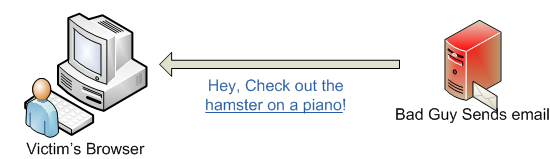
At some point, either in the past, or the near future, the bad guy spams the victim with an email promising a hilariously funny video of a hamster on a piano.
Json-Hijack-2

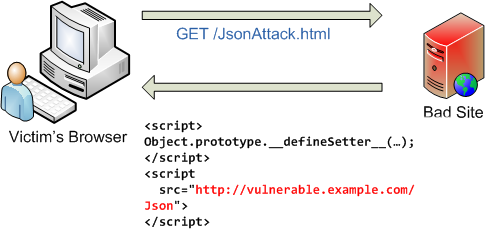
But the link actually points to the bad guy’s website. When the victim clicks on the link, the next two steps happen in quick succession. First, the victim’s browser makes a request for the bad guy’s website.
Json-Hijack-3

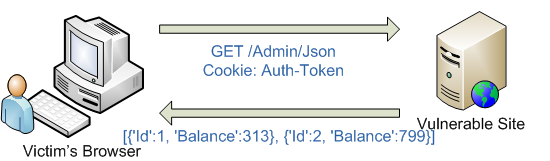
The website responds with some HTML containing some JavaScript along with a script tag. When the browser sees the script tag, it makes another GET request back to the vulnerable site to load the script, sending the auth cookie along.
Json-Hijack-4

The bad guy has tricked the victim’s browser to issue a request for the JSON containing sensitive information using the browser’s credentials (aka the auth cookie). This loads the JSON array as executable JavaScript and now the bad guy has access to this data.

To gain a deeper understanding, it may help to see actual code (which you can download and run) which demonstrates this attack.

Note that the following demonstration is not specific to ASP.NET or ASP.NET MVC in any way, I just happen to be using ASP.NET MVC to demonstrate it. Suppose the Vulnerable Website returns JSON with sensitive data via an action method like this.

[Authorize]
public JsonResult AdminBalances() {
  var balances = new[] {
    new {Id = 1, Balance=3.14}, 
    new {Id = 2, Balance=2.72},
    new {Id = 3, Balance=1.62}
  };
  return Json(balances);
}

Assuming this is a method of HomeController, you can access this action via a GET request for /Home/AdminBalances which returns the following JSON:

[{"Id":1,"Balance":3.14},{"Id":2,"Balance":2.72},{"Id":3,"Balance":1.62}]

Notice that I’m requiring authentication via the AuthorizeAttribute on this action method, so an anonymous GET request will not be able to view this sensitive data.

The fact that this is a JSON array is important. It turns out that a script that contains a JSON array is a valid JavaScript script and can thus be executed. A script that just contains a JSON object is not a valid JavaScript file. For example, if you had a JavaScript file that contained the following JSON:

{"Id":1, "Balance":3.14}

And you had a script tag that referenced that file:

<script src="http://example.com/SomeJson"></script>

You would get a JavaScript error in your HTML page. However, through an unfortunate coincidence, if you have a script tag that references a file only containing a JSON array, that would be considered valid JavaScript and the array gets executed.

Now let’s look at the HTML page that the bad guy hosts on his/her own server:

<html> 
...
<body> 
    <script type="text/javascript"> 
        Object.prototype.__defineSetter__('Id', function(obj){alert(obj);});
    </script> 
    <script src="http://example.com/Home/AdminBalances"></script> 
</body> 
</html>

What’s happening here? Well the bad guy is changing the prototype for Object using the special __defineSetter__ method which allows overriding what happens when a property setter is being called.

In this case, any time a property named Id is being set on any object, an anonymous function is called which displays the value of the property using the alert function. Note that the script could just as easily post the data back to the bad guy, thus disclosing sensitive data.

As mentioned before, the bad guy needs to get you to visit his malicious page shortly after logging into the vulnerable site while your session on that site is still valid. Typically a phishing attack via email containing a link to the evil site does the trick.

If by blind bad luck you’re still logged into the original site when you click through to the link, the browser will send your authentication cookie to the website when it loads the script referenced in the script tag. As far as the original site is concerned, you’re making a valid authenticated request for the JSON data and it responds with the data, which now gets executed in your browser. This may sound familiar as it is really a variant of a Cross Site Request Forgery (CSRF) attack which I wrote about before.

If you want to see it for yourself, you can download this ASP.NET MVC project and run it locally. Make sure to login first and then go visit http://haacked.com/demos/JsonAttack.html.

Note that this attack does not work on IE 8 which will tell you that __defineSetter__ is not a valid method. Last I checked, it does work on Chrome and Firefox.

The mitigation is simple. Either never send JSON arrays OR always require an HTTP POST to get that data (except in the case of non-sensitive data in which case you probably don’t care). For example, with ASP.NET MVC, you could use the AcceptVerbsAttribute to enforce this like so:

[Authorize]
[AcceptVerbs(HttpVerbs.Post)]
public JsonResult AdminBalances() {
  var balances = new[] {
    new {Id = 1, Balance=3.14}, 
    new {Id = 2, Balance=2.72},
    new {Id = 3, Balance=1.62}
  };
  return Json(balances);
}

One issue with this approach is that many JavaScript libraries such as jQuery request JSON using a GET request by default, not POST. For example, $.getJSON issues a GET request by default. So when calling into this JSON service, you need to make sure you issue a POST request with your client library.

ASP.NET and WCF JSON service endpoints actually wrap their JSON in an object with the “d” property as I wrote about a while back. While it might seem odd to have to go through this property to get access to your data, this awkwardness is eased by the fact that the generated client proxies for these services strip the “d” property so the end-user doesn’t need to know it was ever there.

With ASP.NET MVC (and other similar frameworks), a significant number of developers are not using client generated proxies (we don’t have them) but instead using jQuery and other such libraries to call into these methods, making the “d” fix kind of awkward.

What About Checking The Header?

Some of you might be wondering, “why not have the JSON service check for a special header such as the X-Requested-With: XMLHttpRequest or Content-Type: application/json before serving it up in response to a GET request?” I too thought this might be a great mitigation because most client libraries send one or the other of these headers, but a browser’s GET request in response to a script tag would not.

The problem with this (as a couple of co-workers pointed out to me) is that at some point in the past, the user may have made a legitimate GET request for that JSON in which case it may well be cached in the user’s browser or in some proxy server in between the victim’s browser and the vulnerable website. In that case, when the browser makes the GET request for the script, the request might get fulfilled from the browser cache or proxy cache. You could try setting No-Cache headers, but at that point you’re trusting that the browser and all proxy servers correctly implement caching and that the user can’t override that accidentally.

Of course, this particular caching issue isn’t a problem if you’re serving up your JSON using SSL.

The real issue?

There’s a post at the Mozilla Developer Center which states that object and array initializers should not invoke setters when evaluated, which at this point, I tend to agree with, though a comment to that post argues that perhaps browsers really shouldn’t execute scripts regardless of their content type, which is also a valid complaint.

But at the end of the day, assigning blame doesn’t make your site more secure. These type of browser quirks will continue to crop up from time to time and we as web developers need to deal with them. Chrome 2.0.172.31 and Firefox 3.0.11 were both vulnerable to this. IE 8 was not because it doesn’t support this method. I didn’t try it in IE 7 or IE 6.

It seems to me that to be secure by default, the default behavior for accessing JSON should probably be POST and you should opt-in to GET, rather than the other way around as is done with the current client libraries. What do you think? And how do other platforms you’ve worked with handle this? I’d love to hear your thoughts.

In case you missed it, here are the repro steps again: Download this ASP.NET MVC project and run it locally. Make sure to login first and then go visit http://haacked.com/demos/JsonAttack.html in the same browser.

I followed up this post with a proposal to fix JSON to prevent this particular issue.

What others have said

Requesting Gravatar... Scott Jun 25, 2009 12:25 PM
# re: JSON Hijacking
So, IE "whatever's next" will include support for getters and setters.

blogs.msdn.com/.../...tter-syntax-in-ie8-rc-1.aspx

Requesting Gravatar... David Radcliffe Jun 25, 2009 12:44 PM
# re: JSON Hijacking
So, if I return my array inside a json object, I should be ok? Regardless of GET or POST?
Requesting Gravatar... Jon Freeland Jun 25, 2009 12:55 PM
# re: JSON Hijacking
Thanks for this, very informative!
Requesting Gravatar... Mike Simpson Jun 25, 2009 1:04 PM
# re: JSON Hijacking
Thanks for the great post - very informative. This seems to be somewhat more of an issue for RESTful sites, since using POST instead of GET may not be a good option. But avoiding sending arrays, or wrapping them in an object property, are both useful workarounds.
Requesting Gravatar... Louis DeJardin Jun 25, 2009 1:07 PM
# re: JSON Hijacking
I have some actions which return Json(...) if IsAjaxRequest() otherwise they return a view or redirect. So an unconditional POST-only on those actions would be too restrictive.

Would you agree something like an [AjaxRequiresPost] attribute avoids the vulnerability?

public class AjaxRequiresPostAttribute :
ActionMethodSelectorAttribute
{
public override bool IsValidForRequest(
ControllerContext controllerContext,
MethodInfo methodInfo)
{
var request = controllerContext.HttpContext.Request;
if (request.IsAjaxRequest() &&
string.Equals(request.HttpMethod, "POST") == false)
{
return false;
}
return true;
}
}
Requesting Gravatar... LukCAD Jun 25, 2009 2:15 PM
# re: JSON Hijacking
Thank you, Haacked, very important notes about jSon. But we will never found now sites where javascript not used. Controls from ASP.NET in big cases also use javascript libraries for generating events from client side. You are right that ASP.NET has better security and more reliable then MVC, but i must note that sometime error (mistake) of security is into wrong adjusting of web servers. Image next: if somebody has asp.net site into root site with just only asp technology - then not any grantee that asp code easy to use to hijack strong security from asp.net(note: it will works like inserted by json javascripts but more worst - on server side).
My resume: problem not with technology of sending objects - problem how and where it must be used. JSON is good for news feed and for chat objects. JSON is bad for transmitting in banking, servicing and accounting systems where databases save a lot of records about providers and subscribers.
But i hope your article will help a lot of CEO find a right way for the web technology and do not a lot of changing every year regards of modern words in press. step by step we need use reliable technology and with maximal profit and faster and faster experiment with new ideas around.
Sincerely, LukCAD
Requesting Gravatar... Stuart Branham Jun 25, 2009 2:38 PM
# re: JSON Hijacking
@David - With regards to this particular vulnerability, it sounds like it. That's what Phil described ASP.NET and WCF as doing with the automatic { d: [] } construct.
Requesting Gravatar... Haacked Jun 25, 2009 2:46 PM
# re: JSON Hijacking
@David that is correct, as Stuart points out. The vulnerability only applies if the JSON package you send IS a JSON array.

@Louis well one thought is we change JsonResult to require POST by default. That way, you wouldn't need to change your action method. However, if we did that, then jQuery calls for JSON data would have to be updated to specify that the HTTP method to use should be POST and not GET, which is the default.
Requesting Gravatar... Louis Jun 25, 2009 7:52 PM
# re: JSON Hijacking
Sounds good. I was thinking briefly you would still be exposed to state changes committed before for JsonResult throws, but that's moot because it's true for any script src where the target doesn't have AcceptVerbs POST.

So +1 on require POST by JsonResult. Or possibly only require POST when you attempt to return an array? It would be less impactful - unless that leaves other vulnerability concerns.

Requesting Gravatar... Haacked Jun 25, 2009 7:57 PM
# re: JSON Hijacking
I personally like that approach, but the worry is that there may be other similar exploits we haven't discovered yet. The tendency over here is to try to avoid such heuristics when it comes to security.

Also, it can get confusing when the JSON in some cases works and others doesn't and the end user doesn't understand why.

Eilon has a phrase he likes to tell me. "Heuristic" is another word for "Bug". ;)
Requesting Gravatar... David Meyer Jun 25, 2009 8:29 PM
# re: JSON Hijacking
Another thing to think about, which probably isn't an issue in this case, is that POST is by definition non-deterministic, meaning that it is never cached. This might affect performance, but it seems like these types of GET requests would probably be non-deterministic anyway. Just a thought.

The best solution would be, of course, to make everyone smart enough not to click on the bad guy's link. :P

Don't you hate how security and permissions issues eat up our valuable time??? Thanks for the heads up, though!
Requesting Gravatar... Thanigainathan.S Jun 25, 2009 10:33 PM
# re: JSON Hijacking
Hi Sir,

This article is very helpful for me.

Thanks,
Thani
Requesting Gravatar... Asbjørn Ulsberg Jun 26, 2009 12:52 AM
# re: JSON Hijacking
I have a fairly simple solution to mitigate this problem without requiring POST or some other obscure (and wrong) HTTP method to access the JSON data. Most Ajax libraries, when accessing JSON, request it with 'Accept: appliaction/json'. They also append the HTTP header 'X-Requested-With: XMLHttpRequest'.

If both of these headers were added up as requirements to access the JSON data (on top of Authorize), a simple HTML script reference to the AdminBalances JsonResult Action wouldn't work. My humble opinion is that promoting POST as a solution to problem this is misguided and is like forcing a screw in with a hammer.
Requesting Gravatar... Sruly Taber Jun 26, 2009 1:14 AM
# re: JSON Hijacking
Thanks for the info.

It kinda feels wrong to use POST to GET data.

Hopefully the browser will fix this vulnerability in the future.
Requesting Gravatar... zihotki Jun 26, 2009 2:44 AM
# re: JSON Hijacking
What about to check referrer on the json request and send json data only to referrers in white list? It seems to me that this should work - as far as I remember there are no way to modify referrer for urls in script html element.
Requesting Gravatar... Andrew Jun 26, 2009 5:17 AM
# re: JSON Hijacking
Good post. But where's the hamster on the piano?
Requesting Gravatar... Todd Price Jun 26, 2009 5:38 AM
# re: JSON Hijacking
Would SSL really solve anything? Wouldn't that just protect the data from being sniffed over the wire? Once it arrives at the browser, it will have been decrypted, and the hijacked setter will still have access to the data, no? Haven't actually tried it myself though. Anybody have an answer?
Requesting Gravatar... Haacked Jun 26, 2009 6:40 AM
# re: JSON Hijacking
@Asbjørn as I pointed out in my post, that wouldn't work. Imagine this scenario. Step 1, you visit the vulnerable site and legitimately make a proper AJAX request. The site returns the JSON to your browser. Now your browser caches that JSON.

Now, when you visit the bad guy site, the script tag tries to request that file, but the browser returns it from the cache! It doesn't even make a request to the bad server.

In that case, your bad data has been returned.
Requesting Gravatar... Haacked Jun 26, 2009 6:42 AM
# re: JSON Hijacking
@Todd I believe SSL *only* solves the caching issue because browsers are not supposed to cache SSL content. But I could be wrong.
Requesting Gravatar... Haacked Jun 26, 2009 6:46 AM
# re: JSON Hijacking
@zihotki see my response to Asbjørn. Any solution that requires checking headers etc... is still vulnerable because you're allowing the browser to cache this sensitive data.

At some point, the user will visit the site, and make a legitimate request and cache the data, after all, that's the whole point of the JSON service.

Once the data is in the browser cache, it's vulnerable to this attack. You can't force the browser check for these headers in the same way that your server does.

Keep in mind, it might not even be your browser that serves up the content. Maybe it's an intermediate proxy server. Relying on checking for headers is not safe in this case.
Requesting Gravatar... Asbjørn Ulsberg Jun 26, 2009 7:04 AM
# re: JSON Hijacking
@Haacked: You're correct with your caching scenario, but what if we force the browser not to cache the response in the first place? It will still be better than using POST to GET something, imho.
Requesting Gravatar... Andrey Shchekin Jun 26, 2009 10:10 AM
# re: JSON Hijacking
Would this work under IE8 if you use Object.defineProperty?
http://msdn.microsoft.com/en-us/library/dd229916(VS.85).aspx
Requesting Gravatar... zihotki Jun 26, 2009 10:37 AM
# re: JSON Hijacking
@Asbjørn there are no way to force browser or proxies not to cache something with 100% guarantee, Phil is right here. There may be bugs in proxies and browsers or superb optimizations. We can't absolutely guarantee that using "Pragma: No-cache;" or other techniques nothing will be cached.
And I agree, the most easiest way to fix this is to use POST instead of GET.
Requesting Gravatar... Haacked Jun 26, 2009 10:49 AM
# re: JSON Hijacking
@Asbjørn Browsers have a history of caching problems, bugs, etc... As Zihotki says, that would be relying on every browser from now and into the future to get this correct. Not only every browser, but every Proxy server.

I'm not willing to lay my bet on that.

One nice thing about requiring POST is that it protects ALL browsers, old and new. Only an untrusted browser would be prone to this issue, but if your browser is compromised, then all bets are off anyways. It might as well send keystrokes directly to the bad guy. ;)

I also wrote about an alternative which would require everyone to change JSON itself. I have very little hope of seeing it happen, but it also has the benefit of suddenly closing the hole for old browsers.
Requesting Gravatar... drew Jun 26, 2009 11:05 AM
# re: JSON Hijacking
I disagree with your argument that a custom header shouldn't be used because of misbehaving caches. If you're not disabling proxy caching for sensitive data, you're asking for trouble anyways. Disabling caching properly is a bit tricky, but there are some useful details here: code.google.com/.../Part2#Document_caching

Perhaps there are some interesting corner-cases where the browser will locally cache the JSON. Time to go play with it...
Requesting Gravatar... Pat Gannon Jun 26, 2009 3:47 PM
# re: JSON Hijacking
My 2 cents is that I strongly disagree with this: "It seems to me that to be secure by default, the default behavior for accessing JSON should probably be POST and you should opt-in to GET".

This is an abuse of HTTP (to use HTTP POST to GET data) and will disable scenarios where caching is desirable and will make your JSON method less compatible with generic AJAX components that are designed to work with any RESTful resource.

I think that "chang[ing] JsonResult to require POST by default" is a bad idea. Not only are you making it making it so that accessing an MVC/JSON action via jQuery would require an extra bit of hacky code, you are also significantly reducing one of the advantages of ASP.NET MVC, which is that it is currently the best way (IMO) to make RESTful websites on the .NET platform. That is certainly one of the reasons that I give when folks ask me why they should use MVC.

My vote, obviously, is NO on that solution. I think it would be better to put the responsibility of security on the developer (especially for a somewhat remote scenario like this given that the user has to click on a nefarious link AND be logged into a particular site that the attacker is targeting) and allow them to decide what solution is proper for this case (if any at all). I think in general web developers shouldn't be lulled into a false sense of security by using a framework which touts itself as being "secure by default".

I'm a little confused about the alternative of putting your JSON in an object rather than an array. So will wrapping a JSON array in a top-level JSON object fix this, or will the vulnerability be present if there's an array anywhere in your JSON? If a top-level object fixes this, why doesn't the default top-level "d" property you mentioned solve the issue? If any solution along these lines is possible, I would think that would be highly preferable to the POST hack. ;-)

Take care, and keep up the good work! I'm really loving this MVC stuff! :-)
Pat Gannon
Requesting Gravatar... Haacked Jun 26, 2009 10:14 PM
# re: JSON Hijacking
@Pat Hey Pat! Long time no hear. :)

I understand the pain this change would cause. I don't like it either, but I disagree with your assessment for several reasons.

First of all, read through the comments on this post and the follow-up post to this. Notice that even very smart developers are having trouble fully grokking the issue.

Your own comment shows a bit of misunderstanding. I answer your question in a comment on the follow-up post about why the "d" property solves it. Short answer, a JavaScript file that starts with "{" is not a valid script, so the browser throws a script error and the script does not continue to execute. Remember, this attack relies on requesting the script via the SCRIPT tag.

Honestly, I think making JSONResult require POST, but with an option to override that behavior to allow GET for those who know what they are doing is the best option. Given that very few developers fully grok this bug, how can we expect them all to secure themselves? In the follow-up post, Douglas Crockford, the inventor of JSON, even condones this idea.

You say this attack is obscure, but I linked to posts that showed that GMail and Twitter have all been struck by this in the past. After all, aren't you almost always logged into Gmail? Think about that, Google engineers got this wrong the first time. If they didn't get this right, how do you expect us mere mortals to get it right every time?

Lastly, the jQuery code is not so hacky as you think. This guy wrote up a tiny jQuery example in no time.

For those who want to allow GET for JSON arrays because they've got all these issues covered, we won't prevent that. I just don't think we should make that the default.
Requesting Gravatar... Artiom Jun 27, 2009 3:04 PM
# re: JSON Hijacking
Another way to save your users is to use security tokens.
For example, in ASP.NET MVC there's a special class to prevent CSRF attacks. It creates a cookie with a security token when you load the form, and when you submit the form the value submitted in the form is checked against the cookie. If course that works only in POST but that's good, right? :P
See here for more details, and examples (not my blog btw)
blog.codeville.net/.../prevent-cross-site-reque...
Requesting Gravatar... Burcu Dogan Jul 01, 2009 2:25 PM
# re: JSON Hijacking
Unfortunately a referrer check is not solving the problem since we cached the data once on the client. Once you let it to be cached it, it's not safe anymore. Re-authentication may work, but it is only possible on POST and POST's itself kills this headache. It'd absurd to create another subsystem to handle to do the rechecking. This sounds more like a problem of HTTP, rather than abused usage of cached material. Making JSON requests via POST by default is purely forcing the main design, so the decision should be left to developer such as trivial problems like SQL injections checks on other platforms.
Requesting Gravatar... Amit bajaj frm Fazilka INDIA Jul 16, 2009 11:09 PM
# re: JSON Hijackin
hi, i m Amit Bajaj frm Punjab India.. Dis is very gud website..
Requesting Gravatar... Drake Jul 20, 2009 9:07 AM
# re: JSON Hijacking
I was reading the book Ajax Security and was wondering if the solution they offered would deter an attacker. They seem to imply that even enclosing in Object (instead of array) could be possibly hacked since you (may be?) able to override Object constructor as well ... and best solution was to add something to cause attackers page to go into an infinite loop (since javascript will be executed). That solution was to add something like for(;;); and strip that out on your site... but i was curiuos, can that also be used by the attacker aka not sure how this would work but ...
the attacker used a ajax/json library to get json data, treats it as a string, strips out that 'for(;;)' if its there and passes it to <script> as src param or eval()'s it. Just guessing, kinda new to this security stuff.
Requesting Gravatar... Kyle Simpson Dec 15, 2009 5:28 AM
# re: JSON Hijacking
I'm sorry, but I have some issues with the content of this post.

1. You state that an object literal {id:"1", value:"foo"} is not valid JavaScript and if it's returned to a script tag will throw an error. This is completely false. 100%. Object literals are in fact the fundamental basis of JSON, which is perfectly valid JavaScript.

2. You make no real explanation of why POST is safe but GET is not. I can only guess it's because you're asserting that a malicious site can't make an automatic/background cross-domain POST (where clearly they can make GETs via script tags).

But sites certainly can make background POSTs, even cross domain, including iframe proxies, flash proxies (like flXHR), etc. So a POST seems just as vulnerable.

-----

I think the point of this article should be about the very familiar auth hijacking vulnerability. This really has nothing to do with JSON (in my opinion).
Requesting Gravatar... haacked Dec 15, 2009 3:34 PM
# re: JSON Hijacking
@Kyle regarding #1, prove it. Show me a JavaScript that is a valid JSON object literal for which the browser continues to execute the scirpt and does not throw an error.

2. POST responses aren't cached by proxies or browsers. Do you have a demo of this? For the most part, POST is much safer than GET when you're using a trusted browser. If the browser is not trusted, then all bets are off. You have bigger problems then.
Requesting Gravatar... James Wheare Dec 20, 2009 7:20 PM
# re: JSON Hijacking
JSONP has this exact same vulnerability and is the reason why you should NEVER expose sensitive information via a valid JavaScript statement. Much has already been written on this subject.

The ONLY safe way to return sensitive data is as an object literal on it's own. A JSONP callback is a valid JavaScript statement, just as an array literal sometimes is in some browsers.

An assignment statement is also valid, you could have written a blog post about how it's a bad idea to return sensitive data like this:

var pinNumber = "1234";

This is the first I've seen anything returning JSON as an array, but maybe it's more common than I thought, I suppose it's technically valid JSON.

For what it's worth, it looks like __defineSetter__ no longer works in the latest version of Firefox.
Requesting Gravatar... Freez Feb 26, 2010 7:34 AM
# re: JSON Hijacking
I can't download the demo project, the archive is broken
Requesting Gravatar... John Jun 10, 2010 9:39 AM
# re: JSON Hijacking
Phil,

1. Thanks for this post.

2. Thanks for the descriptive error in ASP.NET MVC 2. I wouldn't have known about this if it weren't for that exception. In general, I appreciate the attitude that "we should make them stop and think" but then also allow me to go ahead anyway via simple annotation.

3. I wonder how impossible it would be to take the next logical step and include a link to a MS KB article in the server's response?
Requesting Gravatar... apple-laptop-battery Jul 14, 2010 7:51 PM
# re: JSON Hijacking
good article! thanks
Requesting Gravatar... saleh Jul 27, 2010 2:19 AM
# re: JSON Hijacking
is there any fiewall for json?
is it reasonable to make a firewall for this purpose?

What do you have to say?

(will show your gravatar)
Please add 4 and 4 and type the answer here: