Fun With Named Formats, String Parsing, and Edge Cases

DOUBLE UPDATE! Be sure to read Peli’s post in which he explores all of these implementations using PEX. Apparently I have a lot more unit tests to write in order to define the expected behavior of the code.

UPDATE: By the way, after you read this post, check out the post in which I revisit this topic and add two more implementations to check out.

Recently I found myself in a situation where I wanted to format a string using a named format string, rather than a positional one. Ignore for the moment the issue on whether this is a good idea or not, just trust me that I’ll be responsible with it.

The existing String.Format method, for example, formats values according to position.

string s = string.Format("{0} first, {1} second", 3.14, DateTime.Now);

But what I wanted was to be able to use the name of properties/fields, rather than position like so:

var someObj = new {pi = 3.14, date = DateTime.Now};
string s = NamedFormat("{pi} first, {date} second", someObj);

Looking around the internet, I quickly found three implementations mentioned in this StackOverflow question.

All three implementations are fairly similar in that they all use regular expressions for the parsing. Hanselman’s approach is to write an extension method of object (note that this won’t work in VB.NET until they allow extending object). James and Oskar wrote extension methods of the string class. James takes it a bit further by using DataBinder.Eval on each token, which allows you to have formats such as {foo.bar.baz} where baz is a property of bar which is a property of foo. This is something else I wanted, which the others do not provide.

He also makes good use of the MatchEvaluator delegate argument to the Regex.Replace method, perhaps one of the most underused yet powerful features of the Regex class. This ends up making the code for his method very succinct.

Handling Brace Escaping

I hade a chat about this sort of string parsing with Eilon recently and he mentioned that many developers tend to ignore or get escaping wrong. So I thought I would see how these methods handle a simple test of escaping the braces.

String.Format with the following:

Console.WriteLine(String.Format("{{{0}}}", 123));

produces the output (sans quotes) of “{123}”

So I would expect with each of these methods, that:

Console.WriteLine(NamedFormat("{{{foo}}}", new {foo = 123}));

Would produce the exact same output, “{123}”. However, only James’s method passed this test. But when I expanded the test to the following format, “{{{{{foo}}}}}”, all three failed. That should have produced “{{123}}”.

Certainly this is not such a big deal as this really is an edge case, but you never know when an edge case might bite you as Zune owners learned recently. More importantly, it poses an interesting problem - how do you handle this correctly? I thought it would be fun to try.

This is possible to handle correctly using regular expressions, but it’s challenging. Not only are you dealing with balanced matching, but the matching depends on whether the number of consecutive braces are odd or even.

For example, the following “{0}}” is not valid because the right end brace is escaped. However, “{0}}}” is valid. The expression is closed with the leftmost end brace, which is followed by an even number of consecutive braces, which means they are all escaped sequences.

Performance

As I mentioned earlier, only James’s method handles evaluation of sub-properties/fields via the use of the DataBinder.Eval method. Critics of his blog post point out that this is a performance killer.

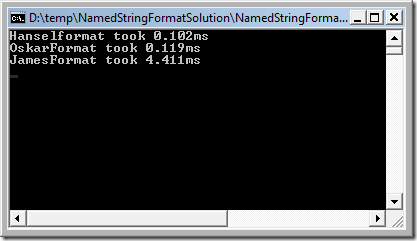
Personally, until I’ve measured it in the scenarios in which I plan to use it, I doubt that the performance will really be an issue compared to everything else going on. But I thought I would check it out anyways, writing a simple console app which runs each method over 1000 iterations, and then divides by 1000 to get the number of milliseconds each method takes. Here’s the result:
format perf

Notice that James’s method is 43 times slower than Hanselman’s. Even so, it only takes 4.4 milliseconds. So if you don’t use it in a tight loop with a lot of iterations, it’s not horrible, but it could be better.

My Implementation

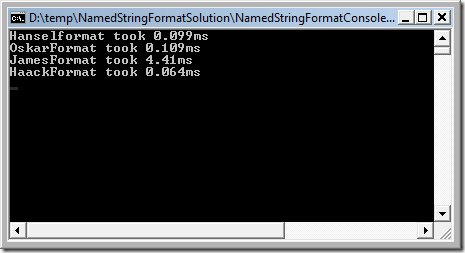
At this point, I thought it would be fun to write my own implementation using manual string parsing rather than regular expressions. I’m not sure my regex-fu is capable of handling the challenges I mentioned before. After implementing my own version, I ran the performance test and saw the following result.
haackformat perf

Nice! by removing the overhead of using a regular expression in this particular case, my implementation is faster than the other implementations, despite my use of DataBinder.Eval. Hopefully my implementation is correct, because fast and wrong is even worse than slow and right.

One drawback to not using regular expressions is that the code for my implementation is a bit long. I include the entire source here. I’ve also zipped up the code for this solution which includes unit tests as well as the implementations of the other methods I tested, so you can see which tests they pass and which they don’t pass.

The core of the code is in two parts. One is a private method which parses and splits the string into an enumeration of segments represented by the ITextExpression interface. The method you call joins these segments together, evaluating any expressions against a supplied object, and returning the resulting string.

I think we could optimize the code even more by joining these operations into a single method, but I really liked the separation between the parsing and joining logic as it helped me wrap my head around it. Initially, I hoped that I could cache the parsed representation of the format string since strings are immutable thus I could re-use it. But it didn’t end up giving me any real performance gain when I measured it.

public static class HaackFormatter
{
  public static string HaackFormat(this string format, object source)
  {

    if (format == null) {
        throw new ArgumentNullException("format");
    }

    var formattedStrings = (from expression in SplitFormat(format)
                 select expression.Eval(source)).ToArray();
    return String.Join("", formattedStrings);
  }

  private static IEnumerable<ITextExpression> SplitFormat(string format)
  {
    int exprEndIndex = -1;
    int expStartIndex;

    do
    {
      expStartIndex = format.IndexOfExpressionStart(exprEndIndex + 1);
      if (expStartIndex < 0)
      {
        //everything after last end brace index.
        if (exprEndIndex + 1 < format.Length)
        {
          yield return new LiteralFormat(
              format.Substring(exprEndIndex + 1));
        }
        break;
      }

      if (expStartIndex - exprEndIndex - 1 > 0)
      {
        //everything up to next start brace index
        yield return new LiteralFormat(format.Substring(exprEndIndex + 1
          , expStartIndex - exprEndIndex - 1));
      }

      int endBraceIndex = format.IndexOfExpressionEnd(expStartIndex + 1);
      if (endBraceIndex < 0)
      {
        //rest of string, no end brace (could be invalid expression)
        yield return new FormatExpression(format.Substring(expStartIndex));
      }
      else
      {
        exprEndIndex = endBraceIndex;
        //everything from start to end brace.
        yield return new FormatExpression(format.Substring(expStartIndex
          , endBraceIndex - expStartIndex + 1));

      }
    } while (expStartIndex > -1);
  }

  static int IndexOfExpressionStart(this string format, int startIndex) {
    int index = format.IndexOf('{', startIndex);
    if (index == -1) {
      return index;
    }

    //peek ahead.
    if (index + 1 < format.Length) {
      char nextChar = format[index + 1];
      if (nextChar == '{') {
        return IndexOfExpressionStart(format, index + 2);
      }
    }

    return index;
  }

  static int IndexOfExpressionEnd(this string format, int startIndex)
  {
    int endBraceIndex = format.IndexOf('}', startIndex);
    if (endBraceIndex == -1) {
      return endBraceIndex;
    }
    //start peeking ahead until there are no more braces...
    // }}}}
    int braceCount = 0;
    for (int i = endBraceIndex + 1; i < format.Length; i++) {
      if (format[i] == '}') {
        braceCount++;
      }
      else {
        break;
      }
    }
    if (braceCount % 2 == 1) {
      return IndexOfExpressionEnd(format, endBraceIndex + braceCount + 1);
    }

    return endBraceIndex;
  }
}

And the code for the supporting classes

public class FormatExpression : ITextExpression
{
  bool _invalidExpression = false;

  public FormatExpression(string expression) {
    if (!expression.StartsWith("{") || !expression.EndsWith("}")) {
      _invalidExpression = true;
      Expression = expression;
      return;
    }

    string expressionWithoutBraces = expression.Substring(1
        , expression.Length - 2);
    int colonIndex = expressionWithoutBraces.IndexOf(':');
    if (colonIndex < 0) {
      Expression = expressionWithoutBraces;
    }
    else {
      Expression = expressionWithoutBraces.Substring(0, colonIndex);
      Format = expressionWithoutBraces.Substring(colonIndex + 1);
    }
  }

  public string Expression { 
    get; 
    private set; 
  }

  public string Format
  {
    get;
    private set;
  }

  public string Eval(object o) {
    if (_invalidExpression) {
      throw new FormatException("Invalid expression");
    }
    try
    {
      if (String.IsNullOrEmpty(Format))
      {
        return (DataBinder.Eval(o, Expression) ?? string.Empty).ToString();
      }
      return (DataBinder.Eval(o, Expression, "{0:" + Format + "}") ?? 
        string.Empty).ToString();
    }
    catch (ArgumentException) {
      throw new FormatException();
    }
    catch (HttpException) {
      throw new FormatException();
    }
  }
}

public class LiteralFormat : ITextExpression
{
  public LiteralFormat(string literalText) {
    LiteralText = literalText;
  }

  public string LiteralText { 
    get; 
    private set; 
  }

  public string Eval(object o) {
    string literalText = LiteralText
        .Replace("{{", "{")
        .Replace("}}", "}");
    return literalText;
  }
}

I mainly did this for fun, though I plan to use this method in Subtext for email fomatting.

Let me know if you find any situations or edge cases in which my version fails. I’ll probably be adding more test cases as I integrate this into Subtext. As far as I can tell, it handles normal formatting and brace escaping correctly.

What others have said

Requesting Gravatar... Lance Fisher Jan 04, 2009 8:53 PM
# re: Fun With Named Formats, String Parsing, and Edge Cases
Nice work on this. I've looked into this before, and found the same stackoverflow question and solutions. Way to take it a step further!

You mentioned that renaming could break the formatter, but if you use the anonymous object approach as a mapper, it shouldn't be a problem. e.g.

var person = repo.FetchPerson(1);
string s = NamedFormat(
"First name: {firstName}, Last name: {lastName}",
new {firstName=person.FirstName, lastName=person.LastName});

This won't break the output if the FirstName or LastName properties names change. Granted, this is a little more cumbersome than just passing the Person object to NamedFormat, but it gives you the refactoring protection if you want it.
Requesting Gravatar... haacked Jan 04, 2009 9:19 PM
# re: Fun With Named Formats, String Parsing, and Edge Cases
@Lance good point! I actually mentioned that approach in a Tweet a few minutes ago! :)

I also just updated the source code to refactor the perf tests to clean them up a bit. They weren't very DRY. ;)
Requesting Gravatar... Aaron Powell Jan 04, 2009 10:09 PM
# re: Fun With Named Formats, String Parsing, and Edge Cases
Wow, seems like every man and his dog is doing something such as this at the moment :P

I did a similar concept to this (closest to Scott's though) for email templating - www.aaron-powell.com/.../...o-email-templates.aspx

Just an example of how to use this for another practical solution :)
Requesting Gravatar... haacked Jan 04, 2009 10:19 PM
# re: Fun With Named Formats, String Parsing, and Edge Cases
Ok, I found a bug in the code and fixed it. If you downloaded it before this comment, please re-download. :)
Requesting Gravatar... James Newton-King Jan 04, 2009 10:26 PM
# re: Fun With Named Formats, String Parsing, and Edge Cases
I remember explicitly writing a unit test to make sure that triple braces would work. The scenarios beyond that stretched a little bit far outside my regex comfort zone :)

Good to see a solution that combines the best of all our approaches!
Requesting Gravatar... Paulo Morgado Jan 05, 2009 12:58 AM
# re: Fun With Named Formats, String Parsing, and Edge Cases
Have you thought of using a mix of named and place holder?

string.NamedFormat("First Name: {0.FirstName}\nLast Name: {0.LastName}", person)

It would be nice (also for string.Format) to generate an executable template. Something to be used like this:

var executableTemplate = new ExecutableTemplate("First Name: {0.FirstName}\nLast Name: {0.LastName}");
var text = executableTemplate.ToString(person);
Requesting Gravatar... Giorgio Turrini Jan 05, 2009 1:51 AM
# re: Fun With Named Formats, String Parsing, and Edge Cases
Good Work!

There is only one thing missing, support for different cultures, all the tests are wrong if you are an italian and comma is the digit separator :-)
Requesting Gravatar... Stephen Jan 05, 2009 2:12 AM
# re: Fun With Named Formats, String Parsing, and Edge Cases
What, not type safe yet? :P f#'s format string is clever!
Requesting Gravatar... Atif Aziz Jan 05, 2009 2:29 AM
# re: Fun With Named Formats, String Parsing, and Edge Cases
Phil, the main cost in James's implementation comes from, believe it or not, instantiating the Regex object on each call. If you factor out this cost, you'll find that it performs far better than implemenations from Hanselman and Oskar and only marginally less than your hand-made version.

The obvious way to factor out the Regex instantiation cost is to do it once during type construction and tuck it away into a static field that is then re-used in FormatWith. The less obvious way would be to simply use the static version of Regex.Replace and do away with new-ing a Regex object on each call. The static methods on Regex use an internal cache whereas the using the constructor bypasses the cache (more on this later).

Here are the numbers from my machine to prove the case. First off, here's just downloading and running NamedStringFormatConsole from your solution.

Hanselformat took 0.3042 ms
OskarFormat took 0.2934 ms
JamesFormat took 11.3133 ms
HaackFormat took 0.1373 ms

I then modified JamesFormatters.FormatWith to use the static Regex.Replace method so that the cache gets involved. Here are the numbers with this change:

Hanselformat took 0.2765 ms
OskarFormat took 0.3137 ms
JamesFormat took 0.1699 ms
HaackFormat took 0.1373 ms

Given this, your version is around only 20% faster than the next fastest version, which now happens to be JamesFormatter. 20% could still mean a lot for a very tight loop, but what I wanted to point out is that the real cost is not using regular expression parsing as such and therefore may not warrant the need to hand-write the parsing logic and create further abstractions. What one can take away from all this dialogueis that DataBinder.Eval and regular expressions can give you a lot of mileage while keeping the code simple before any need for optimization may arise.

Finally, see Regex Class Caching Changes between .NET Framework 1.1 and .NET Framework 2.0 [Josh Free] for more information on the caching behavior of the Regex class as well as how that behavior was changed for the constructors to bypass the cache between 1.1 and 2.0.
Requesting Gravatar... Atif Aziz Jan 05, 2009 2:51 AM
# re: Fun With Named Formats, String Parsing, and Edge Cases
Here's the updated JamesFormatter based on the previous comment:

JamesFormatter.cs

Requesting Gravatar... Tuna Toksoz Jan 05, 2009 3:29 AM
# re: Fun With Named Formats, String Parsing, and Edge Cases
Phil, is there any specific reason that you're not using any template engine for email formatting? other than speed? I am using template engines for this purpose and it works good.
Requesting Gravatar... Peli Jan 05, 2009 3:29 AM
# re: Fun With Named Formats, String Parsing, and Edge Cases
Hi Haacked,

Nice to package your solution for us. I could not resist to run Pex on your little formatter :). Try this format string (without the quotes), you'll be surprised:

"{(\')}" -> ArgumentOutOfRangeException

Jokes aside, I don't think it is a good advice to advocate this kind of solution. If you don't know how to use String.Format, use StringBuilder instead. IMO, using Regex for parsing is a smell (unless you are a regex expert) as it hides a lot of complexity behind it.

In Pex, we had to implemented the same kind of feature to render objects using the DebuggerDisplayAttribute format string. Since that format string never changes, we can agressively compile it into a dynamic method that calls into a StringBuilder.
Requesting Gravatar... Peli Jan 05, 2009 3:41 AM
# re: Fun With Named Formats, String Parsing, and Edge Cases
Just to put those numbers in perspective, I wrote 2 more formatters:

Func<string> stringBuilder = () =>
{
var sb = new StringBuilder();
sb.Append(o.foo);
sb.Append(" is a ");
sb.Append(o.bar);
sb.Append(" is a ");
sb.Append(o.baz);
sb.Append(" is a ");
sb.Append(o.qux.ToString("#.#"));
return sb.ToString();
};

And the results are the following:

StringFormat took 0.0014 ms
StringBuilder took 0.001 ms
Hanselformat took 0.0747 ms
OskarFormat took 0.0934 ms
JamesFormat took 3.7797 ms
HaackFormat took 0.0492 ms

This should give you
Requesting Gravatar... Peli Jan 05, 2009 3:43 AM
# re: Fun With Named Formats, String Parsing, and Edge Cases
Previous got cut. Here's the second formatter:

Func<string> stringformat = () =>
{
return String.Format("{0} is a {1} is a {2} is a {3:#.#}",
o.foo, o.bar, o.baz, o.qux);
};

The number are pretty much self-explanatory (altough the StringBuilder time is too small and probably has a large error margin): all hand made implementation are significantly slower.
Requesting Gravatar... Matt Jan 05, 2009 3:45 AM
# re: Fun With Named Formats, String Parsing, and Edge Cases
You have also those tiny examples stackoverflow.com/.../c-named-parameters-to-a-s...
Requesting Gravatar... Filip Ekberg Jan 05, 2009 6:24 AM
# re: Fun With Named Formats, String Parsing, and Edge Cases
Giorgio Turrini, you could easily change the code to support other cultures and other types of delimiters.

Nicely done Phil, nicely done!
Requesting Gravatar... Oskar Austegard Jan 05, 2009 7:27 AM
# re: Fun With Named Formats, String Parsing, and Edge Cases
Great. Now I feel an irrepressible urge to integrate your changes (and those in the comments) into my InjectSingleValue method, which drives the whole enchilada.

Don't you know I have real work to do here?

;-p

Seriously - thanks for being worthy of consideration in your tests, even though I now appear to finish 4th...
Requesting Gravatar... Mark Cidade Jan 05, 2009 7:36 AM
# re: Fun With Named Formats, String Parsing, and Edge Cases
This version uses parameters of lambda expressions for named arguments:


static string Format( this string str
, params Expression<Func<string,object>[] args)
{ var parameters=args.ToDictionary
( e=>string.Format("{{{0}}}",e.Parameters[0].Name)
,e=>e.Compile()(e.Parameters[0].Name));

var sb = new StringBuilder(str);
foreach(var kv in parameters)
{ sb.Replace( kv.Key
,kv.Value != null ? kv.Value.ToString() : "");
}
return sb.ToString();
}


With the above extension you can write this:

var str = "{foo} {bar} {baz}".Format(foo=>foo, bar=>2, baz=>new object());

and you'll get `"foo 2 System.Object`".
Requesting Gravatar... haacked Jan 05, 2009 8:57 AM
# re: Fun With Named Formats, String Parsing, and Edge Cases
@Oskar the performance aspect is not a competition. It's the correctness within reasonable performance boundaries I'm concerned about.
Requesting Gravatar... haacked Jan 05, 2009 9:05 AM
# re: Fun With Named Formats, String Parsing, and Edge Cases
@Atif good point about the regex creation perf cost. That brings his method up to speed so its more usable, but it still doesn't pass all my unit tests.
Requesting Gravatar... haacked Jan 05, 2009 9:13 AM
# re: Fun With Named Formats, String Parsing, and Edge Cases
@Peli interestingly enough, that ArgumentException is thrown by DataBinder.Eval, not my code. I updated the code to catch that and throw a FormatException.
Requesting Gravatar... joe Jan 05, 2009 9:22 AM
# re: Fun With Named Formats, String Parsing, and Edge Cases
I like this a lot. I think with a little playing around it would make for a good mvc view engine in a cms system I am working on.
Requesting Gravatar... Brannon Jan 05, 2009 11:01 AM
# re: Fun With Named Formats, String Parsing, and Edge Cases
I've used a similar method for formatting emails as well, but ended up converting to NVelocity because I needed conditional and iteration support. NVelocity also handles simple expressions. FWIW, I used the NVelocity included with MonoRail (svn.castleproject.org:8080/.../NVelocity), since the main NVelocity project looks dead.
Requesting Gravatar... Paco Jan 05, 2009 11:33 AM
# re: Fun With Named Formats, String Parsing, and Edge Cases
Nice job!
Let's extend it with interpolation now!
docs.codehaus.org/display/BOO/String+Interpolation
Requesting Gravatar... James Newton-King Jan 05, 2009 12:56 PM
# re: Fun With Named Formats, String Parsing, and Edge Cases
Well that's something I didn't know: Using the Regex constructor doesn't cache and reuse the compiled expression.

Thanks Atif.
Requesting Gravatar... - Jan 05, 2009 1:13 PM
# re: Fun With Named Formats, String Parsing, and Edge Cases
did you consider using pex to test for ALL possible inputs?

http://research.microsoft.com/en-us/projects/Pex/
Requesting Gravatar... Scott Jan 05, 2009 2:16 PM
# re: Fun With Named Formats, String Parsing, and Edge Cases
You should probably test a small line and then test a large line. Times do change with the bigger tests...
Requesting Gravatar... Niki Jan 05, 2009 2:57 PM
# re: Fun With Named Formats, String Parsing, and Edge Cases
Why not use a templating libary like StringTemplate (http://www.stringtemplate.org)?
var template = new StringTemplate("$x.pi$ first, $x.date$ second");
template.SetAttribute("x", someObj);
It's way more powerful than that, it can do conditionals and loops and it's based on a genuine parser, so it doesn't have the regex problems you describe. I use it all the time.
Requesting Gravatar... Atif Aziz Jan 06, 2009 12:56 AM
# re: Fun With Named Formats, String Parsing, and Edge Cases
Phil, the following updated version also passes all your current tests along with the performance enhancement mentioned earlier:

JamesFormatter.cs

The two changes needed were to convert HttpException to FormatException in case of a missing property and to cater for escape cases.
Requesting Gravatar... Andrew Jan 06, 2009 7:02 AM
# re: Fun With Named Formats, String Parsing, and Edge Cases
What about something like this:


internal static class ObjectFormatter {
internal static string Format(this object o, string format) {
if (string.IsNullOrEmpty(format)) throw new ArgumentNullException("format");

const string propertyPattern = "{(?<PropertyName>[a-z,0-9,_]*)}";

MatchCollection matches = Regex.Matches(format, propertyPattern, RegexOptions.Compiled | RegexOptions.CultureInvariant | RegexOptions.IgnoreCase);
foreach (Match match in matches) {
string propertyName = match.Groups["PropertyName"].Value;
PropertyInfo propertyInfo = o.GetType().GetProperty(propertyName);

if (propertyInfo != null) {
object propertyObject = propertyInfo.GetValue(o, null);
string propertyValue = null;
if (propertyObject != null) {
propertyValue = propertyObject.ToString();
}
format = format.Replace(match.Value, propertyValue);
}
}

return format;
}
}
Requesting Gravatar... Dave Reed Jan 07, 2009 12:34 AM
# re: Fun With Named Formats, String Parsing, and Edge Cases
We had a pretty sophisticated parser that did this at a previous company of mine. It too used manual parsing for the best performance. An interesting enhancement it had was that it supported an inline if style syntax so you could deal with null values and non-null values differently. For example, you wanted to format a contact's BirthDate field but Contact may be null, so {Contact.BirthDate} is going to cause problems. You did it something like this: {?Contact:{BirthDate:MM/dd/yyyy}}{!Contact:N/A}. Dealing with brace escaping with these nested expressions was just way too hairy for a regex. The whole thing was critical to operations -- administrators configured the site with the format string the client wanted, which the developers couldn't possibly know ahead of time.
Requesting Gravatar... Richard Jan 08, 2009 11:39 AM
# re: Fun With Named Formats, String Parsing, and Edge Cases
Atif,

Your rewritten version of the JamesFormatter fails with a format string of "{{{foo}" - the rewrittenFormat variable contains the same string, which then throws a FormatException. Calling string.Format("{{{0}", 123) returns "{123" as expected.

If you change line 41 from:
return openings > closings || openings % 2 == 0
to:
return openings % 2 == 0
it seems to work.
Requesting Gravatar... Alski Jan 09, 2009 5:16 AM
# re: Fun With Named Formats, String Parsing, and Edge Cases
I note this is exactly the same syntax as the [DebuggerDisplayAttribute()]. I've been thinking about implementing this recently, now I don't have to. Thanks
Requesting Gravatar... Andy Jan 10, 2009 10:05 AM
# re: Fun With Named Formats, String Parsing, and Edge Cases
Hmmm... I thought this was my idea. :] My own version though, was able to do this in 0.015 milliseconds (on my slow old laptop). It relies on String.Format to worry about the brackets and format parameters. It's not perfect, but it short, sweet, and to the point... and fast.

Private _props As New Dictionary(Of Integer, Reflection.PropertyInfo())
<Extension()> _
Public Function GetCachedProperties(ByVal type As Type) As Reflection.PropertyInfo()
Dim id As Integer = type.GetHashCode
If _props.ContainsKey(id) Then Return _props(id)
Dim props = type.GetProperties()
SyncLock _props
_props.Add(id, props)
End SyncLock
Return props
End Function

''' <summary>
''' Uses object's properties to format the string
''' (Ex. "The price is {Price:c2}" becomes "The price is $9,999.99").
''' </summary>
<Extension()> _
Public Function FormatWith(ByVal input As String, ByVal obj As Object) As String
Dim vals As New List(Of Object)
For Each prop In obj.GetType.GetCachedProperties()
If input.Contains("{" & prop.Name, StringComparison.OrdinalIgnoreCase) Then
input = input.Replace("{" & prop.Name, "{" & vals.Count, StringComparison.OrdinalIgnoreCase)
vals.Add(prop.GetValue(obj, Nothing))
End If
Next
Return String.Format(input, vals.ToArray())
End Function
Requesting Gravatar... Zack Jan 14, 2009 1:05 AM
# re: Fun With Named Formats, String Parsing, and Edge Cases
Hi Haacked,

I Test all the methods you mentioned above and what I want to figure out is that in JamesFromater's performance problem is mainly because the incorrect use of the RegexOptions.Compiled. Just remove it , you will see the improvement.

By the way, your method is still the fastest one. But I wonder if I can replace the DataBinder with sth else. Still working on it .....

^_^
Requesting Gravatar... Atif Aziz Jan 15, 2009 11:58 PM
# re: Fun With Named Formats, String Parsing, and Edge Cases
@Richard: You're probably right and I'm sure there are other defects lurking and begging to be discovered. I was trying to make the code pass the test cases Phil had worked up so far since the tweaks needed were really trivial. By no means can the implementation claimed to be correct with respect to String.Format. In the ideal case, one would make it work, then make it right and eventually make it fast. By the time you're working on making it fast, you hope that you have all the tests written up to prove that the less-than-optimal version was right. They can then serve one to stay sane and stress-free while the guts are re-factored for speed.

What do you have to say?

(will show your gravatar)
Please add 5 and 1 and type the answer here: