Comparing Strings in Unit Tests

Suppose you have a test that needs to compare strings. Most test frameworks do a fine job with their default equality assertion. But once in a while, you get a case like this:

[Fact]
public void SomeTest()
{
    Assert.Equal("Hard \tto\ncompare\r\n", "Hard  to\r\ncompare\n");
}

Let’s pretend the first value in the above test is the expected value and the second value is the value you obtained by calling some method.

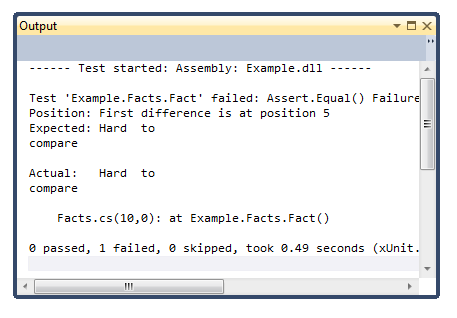
Clearly, this test fails. So you look at the output and this is what you see:
test-output

It’s pretty hard to compare those strings by looking at them. Especially if they are two huge strings.

This is why I typically write an extension method against string used to better output a string comparison. Here’s an example of a test using my helper.

[Fact]
public void Fact()
{
    "Hard  to\rcompare\n".ShouldEqualWithDiff("Hard \tto\ncompare\r\n");
}

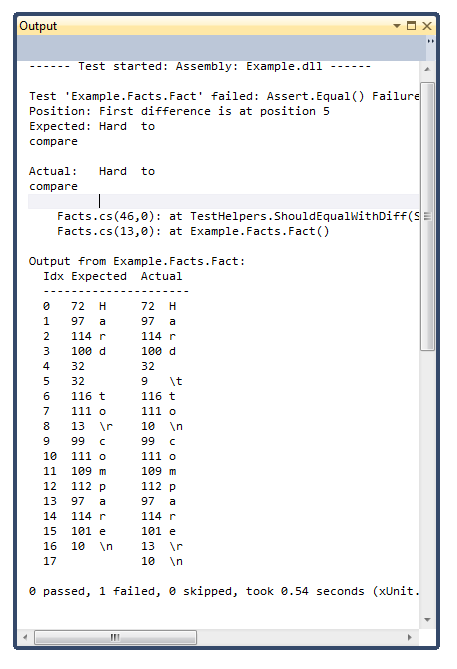
And here’s an example of the output.
test-compare-output

At the very top, the assert message is the same as before. I deferred to the existing Assert.Equal method in xUnit (typically Assert.AreEqual in other test frameworks) to output the error message.

Underneath the existing message are headings for three columns: the character index, the expected character, and the actual character. For each character I print out the int value and the actual character.

Of course in some cases, I don’t print out the actual value. If I were to do that for new line characters and tab characters, it’d screw up the formatting. So instead, I special case those characters and print out the escape sequence in C# for those characters.

This makes it easy to compare two strings and see every difference when a test fails. Even the hidden ones.

This is a simple quick and dirty implementation available in a Gist. For example, it doesn’t do any real DIFF comparisons and try to line up similarities. That’d be a nice improvement to make at some point. If you can improve this, feel free to fork the gist and send me a pull request.

What others have said

Requesting Gravatar... Jon Galloway Jan 14, 2012 7:42 AM
# re: Comparing Strings in Unit Tests
If you're doing diff comparisons, I'd recommend checking out Approval Tests: http://approvaltests.sourceforge.net/
Requesting Gravatar... Royston Shufflebotham Jan 14, 2012 10:07 AM
# re: Comparing Strings in Unit Tests
Often string differences like this occur a long way into a string (e.g. 250 chars into a 300 char string), so many string diff displays (e.g. NUnit's) only show the bit that actually differs (with a bit of context) rather than the whole string.

I usually find that I just need to know the character code of the first differing character (usually CR instead of LF or vice versa!) to find the problem.

Requesting Gravatar... haacked Jan 14, 2012 8:41 PM
# re: Comparing Strings in Unit Tests
@Royston great point! I wanted to show a significant enough chunk of the string because in certain cases (such as when you're applying a normalization to the string), you want to see the pattern of differences to provide more information about what wen't wrong.

One improvement I could make to my method is to put a max # of characters I'll show and show the segment near the first difference like NUnit does.

Going even further, the differences could be spaced apart. So maybe show up to X differences and Y characters around each difference. That'd be a nice improvement. :)
Requesting Gravatar... Nik Molnar Jan 15, 2012 5:07 AM
# re: Comparing Strings in Unit Tests
Great idea Phil!

This reminds me of the Power Assert library, take a look if you haven't seen it...
Requesting Gravatar... Siderite Jan 15, 2012 10:24 AM
# re: Comparing Strings in Unit Tests
I've had a similar problem with comparing HTML (only there I had to ignore whitespace) and I've created a small class that receives a string in the constructor and has overridden Equals and ToString methods as well as an implicit cast to string.
All you have to do is change Assert.Equal(s1,s2) with Assert.Equal(new Stringer(s1),new Stringer(s2)), changing the code to a minimum level and achieving your desired result with an encapsulated class.
In your example you could transform tabs and carriage returns back into slash notation when outputing.
Requesting Gravatar... Jim Cooper Jan 16, 2012 10:30 AM
# re: Comparing Strings in Unit Tests
Or if you were to use a more sophisticated unit test framework (NUnit) :-) you'd have this test:


[Test]
public void CheckStringAsserts()
{
Assert.That("Hard \tto\ncompare\r\n", Is.EqualTo("Hard to\r\ncompare\n"));
}


and this output:


String lengths are both 18. Strings differ at index 5.
Expected: "Hard to\r\ncompare\n"
But was: "Hard \tto\ncompare\r\n"
----------------^


Both the test and the output are much nicer
Requesting Gravatar... zvolkov Jan 16, 2012 11:31 PM
# re: Comparing Strings in Unit Tests
Re: extension methods for assertion, check out Shouldy at http://shouldly.github.com/
Requesting Gravatar... Llewellyn Falco Apr 13, 2012 6:45 AM
# re: Comparing Strings in Unit Tests
As Jon said, approvaltests deals with this often & fairly well. Mainly by harnessing other tools (like a diff tool).

You can see an example of a fairly complex string comparison here: http://youtu.be/vKLUycNLhgc

What do you have to say?

(will show your gravatar)
Please add 3 and 2 and type the answer here: