Introducing ASP.NET MVC 3 Tools Update

Today at Mix, Scott Guthrie announced an update to the ASP.NET MVC 3 we’re calling the ASP.NET MVC 3 Tools Update. You can install it via Web PI or download the installer by going to the download details page. Check out the release notes as well for more details.

Notice the emphasis on calling it a Tools Update? The reason for that is simple. This only updates the tooling for ASP.NET MVC 3 and not the runtime. There are no changes to System.Web.Mvc.dll or any of its other assemblies that ship as part of the ASP.NET MVC 3 Framework. Instead, given that we just released ASP.NET MVC 3 this past January, we focused on improvements to the tools and project templates that we wanted to ship in time for Mix.

To drive this point home, here’s a screenshot of the Programs and Features dialog with ASP.NET MVC 3 RTM installed.

BEFORE
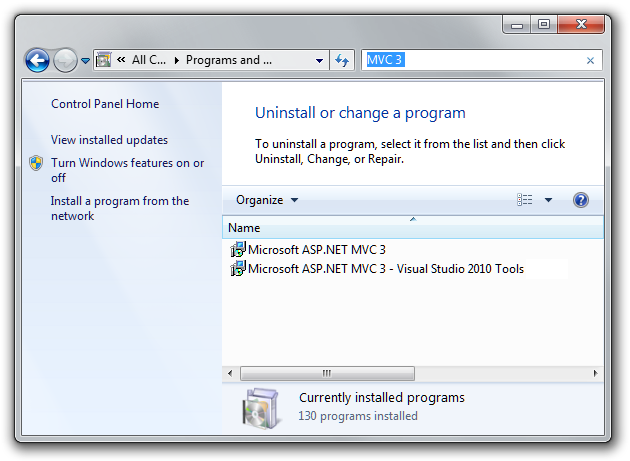
mvc3-installed

And here’s one with the Tools Update installed.

AFTER

mvc3-update-installed

Did you see what changed? If not, I’ll help you. Smile

mvc3-update-installed-highlighted

What’s new in this release?

We’ve added a lot of improvements to the tooling experience in this release. For more details, check out the release notes.

  • New Intranet Project Template that enables Windows Authentication and does not include the AccountController.
  • HTML 5 checkbox to enable HTML 5 versions of project templates.
  • Add Controller Dialog now supports full automatic scaffolding of Create, Read, Update, and Delete controller actions and corresponding views. By default, this scaffolds data access code using EF Code First.
  • Add Controller Dialog supports extensible scaffolds via NuGet packages such as MvcScaffolding. This allows plugging in custom scaffolds into the dialog which would allow you to create scaffolds for other data access technologies such as NHibernate or even JET with ODBCDirect if you’re so inclined!
  • JavaScript libraries within project templates are updatable via NuGet! (We included them as pre-installed NuGet packages.)
  • Includes Modernizr 1.7. This provides compatibility support for HTML 5 and CSS 3 in down-level browsers.
  • Includes EF Code First 4.1 as a pre-installed NuGet package.

We’ve also made several other small changes and fixed several bugs in the MVC tooling for Visual Studio:

  • We did some major cleanup to the AccountController in the Internet project template
  • We now have more “sticky” options that remember their settings even when you restart Visual Studio
  • We have much smarter model type filtering logic in the Add View and Add Controller dialogs

NuGet 1.2 Included

Around 12 days ago, we released NuGet 1.2. If you don’t already have NuGet 1.2 installed, ASP.NET MVC 3 Tools Update will install it for you. In fact, it requires it because of the pre-installed NuGet packages feature I mentioned earlier. When you create a new ASP.NET MVC 3 Tools Update project, the script libraries such as jQuery are installed as NuGet packages so that it’s easy to update them after the fact.

Give it a spin and let us know what you think!

What others have said

Requesting Gravatar... NickS Apr 12, 2011 2:45 AM
# re: Introducing ASP.NET MVC 3 Tools Update
I'm intrigued by the full scaffolding of CRUD operations in the Add Controller dialog. Have you given any thought to supporting the repository pattern for this?

I learned most of what I know about ASP.NET MVC by reading Steve Sanderson's excellent "Pro ASP.NET MVC 2 Framework", which makes use of the repository pattern in the supplied examples. In my project, I'm using Entity Framework v4 with the ADO.NET C# POCO Entity Generator rather than LINQ to SQL, but I've stuck with the repository pattern for data access.
Requesting Gravatar... Mike Apr 12, 2011 2:51 AM
# re: Introducing ASP.NET MVC 3 Tools Update
I'm not too excited. I understand you want to be somewhat opinionated, but you can keep tweaking project templates as long as you want and not satisfy a lot of people. Seems like a job for the community to come up with cool project templates, be it HTML5 ready templates, or Silverlight optimized templates or whatever.

Requesting Gravatar... mike johnson Apr 12, 2011 3:28 AM
# re: Introducing ASP.NET MVC 3 Tools Update
Nice. does this have a way to upgrade projects already underway in MVC2 or MVC3 ?
Requesting Gravatar... Hattan Shobokshi Apr 12, 2011 3:43 AM
# re: Introducing ASP.NET MVC 3 Tools Update
NickS - Steve Sanderson actually wrote MvcScaffolding which, I think, is the technology used to do the scaffolding.I know for a fact that you scaffold out everything in the command line and include a "-repository" switch that puts everything in a nice repository. Since the Add Controller dialog is extensible, I wouldn't be surprised to see a repository template soon.
Requesting Gravatar... Doug McClean Apr 12, 2011 3:44 AM
# re: Introducing ASP.NET MVC 3 Tools Update
Phil, this is pretty cool. It's nice to see you guys releasing smaller goodies like this between VS releases.

As far as HTML5 support in VS, it would be really nice if you could do something about Connect bug 656626. It's minor but annoying.
Requesting Gravatar... Billy Apr 12, 2011 3:50 AM
# re: Introducing ASP.NET MVC 3 Tools Update
I see a Paint Disaster here, it's the same image with white a rectangle on it. On a side note, if you want MVC have a look at some Java frameworks.
Requesting Gravatar... Frank Krueger Apr 12, 2011 3:53 AM
# re: Introducing ASP.NET MVC 3 Tools Update
A little confusion. I held back on installing MVC3 but after @shanselman's demo I thought I'd try.

Went to http://asp.net, then to MVC, and clicked that itty bitty link for those of us who already have VS installed. The link is labeled "MVC 3". That downloaded AspNetMVC3ToolsUpdateSetup.exe. Spent 45 minutes letting that install. When done I was shocked (shocked!) that VS was still only offering me MVC2. :-(

How does one actually get this MVC3 goodness?

Requesting Gravatar... Ignat Andrei Apr 12, 2011 5:09 AM
# re: Introducing ASP.NET MVC 3 Tools Update
Could you support both Windows and Form authentication in MVC?
Requesting Gravatar... Tim VanFosson Apr 12, 2011 5:22 AM
# re: Introducing ASP.NET MVC 3 Tools Update
Any reason why this would have required me to reapply VS2010 SP1? which it did. :-(
Requesting Gravatar... James C Apr 12, 2011 10:06 AM
# re: Introducing ASP.NET MVC 3 Tools Update
@Billy,

Go tell that story to DHH and the boys over in Rails land. I'm sure you will get an earful of the latest Cee Lo hit...

Cheers,
James
Requesting Gravatar... Harry Pfleger Apr 12, 2011 1:44 PM
# re: Introducing ASP.NET MVC 3 Tools Update
to Frank:
make sure you have selected ".NET Framework 4" in the "New Project" dialog..
Requesting Gravatar... Allan Apr 12, 2011 1:54 PM
# re: Introducing ASP.NET MVC 3 Tools Update
I installed the ASP.NET MVC 3 Tools Update from WPI. I reloaded the WPI and it shows ASP.NET MVC 3 Tools Update not installed. I uninstalled the ASP.NET MVC 3 Tools Update. I then downloaded the AspNetMVC3ToolsUpdateSetup.exe file and ran it with logging. Everything installed successfully. I booted up WPI and again it still shows ASP.NET MVC 3 Tools Update not installed.

On the same note, WPI shows that Visual Studio 2010 SP1 is not installed even though it is.

What gives? I can send you all the logs you need.
Requesting Gravatar... hazzik Apr 12, 2011 3:05 PM
# re: Introducing ASP.NET MVC 3 Tools Update
I think it's awful. It is better to fix bugs in the framework, rather than engage this nonsense! Anyway, these tools are useless. Nobody use it.
Requesting Gravatar... Kristof Claes Apr 12, 2011 3:14 PM
# re: Introducing ASP.NET MVC 3 Tools Update
I've just installed the update and now Visual Studio 2010 won't start anymore. It just gives "Unknown Error". Rebooting my machine didn't solve it.

Even after uninstalling the MVC3 Tools Update, I keep getting the error and I can't start Visual Studio 2010 :-(
Requesting Gravatar... hilton smith Apr 12, 2011 3:35 PM
# re: Introducing ASP.NET MVC 3 Tools Update
I've been waiting for a tooling update for a while now, unfortunately the problem I've been having with the add view dialog is still happening...

It can't find any of my object types within my actual mvc project, only the types in my references. :(

(stackoverflow.com/.../5185863)
Requesting Gravatar... Kristof Claes Apr 12, 2011 3:51 PM
# re: Introducing ASP.NET MVC 3 Tools Update
Even completely uninstalling Visual Studio 2010 (and separate parts like SP1, MVC2, MVC3, ...) gives the same error after a clean install of Visual Studio 2010.
Requesting Gravatar... Kristof Claes Apr 12, 2011 4:57 PM
# re: Introducing ASP.NET MVC 3 Tools Update
Doing a "Repair" didn't solve it either. Trying to start VS2010 in SafeMode doesn't help. Same error: http://twitpic.com/4k9ite

Using the /Log switchs gives this: http://twitpic.com/4k9vu5
Requesting Gravatar... Bats Ihor Apr 12, 2011 5:18 PM
# re: Introducing ASP.NET MVC 3 Tools Update
Very nice update, I was dreamed about this implementation of scaffolding. ) Thanks!
Requesting Gravatar... Kristof Claes Apr 12, 2011 7:11 PM
# re: Introducing ASP.NET MVC 3 Tools Update
Ok, I finally managed to get VS2010 working again. Here's what I did:
- Uninstall VS2010
- Uninstall everything that might have anything to do with VS2010 (MVC, SQL CE4.0, ...)
- Remove all VS2010 directories (eg. C:\Program Files (x86)\Microsoft Visual Studio 10.0)
- Remove all VS2010 items in the registry
- Reboot
- Install VS2010
- Run VS2010
- Install SP1
- Run VS2010
- Install everything that's needed using Web Platform installer

I still get "The 'VSTS for Database Professionals Sql Server Data-tier Application' package did not load correctly", "The 'RadLangSvc.Package, RadLangSvc.VS, Version=10.0.0.0, Culture=neutral, PublicKeyToken=89845dcd8080cc91' package did not load correctly" and "The 'Language Package' package did not load correctlty" errors, but I don't know what they mean.
Requesting Gravatar... raphael Apr 12, 2011 8:51 PM
# re: Introducing ASP.NET MVC 3 Tools Update
Show!
Very good!
Now we need a scaffolding template for (controller) search.

Very thanks.
Requesting Gravatar... Dan Martin Apr 12, 2011 10:22 PM
# re: Introducing ASP.NET MVC 3 Tools Update
I think this update just killed MVC projects on my machine. When I try to create/open mvc projects in vs2010 now I get the "The project type is not supported by this installation." message. Repair time I guess.
Requesting Gravatar... Gerry High Apr 12, 2011 10:55 PM
# re: Introducing ASP.NET MVC 3 Tools Update
After installing this update and then working with my previously existing MVC 3 project with Razor view engine the designer is basically useless as now Visual Studio will lock up as soon as I start to type in a cshtml file. I then get the "Visual Studio is busy with an external operation...". Eventually it comes back until I type something else.

Gerry
Requesting Gravatar... Alexander DiMauro Apr 13, 2011 12:36 AM
# re: Introducing ASP.NET MVC 3 Tools Update
It seems that only the people with problems are posting here? The only issue I had was that it failed to download via WPI (too much traffic?). After 3 attempts, I finally downloaded the installer, and it worked without a problem.

I've already been using MvcScaffolding, Modernizr, and CodeFirst on every new project, so having it all 'baked in' now is nice.
Requesting Gravatar... Yarx Apr 13, 2011 1:45 AM
# re: Introducing ASP.NET MVC 3 Tools Update
I was hoping this tools update would fix my issue, maybe you know the reason for this. Why do Model classes defined in a separate project referenced by the main MVC application not show up in the list of Model classes when trying to add a new View (in order to generate the view via scaffolding). I get classes in the list from pre-compiled 3rd party libraries like nHibernate, Castle, WebActivator, log4net and even other classes in my own namespace defined in the MVC3 application, but not any of the ones defined in my project reference library that has my Models.
Requesting Gravatar... Moorthi Apr 13, 2011 4:16 AM
# re: Introducing ASP.NET MVC 3 Tools Update

Tried installing AspNetMVC3ToolsUpdateSetup.exe. It hung for ever.
I have VS2010 on win 7 enterprise edition.
Requesting Gravatar... Adrian Grigore Apr 13, 2011 6:42 AM
# re: Introducing ASP.NET MVC 3 Tools Update
Phil,

Many thanks for this update - It worked like a treat for me. It also offered a quick way of taking my first steps with EF Code First. I couldn't believe how smooth it works after creating my first project. Awesome job!
Requesting Gravatar... Betty Apr 13, 2011 10:28 AM
# re: Introducing ASP.NET MVC 3 Tools Update
Restarting VS fixed my "The project type is not supported by this installation." error.
Requesting Gravatar... Philip Apr 13, 2011 12:26 PM
# re: Introducing ASP.NET MVC 3 Tools Update
What is going on with this installation ?....it takes forever....I finally had to cancel the installation...
Requesting Gravatar... Billy Apr 13, 2011 1:30 PM
# re: Introducing ASP.NET MVC 3 Tools Update
Since you are announcing it, when will you address all those horrible errors people are getting? That poor dude had to scrape his computer in the kitchen sink and it still isn't working.

Good thing I read this post, I can't afford to ruin my development environment.

So, what's up?
Requesting Gravatar... Justin Apr 14, 2011 1:43 AM
# re: Introducing ASP.NET MVC 3 Tools Update
You guys suck, give the guy a break! The update worked just fine for me.

Thanks very much, Phil, for your, and your team's, hard work. I'm a huge fan of ASP.NET MVC, and it just keeps getting better!
Requesting Gravatar... Ronald Apr 14, 2011 9:45 PM
# re: Introducing ASP.NET MVC 3 Tools Update
Phil,

Thanks for the update with some cool new features.

I have installed the update on serveral VS2010 Premium environments. However on one machine the syntax highlighting and intellisense do not work anymore after the update. Repairing SP1, uninstalling MVC3 and installing it again did not work.

Any ideas what to do to fix it?

Thanks.
Requesting Gravatar... Lonnie Apr 14, 2011 11:59 PM
# re: Introducing ASP.NET MVC 3 Tools Update
Anyone else having this problem?
Since I installed the MVC 3 Tools update, I now get this error as soon as I hit F5:
Microsoft JScript runtime error: Not implemented.
VS opens the modernizr-1.7.min.js file and highlights this section in yellow:
c.ogg=a.canPlayType('video/ogg; codecs="theora"')
I rebooted my PC and error persists. Any ideas?
Thanks
Requesting Gravatar... Lonnie Apr 15, 2011 1:12 AM
# re: Introducing ASP.NET MVC 3 Tools Update
okay, the problem is bigger than I thought. It appears the the modernizr-1.7.js file is breaking across several of the audio codecs, not just theora.

I am running VS on a VM with no installed audio device (the host server does not have one to assign).

Could this be the issue, and if so, how can I fix it?

Even removing the modernizr files from the script folder, deleting them from the project and rebuilding doesn't work, as VS dynamically replaces them on debug.

I'm new and trying to learn this, but the environment keeps killing my efforts. Any help would be appreciated.
Thanks
Requesting Gravatar... Anthony Apr 15, 2011 2:16 AM
# re: Introducing ASP.NET MVC 3 Tools Update
Install seems to have gone okay, but there is no ASP.NET MVC 3 Empty Web Application option when creating a new project - is this by design?
Requesting Gravatar... jim Apr 15, 2011 9:30 PM
# re: Introducing ASP.NET MVC 3 Tools Update
I think a lot of peoples' issues with installation have to do with an conflict when the installer tries to execute vs10-kb2483190-x86.exe. I get the same hanging and eventual error described by a lot of commenters, and when I go to the temp directory that the installer uses and install all of the MSIs individually it works fine. This is the second tools update with this issue.
Requesting Gravatar... Lonnie Apr 16, 2011 12:55 AM
# re: Introducing ASP.NET MVC 3 Tools Update
In case anyone else has the problem I described in my earlier posts, I resolved it by uninstalling all Web Dev and MVC3 programs and reinstalling from the WebPI again.
Just select Visual Web Developer Express 2010 SP1 alone. It still fails to load SP1, but everything else installed and the issue no longer exists.
Requesting Gravatar... haacked Apr 16, 2011 2:41 AM
# re: Introducing ASP.NET MVC 3 Tools Update
Hi all. Sorry for the installation problems. The installer attempts to patch VS 2010 to add Razor support, which is why it is very slow on some machines. If you have VS 2010 SP 1 installed, it shouldn't need to apply the patch. If you have VS 2010 SP 1 Beta, it may still attempt to apply the patch. I need to double check.

If you have the old Async CTP installed, you'll need to unistall that first.

If you have VS install logs, email me at philha@microsoft.com.
Requesting Gravatar... Carson Apr 16, 2011 9:42 AM
# re: Introducing ASP.NET MVC 3 Tools Update
Kristof, might be worth taikng a look at connect.microsoft.com/... - it describes those package loading errors and has a suggested workaround. The workaround didn't work for me - said I already had a new version installed of the packages it recommended manually installing - but for the time being the problem seems to have disappeared anyway, fingers crossed.
Requesting Gravatar... Zote Apr 18, 2011 10:51 PM
# re: Introducing ASP.NET MVC 3 Tools Update
Phil, creating a new ASP.NET MVC 3 Web Application usign template = Internet Application and Razor and Use HTML5 semantic markup, I'm getting error above.

---------------------------
Error adding packages to project
---------------------------
Could not add all required packages to the project. Please reinstall the ASP.NET MVC 3 Tools Update release. The following packages failed to install from C:\Program Files (x86)\Microsoft ASP.NET\ASP.NET MVC 3\Packages:


jQuery.vsdoc.1.5.1

jQuery.Validation.1.8.0

jQuery.UI.Combined.1.8.11


---------------------------
OK
---------------------------


I tried to reinstall and error persists. I'm using stand alone install.
Requesting Gravatar... Zote Apr 18, 2011 10:54 PM
# re: Introducing ASP.NET MVC 3 Tools Update
below
Requesting Gravatar... yes Apr 19, 2011 11:36 PM
# re: Introducing ASP.NET MVC 3 Tools Update
Classic Microsoft software, with all the hundreds employees end user feedback reveals issues such as installing fails when certain criteria is missing (like Service pack). Developer tools and updates used to be an exception to the Office, Exchange, Windows and other product groups but apparently bad example is contagious.
Requesting Gravatar... n0mad Apr 20, 2011 12:27 AM
# re: Introducing ASP.NET MVC 3 Tools Update
Hey Phil - Good work on this, we have some of it in production now. I was at your presentations at MIX, I'm happy to see scaffolding and other productivity stuff.

You made a point to show the new Project templates (and Hanselman talks about the white space in the tooling dialogs for adding new Views, Controller, Model types). Is there any comprehensive docs on how to do that?

I want a custom MVC project template, with tooling integration - I think MvcScaffolding will get me some of that. I want to put this in a NuGet package.
Requesting Gravatar... Amir Apr 20, 2011 3:37 PM
# re: Introducing ASP.NET MVC 3 Tools Update
Excellent, It works fine for me as well. Thanks a lot.
Requesting Gravatar... Gabriel Rodriguez Apr 22, 2011 11:04 AM
# re: Introducing ASP.NET MVC 3 Tools Update
friggin' AWESOME. MVC3 just overflows with coolness.
Requesting Gravatar... Dan Martin Apr 26, 2011 12:40 AM
# re: Introducing ASP.NET MVC 3 Tools Update
FYI, uninstalling vs2010 (and sp1) and reinstalling fixed my "The project type is not supported by this installation." error on my laptop. Everything installed fine on my other machine the first time though. Working great now, thanks.
Requesting Gravatar... tshah May 01, 2011 11:11 PM
# re: Introducing ASP.NET MVC 3 Tools Update
It fails for me:

OS Version = 6.0.6002, Platform 2, Service Pack 2
OS Description = Vista - x86 Enterprise Edition Service Pack 2

CommandLine = c:\temp\ext27692\setup.exe
TimeZone = Eastern Daylight Time
Initial LCID = 1033


Using Simultaneous Download and Install mechanism
Operation: Installing

Package Name = Microsoft ASP.NET MVC 3 Tools Update
Package Version = 3.0.20406.0

User Experience Data Collection Policy: Disabled
Number of applicable items: 2
MSI (c:\temp\ext27692\AspNetMVC3VS2010Tools.msi) Installation succeeded. Msi Log: Microsoft ASP.NET MVC 3 Tools Update_20110502_093907253-MSI_AspNetMVC3VS2010Tools.msi.txt


MSI (c:\temp\ext27692\NuGet.msi) Installation failed. Msi Log: Microsoft ASP.NET MVC 3 Tools Update_20110502_093907253-MSI_NuGet.msi.txt

MSI (c:\temp\ext27692\AspNetMVC3VS2010Tools.msi) Uninstall succeeded. Msi Log: Microsoft ASP.NET MVC 3 Tools Update_20110502_093907253-MSI_AspNetMVC3VS2010Tools.msi.txt

Final Result: Installation failed with error code: (0x80070643), "Fatal error during installation. " (Elapsed time: 0 00:26:53).
Requesting Gravatar... Shane Whittet May 01, 2011 11:22 PM
# re: Introducing ASP.NET MVC 3 Tools Update
Looks like the jQueryUI Combined package has base theme and many variations of NuGet Package.

How would you work with this if your theme is not the base?

Alternately, could a package have a configuration that defines how it updates? For example, I delete the base theme and replace it with a custom Redmond. This configuration is stored as a url in the .css file. How great would it be if the jqueryui builder config could be stored and the NuGet updater access this project information to update to the latest version. This could avoid having 8 versions of jqueryui available for download on NuGet...

Regards, from snowy MN:)

I saw flakes again today, I miss spring break!
Requesting Gravatar... Michael Kennedy May 03, 2011 6:50 AM
# re: Introducing ASP.NET MVC 3 Tools Update
Thanks Phil. MVC 3 is really looking good now.

Regards,
Michael
Requesting Gravatar... Richard Arran Photography May 08, 2011 10:37 PM
# re: Introducing ASP.NET MVC 3 Tools Update
Absolutley love the MVC framework. It's asp.net as it should be, webforms are awful!
Requesting Gravatar... daniel glenn May 18, 2011 9:56 PM
# re: Introducing ASP.NET MVC 3 Tools Update
Thanks ? but CDN for Modernizr on ajax.aspnetcdn.com is not available?
why? special reason ?

if (Modernizr != "ajax.aspnetcdn.com")
{
Console.WriteLine("fail");
} else
{
Console.WriteLine("sweeeet");
}

thx man, for your nice work...mvc 3 is sweet.
Requesting Gravatar... Vincent May 22, 2011 2:36 PM
# re: Introducing ASP.NET MVC 3 Tools Update
Thanks again microsoft, your stupid installation package broke my VS IDE... I'll will reboot into ubuntu, I've had enough Microsoft for this year. Crappy install programs just doesn't cut it anymore when you are used to proper distribution method like debians deb packages. See you next year if you figure out how to make an installation package properly.

Why does WEB-PI try to reinstall VS2010 SP1 when it's already installed ? And also it's never ending...over 2 hours and still going...

1)'VSTS for Database Professionals Sql Server Data-tier Application' package did not load correctly.
2)'RadLangSvc.Package, RadLangSvc.VS, Version=10.0.0.0, Culture=neutral, PublicKeyToken=89845dcd8080cc91' package did not load correctly.
3: Razor highlighting doesn't work anymore.
Requesting Gravatar... Gaurav Vishwa Aug 21, 2011 4:20 PM
# re: Introducing ASP.NET MVC 3 Tools Update
HI,
I have Visual stdio 2008 ,
but I am installing MVC 3.0 it's not supported.
Can u suggest me which version of MVC is compatible ?
Requesting Gravatar... Farhan Sep 04, 2011 4:22 PM
# re: Introducing ASP.NET MVC 3 Tools Update
you need to upgrade Visual Studio and use 2010 so that you can enjoy with latest technology of mvc 3. othewise you can use mvc 2 for vs2008.
Requesting Gravatar... Chanel Ledertasche Sep 21, 2011 2:57 PM
# re: Introducing ASP.NET MVC 3 Tools Update

Thanks for sharing your article; it’s very nice, thanks. I hope can read more good articles
Requesting Gravatar... saqwer Oct 22, 2011 7:43 PM
# re: Introducing ASP.NET MVC 3 Tools Update
I got next error:

MSI (e:\temp\ext27692\AspNetWebPages.msi) Installation failed. Msi Log: Microsoft ASP.NET MVC 3 Tools Update_20111023_133807407-MSI_AspNetWebPages.msi.txt
Final Result: Installation failed with error code: (0x80070643), "Fatal error during installation. " (Elapsed time: 0 00:00:08).

What will recomend to me?
Requesting Gravatar... saqwer Oct 22, 2011 8:04 PM
# re: Introducing ASP.NET MVC 3 Tools Update
Also I've got next details for this error:
Problem signature:
Problem Event Name: VSSetup
Problem Signature 01: Microsoft ASP.NET MVC 3 Tools Update
Problem Signature 02: 3.0.20406.0
Problem Signature 03: 10.0.30304.1
Problem Signature 04: 1
Problem Signature 05: AspNetWebPages.msi
Problem Signature 06: Install_I_Interactive_Error
Problem Signature 07: 1603
Problem Signature 08: 1722
Problem Signature 09: WebConfigCA_Remove
OS Version: 6.1.7601.2.1.0.256.48
Locale ID: 1058

If you can help, please, tell
Requesting Gravatar... Steve Nov 15, 2011 10:18 PM
# re: Introducing ASP.NET MVC 3 Tools Update
Installed it. It took ages with no indication of progress. Now I get the 'VSTS for Database Professionals Sql Server Data-tier Application package did not load correctly' Error. Grrr.
Requesting Gravatar... TJ Nov 29, 2011 5:37 PM
# re: Introducing ASP.NET MVC 3 Tools Update
Tried to install the Tools update recently as I have forgotten to do so after getting a new machine. Having NuGet 1.5 installed, the tools update failed and I ran into the errors mentioned above.

Uninstalling NuGet 1.5, then installing MVC 3 Tools Update worked for me.
Requesting Gravatar... Trevor de Koekkoek Dec 22, 2011 3:21 AM
# re: Introducing ASP.NET MVC 3 Tools Update
Praise the Lord for the last post! Finally have MVC 3 running again after uninstalling MVC4 (don't recommend this), reinstalling VS2010, uninstalling NuGet 1.5 and then finally MVC3 (stand-alone ToolsUpdate). The MVC with VS 2010 SP1 and tools just hangs.
Requesting Gravatar... yo Jan 17, 2012 10:37 PM
# re: Introducing ASP.NET MVC 3 Tools Update
Scaffolding is an anti-pattern

What do you have to say?

(will show your gravatar)
Please add 2 and 5 and type the answer here: