Hosting a Simple “Read-Only” NuGet Package Feed on the Web

As you may know, NuGet supports aggregating packages from multiple package sources. You can simply point NuGet at a folder containing packages or at a NuGet OData service.

A while back I wrote up a guide to hosting your own NuGet feed. Well, we’ve made it way easier to set one up now! And, surprise surprise, it involves NuGet. Smile I’ll provide step by step instructions here. But first, make sure you’re running NuGet 1.2!

Step 1: Create a new Empty Web Application in Visual Studio

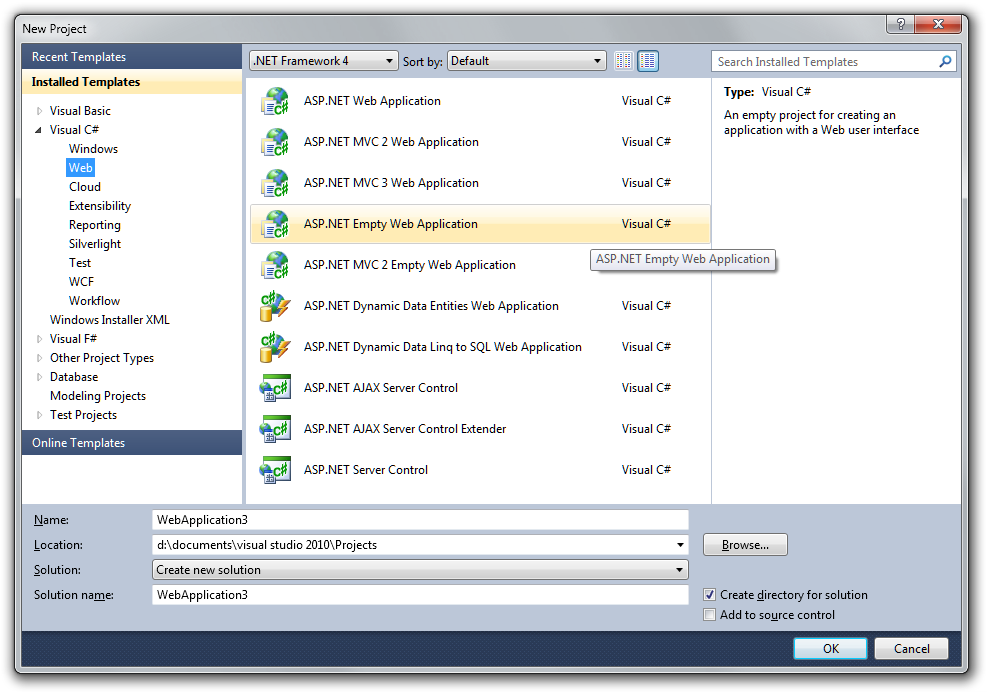
Go to the File | New | Project menu option (or just hit CTRL + SHIFT + N) which will bring up the new project dialog and select “ASP.NET Empty Web Application” as in the following screenshot (click to enlarge).
new-project-dialog

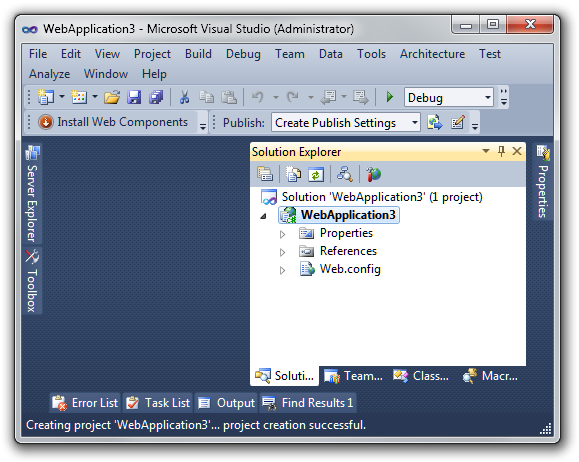
This results in a very empty project template.
empty-web-project

Step 2: Install the NuGet.Server Package

Now right click on the References node and select Add Library Package Reference to launch the NuGet dialog (alternatively, you can use the Package Manager Console instead and type Install-Package NuGet.Server).

Click the Online tab and then type NuGet.Server in the top right search box. Click Install on the NuGet.Server package as shown in the following image (click to enlarge).

nuget-dialog

Step 3: Add Packages to the Packages folder

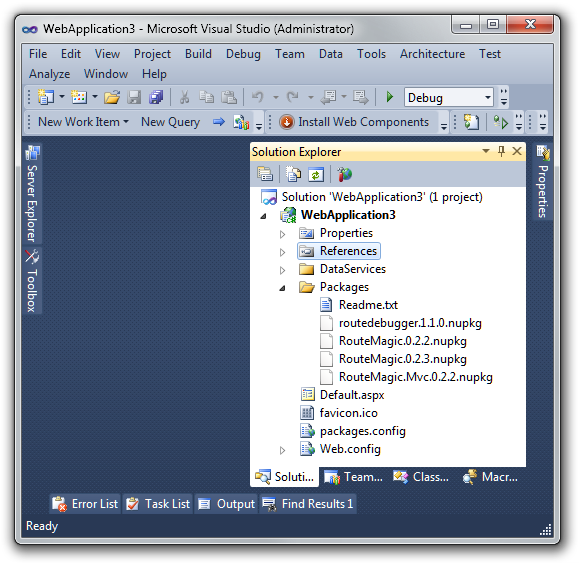
That’s it! The NuGet.Server package just converted your empty website into a site that’s ready to serve up the OData package feed. Just add packages into the Packages folder and they’ll show up.

In the following screenshot, you can see that I’ve added a few packages to the Packages folder.
packages-folder

Step 4: Deploy and run your brand new Package Feed!

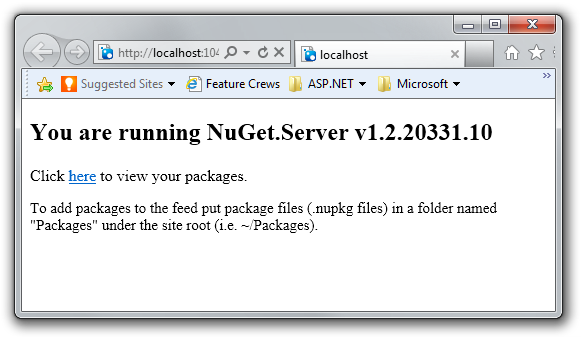
I can hit CTRL + F5 to run the site and it’ll provide some instructions on what to do next.
package-site

Clicking on “here” shows the OData over ATOM feed of packages.
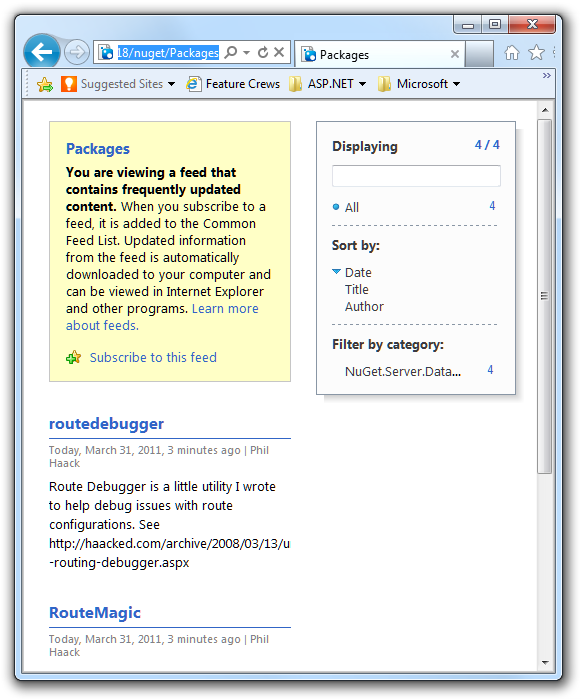
package-feed

Now all I need to do is deploy this website as I would any other site and then I can click the Settings button and add this feed to my set of package sources as in the following screenshot (click to enlarge).

Options

Note that the URL you need to put in is http://yourdomain/nuget/ depending on how you deploy the site.

Yes, it’s that easy! Note that this feed is “read-only” in the sense that it doesn’t support publishing to it via the NuGet.exe command line tool. Instead, you need to add packages to the Packages folder and they are automatically syndicated.

What others have said

Requesting Gravatar... Troy Mar 31, 2011 6:50 AM
# re: Hosting a Simple “Read-Only” NuGet Package Feed on the Web
I can get it running fine on my machine...but when i publish to a fresh Win 2008/IIS 7.5 box the feed url returns a 404 Not Found. I've got .net 4.0/mvc 3.0 installed on the machine. Is there a config step i likely missed that NuGet needs?
Requesting Gravatar... haacked Mar 31, 2011 2:48 PM
# re: Hosting a Simple “Read-Only” NuGet Package Feed on the Web
You need to map the application/zip mime type to *.nupkg in IIS. We're going to try and change our package do that for you. :)
Requesting Gravatar... Betty Mar 31, 2011 4:39 PM
# re: Hosting a Simple “Read-Only” NuGet Package Feed on the Web
I played with this a couple days ago, I was disappointed to see it couldn't be extended easily to host multiple feeds.
Requesting Gravatar... Flash Mar 31, 2011 5:09 PM
# re: Hosting a Simple “Read-Only” NuGet Package Feed on the Web
I had the same problem as Troy when I deployed to IIS 7.5 (i.e. error code 404 on package feed). Once I added the magic runAllManagedModulesForAllRequests="true" attribute to the system.webServer/modules element in the web.config it worked.
Requesting Gravatar... oleksii Apr 01, 2011 1:01 AM
# re: Hosting a Simple “Read-Only” NuGet Package Feed on the Web
This is really cool and useful for me. Thanks!
Requesting Gravatar... Troy Apr 01, 2011 4:06 AM
# re: Hosting a Simple “Read-Only” NuGet Package Feed on the Web
I'm a NuGet noob so be patient with me :)

The fix that @Flash suggested worked great. Now my NuGet feed is working fine, and I can view it via a web browser. The issue is in Visual Studio. I get the following:

get-package -remote
Get-Package : There was an error while processing the request. Please verify that 'http://myserver:8080/nuget/Packages' is a valid feed.
At line:1 char:12
+ get-package <<<< -remote
+ CategoryInfo : NotSpecified: (:) [Get-Package], InvalidOperationException
+ FullyQualifiedErrorId : NuGetCmdletUnhandledException,NuGet.PowerShell.Commands.GetPackageCommand


Am I still missing something?
Requesting Gravatar... Daniel Liuzzi Apr 01, 2011 5:29 AM
# re: Hosting a Simple “Read-Only” NuGet Package Feed on the Web
Is it possible to have the feed require authentication? This would come incredibly handy for teams where developers are scattered over the world, and need a centralized repository for their private packages. Thanks!
Requesting Gravatar... Troy Apr 01, 2011 9:16 AM
# re: Hosting a Simple “Read-Only” NuGet Package Feed on the Web
Solved!

I was using 'http://myserver:8080/nuget/packages' as the feed url. Turns out that NuGet automagically appends '/Packages' to the feed url for you. Once I changed it to 'http://myserver:8080/nuget' everything was right in the world again.
Requesting Gravatar... haacked Apr 02, 2011 7:50 AM
# re: Hosting a Simple “Read-Only” NuGet Package Feed on the Web
@Betty Just have multiple sites. It's pretty easy.

@Daniel I don't think we support authenticated feeds. One way you could do it is to use Basic authentication with HTTPS and supply the authentication information in the URL. Hacky and ugly, I know. Just haven't had a large number of requests for it.

There is a bug in our backlog on this: http://nuget.codeplex.com/workitem/366
Requesting Gravatar... Betty Apr 02, 2011 3:55 PM
# re: Hosting a Simple “Read-Only” NuGet Package Feed on the Web
@haacked, multiple sites works but it really wouldn't have been hard for the author to have fixed that minor issue. Single site would allow making migrating packages from the beta/ci feed to the production one a lot easier (cleaner) too.
Requesting Gravatar... Tugberk (tourismgeek) Apr 03, 2011 5:11 AM
# re: Hosting a Simple “Read-Only” NuGet Package Feed on the Web
sir,

we have been thinking doing something like that as company for only our private libraries but how can we protect the feed? with api key of authorization headers?
Requesting Gravatar... Tugberk (tourismgeek) Apr 03, 2011 5:12 AM
# re: Hosting a Simple “Read-Only” NuGet Package Feed on the Web
there is a typo on my previous comment. last sentence should have been like below;


how can we protect the feed? with api key or authorization headers?
Requesting Gravatar... Tugberk (tourismgeek) Apr 03, 2011 5:14 AM
# re: Hosting a Simple “Read-Only” NuGet Package Feed on the Web
ok. I really sucked here. you already posted an answer to @Daniel about the same issue I am curious about. sorry for the verbosity :S
Requesting Gravatar... Michael Ceranski Apr 04, 2011 10:34 AM
# re: Hosting a Simple “Read-Only” NuGet Package Feed on the Web
I took the code a step further by adding a package upload form and a formatted package list using XSLT. I wrote a post about it and put my code on bitbucket. Contributors are welcome.

Thanks Phil!
Requesting Gravatar... Rick Schott Apr 04, 2011 12:09 PM
# re: Hosting a Simple “Read-Only” NuGet Package Feed on the Web
NuGet is really coming along, great post.
Requesting Gravatar... haacked Apr 05, 2011 4:57 AM
# re: Hosting a Simple “Read-Only” NuGet Package Feed on the Web
@Michael, would you mind submitting a pull request to nuget.codeplex.com with that change? :)
Requesting Gravatar... Jacco Apr 06, 2011 4:29 PM
# re: Hosting a Simple “Read-Only” NuGet Package Feed on the Web
I realy like this solution, but I don't get it. Keep getting the 404 error. I made sure having the <modules runAllManagedModulesForAllRequests="true"> entry in web.config.

Published the site to IIS 7 and added the mimetype as suggested by haacked.

Anyone any other suggestion? please....
Requesting Gravatar... Damian Powell Apr 10, 2011 8:58 PM
# re: Hosting a Simple “Read-Only” NuGet Package Feed on the Web
It seems that WebActivator now depends upon Microsoft.Web.Infrastructure but it isn't included as a reference. Is that intentional?
Requesting Gravatar... Damian Powell Apr 10, 2011 11:55 PM
# re: Hosting a Simple “Read-Only” NuGet Package Feed on the Web
This is very cool, BTW. I should have opened with "Thanks" rather than "Why does this depend on Microsoft.Web.Infrastructure". Where were my manners?

I was just wondering though, does the team have any plans to modify NuGet.Server to allow uploading of new packages in the future?
Requesting Gravatar... David Nelson Apr 12, 2011 2:31 AM
# re: Hosting a Simple “Read-Only” NuGet Package Feed on the Web
I am excited about using NuGet to manage our company's internal collection of libraries; previously we have stored everything on our intranet, and although it is functional, there are numerous problems which I hope NuGet will solve.

However, currently I am having trouble getting my NuGet server running on my development web server. It complains that it "Could not load file or assembly 'Microsoft.Web.Infrastructure..." It seems that NuGet.Server has an external dependency that I don't have installed; but I can't find anything that mentions such a dependency.
Requesting Gravatar... AntiGameZ Apr 13, 2011 2:16 PM
# re: Hosting a Simple “Read-Only” NuGet Package Feed on the Web
Is there any easy way to get packages from the offical source so that I can put them in my own?
Requesting Gravatar... haacked Apr 16, 2011 3:19 AM
# re: Hosting a Simple “Read-Only” NuGet Package Feed on the Web
Use Package Explorer. http://nuget.codeplex.com/releases
Requesting Gravatar... haacked Apr 16, 2011 3:23 AM
# re: Hosting a Simple “Read-Only” NuGet Package Feed on the Web
@David it requires the ASP.NET Web Pages runtime. You can install ASP.NET MVC 3 to get it.
Requesting Gravatar... haacked Apr 16, 2011 4:48 AM
# re: Hosting a Simple “Read-Only” NuGet Package Feed on the Web
Actually, just right click on the Project Properties in VS and select "Add Deployable Assemblies" and select ASP.NET MVC" before deploying. It'll add the right dependencies.
Requesting Gravatar... mcdon Apr 20, 2011 5:32 AM
# re: Hosting a Simple “Read-Only” NuGet Package Feed on the Web
Can NuGet.Server be hosted on XP Pro and Windows Server 2003? My attempts at hosting have been unsuccessful.
Requesting Gravatar... haacked Apr 20, 2011 11:30 AM
# re: Hosting a Simple “Read-Only” NuGet Package Feed on the Web
I think it requires ASP.NET 4. Should run on XP/2003.
Requesting Gravatar... Dave Sussman Apr 20, 2011 8:03 PM
# re: Hosting a Simple “Read-Only” NuGet Package Feed on the Web
Phil - just a warning; adding the deployable dependencies causes a version mismatch. I just isntalled the Web Pages on my server instead.
Requesting Gravatar... Tim Cartwright Apr 22, 2011 4:34 AM
# re: Hosting a Simple “Read-Only” NuGet Package Feed on the Web
This worked great, however I am running into an issue with dependencies. Using the package explorer I added a dependency to jquery. (Actually it happens with any dependency)

I see the package fine in visual studio, however when I go to install I get "unable to resolve dependency".

If I remove the dependencies the package installs fine.
Requesting Gravatar... Matt Apr 26, 2011 6:57 PM
# re: Hosting a Simple “Read-Only” NuGet Package Feed on the Web
@David it requires the ASP.NET Web Pages runtime. You can install ASP.NET MVC 3 to get it.


Shouldn't this come down as a dependency then? Seems wonderfully ironic that a dependency manager should fail to manage it's own dependencies...
Requesting Gravatar... haacked Apr 27, 2011 8:41 AM
# re: Hosting a Simple “Read-Only” NuGet Package Feed on the Web
@Matt. Yeah, we're looking into it. :)
Requesting Gravatar... Sergi May 03, 2011 4:31 PM
# re: Hosting a Simple “Read-Only” NuGet Package Feed on the Web
Hi Phil,

We are trying to put all our private libraries into a private Nuget repository, but we have a problem: some of our private libraries depend as well on 3rd party libraries from the official repository, like the EntLib.

I don't really want to manually download those packages from the official repository to my local one, because of redundancy and the updates nigthmare... So, is there a way to specify the repository source in the <dependency> tag at the .nuspec file? or somewhere? Should Nuget search for the dependencies in all the sources in the "Online" tab?

Thanks,
Sergi
Requesting Gravatar... Shaun McCarthy May 04, 2011 10:00 AM
# re: Hosting a Simple “Read-Only” NuGet Package Feed on the Web
When you deploy this to a live server that binds multiple websites to the same IP Address, make sure to set &lt;serviceHostingEnvironment multipleSiteBindingsEnabled=&quot;true&quot; /&gt; in your web.config file; otherwise, you will end up getting error messages along the lines of "This collection already contains an address with scheme http".

I've listed a few other gotchas on my blog
Requesting Gravatar... haacked May 04, 2011 11:10 AM
# re: Hosting a Simple “Read-Only” NuGet Package Feed on the Web
@Shaun add your private repository to the package sources and move it to the top so it's first. Then use the "All" node when installing packages. It'll look in your private repository first, then in the others if the package isn't in your private.
Requesting Gravatar... Mike May 11, 2011 1:18 AM
# re: Hosting a Simple “Read-Only” NuGet Package Feed on the Web
You are missing a step to add the dependency on Microsoft.Web.Infrastructure, and that is not a NuGet package :(
Requesting Gravatar... Kev Jul 14, 2011 7:08 PM
# re: Hosting a Simple “Read-Only” NuGet Package Feed on the Web

Tried following the instructions but am getting the error

The exception message is 'Could not load file or assembly 'NuGet.Core, Version=1.4.0.0, Culture=neutral, PublicKeyToken=31bf3856ad364e35' or one of its dependencies. The located assembly's manifest definition does not match the assembly reference.

when trying tp browse to view the feeds (http://localhost:49850/nuget/Packages). Same error on both my local machine and server.

NuGet.Core is in the bin but the version shown in the packages.config is 1.4.20615.9012. I can't see any specific references to 1.4.0.0 anywhere.

Any ideas what to do?

Thanks.
Requesting Gravatar... Kev Jul 14, 2011 8:54 PM
# re: Hosting a Simple “Read-Only” NuGet Package Feed on the Web
Also added this to config as suggested online but just changes the error to tell me that it can't reference v1.4.20615.9012.

<runtime>
<assemblyBinding xmlns="urn:schemas-microsoft-com:asm.v1">
<dependentAssembly>
<assemblyIdentity name="NuGet.Core" publicKeyToken="31bf3856ad364e35" culture="neutral"/>
<bindingRedirect oldVersion="0.0.0.0-1.4.0.0" newVersion="1.4.20615.9012"/>
</dependentAssembly>
</assemblyBinding>
</runtime>
Requesting Gravatar... Frank C. Aug 22, 2011 6:33 AM
# re: Hosting a Simple “Read-Only” NuGet Package Feed on the Web
I tried this and it seems to work. However, the private repository does not list any packages when using the nuget.exe tool with the List command. Any ideas?
Requesting Gravatar... Doug Apr 12, 2012 9:55 PM
# re: Hosting a Simple “Read-Only” NuGet Package Feed on the Web
Just got the latest NuGet goodies. 1.7.1 server is not working for me. I can see the packages in the web browser. I can browse the packages in the manager. But any attempt to install a package result in a 404 error.
Requesting Gravatar... Robbie Apr 20, 2012 12:53 PM
# re: Hosting a Simple “Read-Only” NuGet Package Feed on the Web
I have the same problem as Doug except that if I add a trailing backslash to teh request VS makes, then it works.

The question is;

How do I get VS to add the trailing backslash or how do I get IIS to handle the missing backslash?

What do you have to say?

(will show your gravatar)
Please add 4 and 4 and type the answer here: