Uploading Packages To The NuGet Gallery

As David Ebbo blogged today, the NuGet Gallery is now open to the public. The goal of the NuGet Gallery is to be the hub for NuGet users and package authors alike. Users should be able to search and discover packages with detailed information on each one and eventually rate them. Package authors can register for an API key and upload packages.

We’re not quite where we want to be with the gallery, but we’re moving in the right direction. If you want to see us get there more quickly, feel free to lend a hand. The gallery is running on fully open source code!

In this blog post, I wanted to cover step by step what it takes to create and upload a package.

Create Your Package

Well the first step is to create a package so you have something to upload. If you’re well acquainted with creating packages, feel free to skip this section, but you may learn a few tips if you stick with it.

I’ll start with a simple example that I did recently. The XML-RPC.NET library by Charles Cook is very useful for implementing XML-RPC Services and clients. It powers the MetaWeblog API support in Subtext. As a courtesy, I recently asked Charles if he would mind if I created a NuGet package for his library for him, to which he said yes!

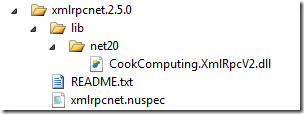
So on my machine, I created a folder named after the latest 2.5 release, xmlrpcnet.2.5.0. Here’s the directory structure I ended up with.
package-folder-structure

By convention, the lib folder is where you place assemblies that will get added as referenced assemblies to the target project when installing this package. Since this assembly only supports .NET 2.0 and above, I put it in the net20 subfolder of the lib folder.

The other required file is the .nuspec file, which contains the metadata used to build the package. Let’s take a look at the contents of that file.

<?xml version="1.0" encoding="utf-8"?> 
<package> 
  <metadata> 
    <id>xmlrpcnet</id> 
    <version>2.5.0</version> 
    <authors>Charles Cook</authors> 
    <owners>Phil Haack</owners>
    <description>A client and server XML-RPC library for .Net.</description> 
    <projectUrl>http://www.xml-rpc.net/</projectUrl>
    <licenseUrl>http://www.opensource.org/licenses/mit-license.php</licenseUrl>
    <tags>xml-rpc xml rpc .net20 .net35 .net40</tags>
    <language>en-US</language> 
  </metadata> 
</package>

There’s a couple of things I want to call out here. Notice that I specified Charles Cook in the authors element, but put my own name in the owners element. Authors represent the authors of the library within the package, while the owner typically represents the person who created the package itself. This allows people to know who to contact if there’s a problem with the package vs a problem with the library within the package.

In general, we hope that most of the time, the authors and the owners are one and the same. For example, someday I’d love to help Charles take ownership of his packages. Until that day, I’m happy to create and upload them myself.

If somebody creates a package for a library that you authored and uploads it to NuGet, assume it’s a favor they did to get your library out there. If you wish to take ownership, feel free to contact them and they can assign the packages over to you. This is the type of thing we’d like to see resolved by the community and not via some policy rules on the gallery site. This is a case where the gallery could do a lot to make this sort of interaction easier, but does not have such features in place yet.

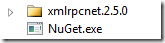
With this in place, it’s time to create the package. To do that, we’ll need the NuGet.exe console application. Copy it to a utility directory and add it to your path, or copy it to the parent folder of the package folder.
nuget-dir

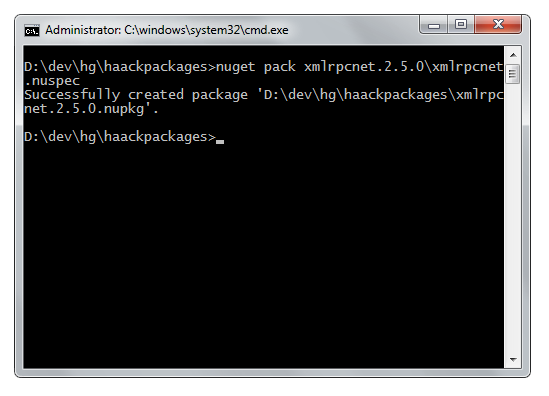
Now, open a command prompt and navigate to the directory and run the nuget pack command.

nuget pack path-to-nuspec-file

Here’s a screenshot of what I did:
nuget-pack

Pro tip: What I really did was add a batch file I call build.cmd in the same directory that I put the NuGet.exe file. The contents of the batch file is a single line:

for /r %%x in (*.nuspec) do nuget pack "%%x" -o d:\packages\

What that does is run the nuget pack command on every subdirectory of the current directory. I have a folder that contains multiple packages that I’m working on and I can easily rebuild them all with this batch file.

Ok, so now we have the package, let’s publish it! But first, we have to create an account on the NuGet Gallery website.

Register and Upload

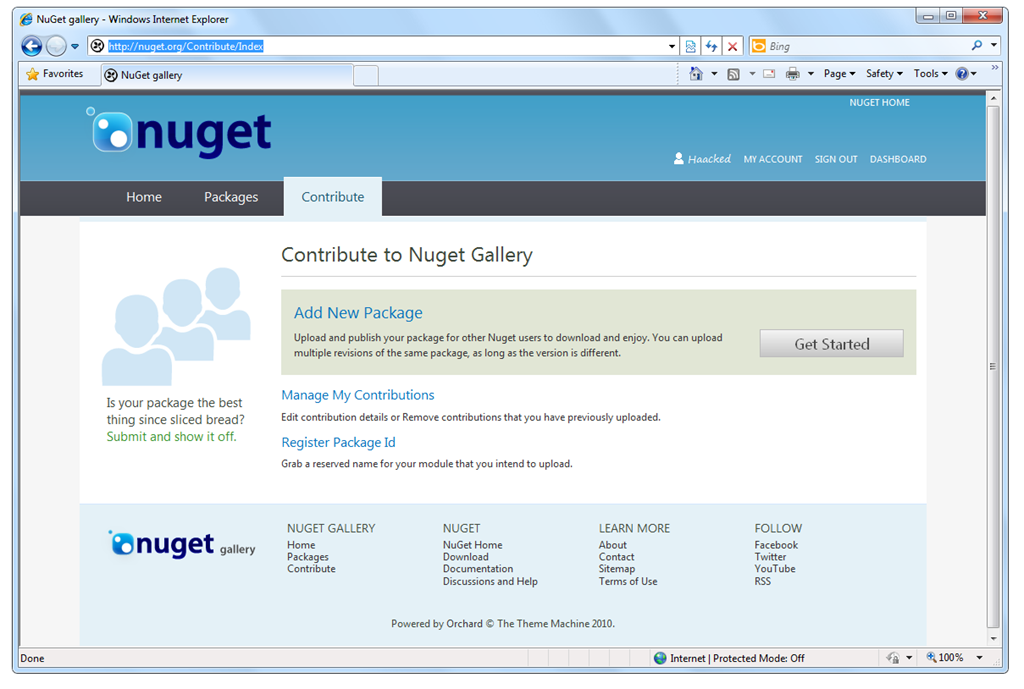
The first step is to register for an account at http://nuget.org/Users/Account/Register. Once you have an account, click on the Contribute tab. This page gives you several options for managing packages (click to enlarge).
contribute-tab

To upload your package, click on the Add New Package link.

upload-package

Notice there’s two options. At this point, you can simply browse for the package you created and upload it and you’re done. In a matter of a few minutes, it should appear in the public feed.

The second option allows you to host your package file in a location other than the NuGet gallery such as CodePlex.com, Google Code, etc. Simply enter the the direct URL to the package and when someone tries to install your package, the NuGet client will redirect the download request to the external package URL.

Submit From The Command Line

Ok, that’s pretty easy. But you’re a command line junky, right? Or perhaps you’re automating package submission.

Well you’re in luck, it’s pretty easy to submit your package directly from the command line. But first, you’re going to need an API key.

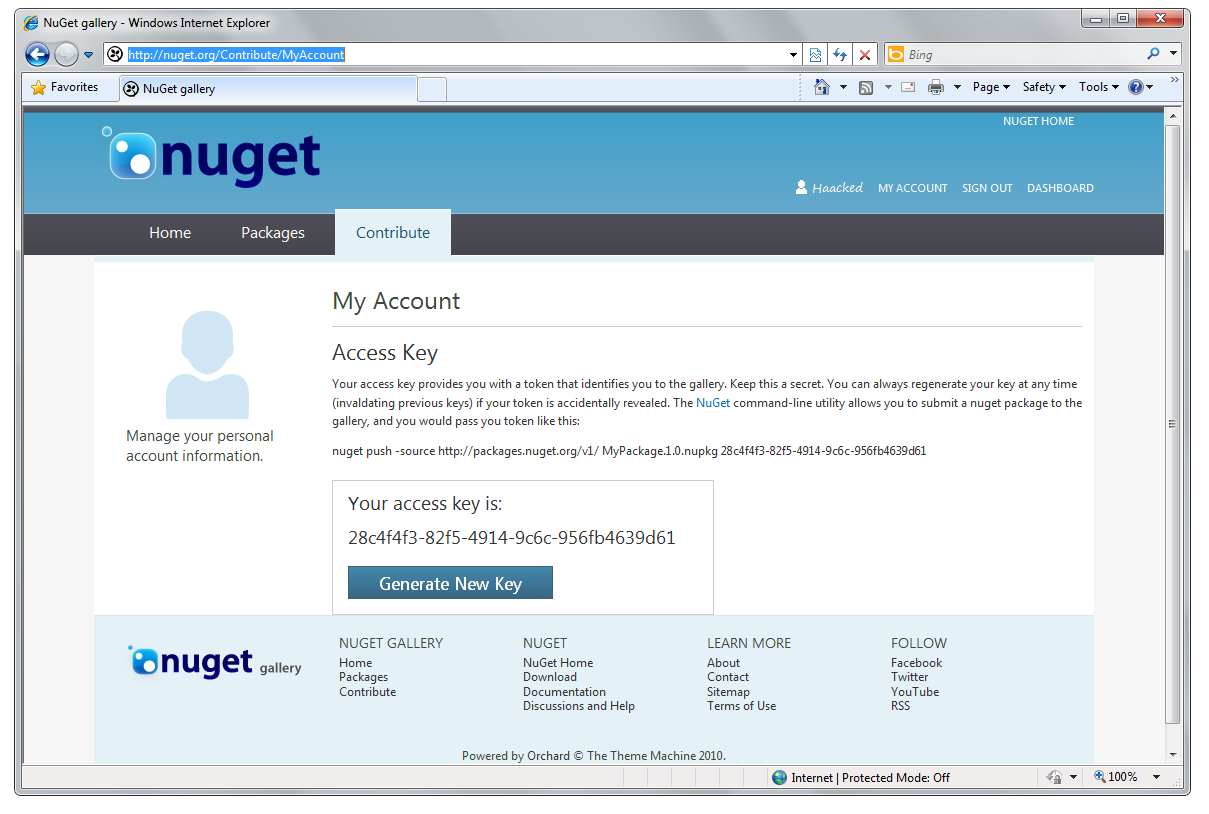
Visit the My Account page (http://nuget.org/Contribute/MyAccount) and make a note of your API key (click image below to enlarge it).
nuget-gallery-api-key

Be sure to keep that API key secret! Don’t give it out like I just did. If you do happen to accidentally leak your API key, you can click the Generate New Key button, again like I just did. You didn’t really think I’d let you know my API key, did you?

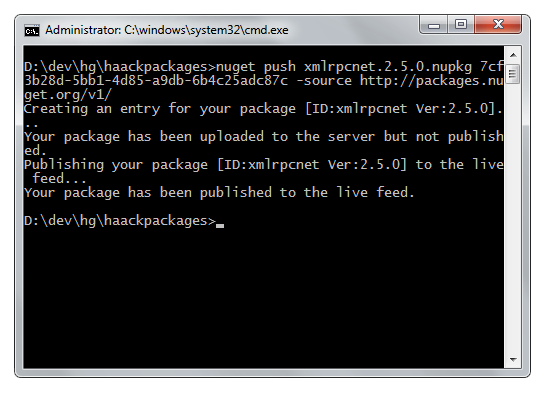
Now, using the same NuGet.exe command line tool we downloaded earlier, we can push the package to the gallery using the nuget push command.

nuget push path-to-nupkg api-key –source http://packages.nuget.org/v1/

Here’s a screenshot of the exact command I ran.
publishing-nupkg

Shoot! There I go showing off my secret API key again! I better regenerate that.

As you can see, this command uploaded my package and published it to the feed. I can login and visit the Manage My Contributions page to see this package and even make changes to it if necessary.

Moving Forward

We’re still working out the kinks in the site and hopefully, by the time you read this blog post, this particular issue will be fixed. Also, we’re planning to update the NuGet.exe client and make the NuGet gallery be the default source so that the –source flag is not required.

As David mentioned, the site was primarily developed as a CodePlex.com project by the Nimble Pros in a very short amount of time. There’s two major components to the site. There’s the front-end Orchard Gallery built as an Orchard module. This powers the gallery website that you see when you visit http://nuget.org/. There’s also the back-end gallery server which hosts the OData feed used to browse and search for packages as well as the WCF service endpoint for publishing packages.

Each of these components are open source projects which means if you really wanted to, you could take the code and host your own gallery website. Orchard will be using the same code to host its own gallery of Orchard modules.

Also, these projects accept contributions! I personally haven’t spent much time in the code, but I hope to find some free time to chip in myself.

What others have said

Requesting Gravatar... ulu Jan 11, 2011 6:05 PM
# re: Uploading Packages To The NuGet Gallery
You know, I really believed you gave out your secret API key.
Requesting Gravatar... Andrew Davey Jan 11, 2011 8:39 PM
# re: Uploading Packages To The NuGet Gallery
I created an account, followed the emailed activation link. But whenever I log on it just returns me back to the log on page, no error message is displayed.

Who do I need to tell about this?
I have a package I'm keen to get online.
Requesting Gravatar... Khalid Abuhakmeh Jan 11, 2011 9:19 PM
# re: Uploading Packages To The NuGet Gallery
Wow, you aren't kidding when you say the site is still in Beta. I would even say Alpha at this point. All the links at the bottom seem to be broken, I can't login after registering, there is no confirmation when registering, and it says "Orchard Gallery" a couple of places. Otherwise it looks great.

Anything I can do to help make the site better?
Requesting Gravatar... Andrey Shchekin Jan 11, 2011 9:50 PM
# re: Uploading Packages To The NuGet Gallery
Great, but the license question (http://galleryserver.codeplex.com/workitem/2) is still unresolved.

Now could you tell me whether I can use, for example, nuget.org/.../Adam-JSGenerator-1-1-0-0 in a commercial project?

Well, I can always hunt the author of each specific package or just not care about licensing, but is it good for anyone?
Requesting Gravatar... Fernando Nomellini Jan 11, 2011 10:01 PM
# re: Uploading Packages To The NuGet Gallery
Can you tell me what is the port that NuGet uses ? And what is the protocol ? My company's firewall is blocking my access this feature, so I can not get any package... :-(

Requesting Gravatar... Joel Martinez Jan 11, 2011 10:32 PM
# re: Uploading Packages To The NuGet Gallery
you know, "haackpackages" seems redundant, you should just name your directory "haackages" ;-)
Requesting Gravatar... Chris Patterson Jan 11, 2011 10:45 PM
# re: Uploading Packages To The NuGet Gallery
If the term "HaackPackage" catches on, wow, that would make for some interesting side discussions.
Requesting Gravatar... haacked Jan 12, 2011 1:48 AM
# re: Uploading Packages To The NuGet Gallery
For those of you having login problems, please read David's announcement. We currently are manually approving accounts during this pre-launch phase.

@Andrey we recommend package authors specify a license. I'm not sure if we require it. Is your suggestion that we require it? For now, you will need to hunt them down.

@Fernando port 80. It's all HTTP.

@Joel interesting. ;)
Requesting Gravatar... Andrey Shchekin Jan 12, 2011 8:12 AM
# re: Uploading Packages To The NuGet Gallery
@haacked I suggest you require it. Obviously, I can hunt authors (though it is much more inconvenient for me to find ways to contact author than for author to provide a license).

However this is step backwards from most places I got binaries before (Google Code/CodePlex/SourceForge), since in *all* of them license is mandatory.

Also, there are ton of developers who will not do the hunt and either ignore the package out of fear for unknown licensing or just use without caring about a license (which in the case of GPL in commercial project may be a critical problem later on, if unnoticed in time).

Final point is that if license is mandatory, it is possible to automatically prove licensing correctness for a used set of packages, which nicely solves the unnoticed GPL problem.
Requesting Gravatar... haacked Jan 12, 2011 1:27 PM
# re: Uploading Packages To The NuGet Gallery
@Andrey I logged a bug against the Orchard Gallery here with your suggestion.
Requesting Gravatar... Andrey Shchekin Jan 12, 2011 8:26 PM
# re: Uploading Packages To The NuGet Gallery
Thanks, resolving this would be great.

It is somewhat amusing that now there are 3 issues about that:
1. http://nuget.codeplex.com/workitem/363 (Closed/Moved)
2. http://galleryserver.codeplex.com/workitem/2 (Open, 4 votes)
3. http://orchardgallery.codeplex.com/workitem/164 (New one)
Requesting Gravatar... Doug Finke Jan 12, 2011 9:48 PM
# re: Uploading Packages To The NuGet Gallery
PowerShell Pro Tip:

Here is the PowerShell version to run the nuget pack command on every subdirectory of the current directory.

dir . -r *.nuspec | % { nuget pack $_.fullname -o d:\packages\ }
Requesting Gravatar... Adam Jan 14, 2011 3:26 AM
# re: Uploading Packages To The NuGet Gallery
Phil,

I get how to express NuGet dependencies on other NuGet packages and how to include assembly reference like you did above with the Xml RPC library. But how do I express dependencies on assemblies that I don't own (that may already be on the user's machine). For instance, if I wanted my NuGet package to add a reference to WebMatrix.WebData.dll, how I can express that dependency in my NuGet package without having to include that assembly in my lib folder of my NuGet package?

Thanks in advance!
Requesting Gravatar... haacked Jan 29, 2011 11:40 AM
# re: Uploading Packages To The NuGet Gallery
@Adam we don't have a clear way to do that, but we're working on it.
Requesting Gravatar... Shane Whittet Mar 15, 2011 5:06 AM
# Call for Oracle Entity Framework (currently in beta)
Call for submission by Oracle of a NuGet package that provides a bin deployable/web.config package. Otherwise, anyone with the correct steps to xcopy deploy this beta, please let me know!
Requesting Gravatar... Sergi Apr 29, 2011 1:21 AM
# re: Uploading Packages To The NuGet Gallery
Hi Phil,

great stuff!! We are changing all our local libraries to a new Nuget repository in our intranet. This will make our lives much easier...

I have one question for you: with the last nuget version, you can use metadata from AssemblyInfo.cs, so instead of doing "nuget pack project.nuspec", you can do "nuget pack project.csproj".

I've seen your batch file doing:
for /r %%x in (*.nuspec) do nuget pack "%%x" -o d:\packages\

but I would like to do something like
for /r %%x in (*.nuspec) do nuget pack "%%x.csproj" -o d:\packages\

I mean, foreach .nuspec file, pack the corresponding .csproj file.

I haven't achieved that. Instead, my batch file has one entry per project, which is not so cool and not reusable... Any ideas? I'm not really an expert with .cmd files...

Thanks again!
Sergi
Requesting Gravatar... haacked May 03, 2011 2:02 PM
# re: Uploading Packages To The NuGet Gallery
Perhaps change it to:


for /r %%x in (*.csproj) do nuget pack "%%x" -o d:\packages\


Requesting Gravatar... Sergi May 03, 2011 4:02 PM
# re: Uploading Packages To The NuGet Gallery
Hi Phil,

Thanks for your reply. I cannot do that as I have some .csproj which will not become a Nuget package, so looking for all the .nuspec files is just what I need, but want to use the .csproj file as the input parameter.

Another question would be: if the .nuspec file has those replacement tokens (%id%, ...) to get the metadata from the project, would packaging the .nuspec file instead of the .csproj file have the same effect?

Thanks again,
Sergi
Requesting Gravatar... haacked May 05, 2011 12:40 AM
# re: Uploading Packages To The NuGet Gallery
Hi Sergi. I see. You want to grab all the .csproj files in a directory that also contains a .nuspec. That's beyond my CMD knowledge. Perhaps try using PowerShell. :)
Requesting Gravatar... Sergi May 05, 2011 7:32 AM
# re: Uploading Packages To The NuGet Gallery
That's it, Phil. I'll take a look with PS. Thanks anyway!

What do you have to say?

(will show your gravatar)
Please add 4 and 6 and type the answer here: