Installing ASP.NET MVC 2 RC 2 on Visual Studio 2010 RC

As many of you have probably heard, the release candidate for Visual Studio 2010 was recently released containing immense performance improvements and tons of bug fixes.

Another thing that release contains is the release candidate for ASP.NET MVC 2. However, that release is not the latest release of ASP.NET MVC 2 as we recently released a second release candidate for ASP.NET MVC 2 in response to customer feedback.

I apologize for the confusion this may have caused, but we really felt it was important to have another release candidate for ASP.NET MVC to help verify that we were responding to feedback in the correct manner.

If you wish to have Visual Studio 2010 RC and ASP.NET MVC 2 RC 2 installed at the same time, it’s not a problem.

If you installed ASP.NET MVC 2 RC 2 Before installing VS 2010 RC

Believe it or not, you’re all set if you install them in this order.

When installing VS 2010 RC, the installation will detect that a newer version of the ASP.NET MVC runtime (aka the System.Web.Mvc assembly) is already installed and will not overwrite it with the older version included with VS 2010 RC.

Keep in mind that the project templates for VS 2010 will still be the slightly older ASP.NET MVC 2 RC project templates and not the RC 2 templates. Fortunately those templates haven’t changed too much between release candidates.

In this configuration, when you create a project using VS 2010 RC, even though the templates may be slightly older, the project will reference the newer System.Web.Mvc assembly.

If you are installing ASP.NET MVC 2 RC 2 After installing VS 2010 RC

In this case, there’s a tiny bit of work to do. The installer for ASP.NET MVC 2 RC 2 will block if an older version of the ASP.NET MVC 2 runtime is installed.

To remedy the situation, all you need to do is uninstall the ASP.NET MVC 2 runtime. In Add/Remove Programs dialog (also known as the Program and features dialog), this would be the entry named “Microsoft ASP.NET MVC 2”.

If you have an older version of MVC tooling/project templates for Visual Studio 2008 installed (named “Microsoft ASP.NET MVC 2 – Visual Studio 2008 Tools”), you’ll also need to uninstall that, but do not uninstall the MVC tooling for VS 2010.
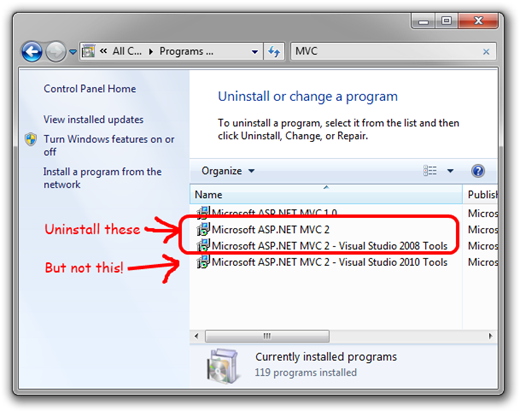
add-remove-dialog 

At this point, you should only have Microsoft ASP.NET MVC 2 – Visual Studio Tools for VS 2010 installed. You may now run the installer for ASP.NET MVC 2 RC 2, which will put the runtime on your machine as well as tooling/project templates for VS 2008.

Hopefully this clears up some of the confusion and gets you going with VS 2010 RC and ASP.NET MVC 2 RC 2.

What others have said

Requesting Gravatar... Martin Aatmaa Feb 10, 2010 11:46 PM
# re: Installing ASP.NET MVC 2 RC 2 on Visual Studio 2010 RC
Great!

Thank you Phil for the clarification.

Congratulations on both releases! They are both solid products and are a pleasure to work with.
Requesting Gravatar... Guillermo Guerini Feb 10, 2010 11:47 PM
# re: Installing ASP.NET MVC 2 RC 2 on Visual Studio 2010 RC
Can I still use MVC 1 with VS2010 RC?
Requesting Gravatar... Shaharyar Feb 11, 2010 2:45 AM
# re: Installing ASP.NET MVC 2 RC 2 on Visual Studio 2010 RC
Thanks Phil, this helped!

But what is with the new JQuery 1.4 support?

How can we enable / add it to our Visual Studio 2010 Project Templates?
Requesting Gravatar... wasserbetten freiburg Feb 11, 2010 6:22 AM
# re: Installing ASP.NET MVC 2 RC 2 on Visual Studio 2010 RC
i have no problem with visual studio.
Requesting Gravatar... Sam Pearson Feb 11, 2010 7:45 AM
# re: Installing ASP.NET MVC 2 RC 2 on Visual Studio 2010 RC
I just have one thing to say about this post.

AWWWWWWWWWWWWWWWWWWWWWWWWWWWWWWWWWWWWWW YEEEEEEEEEEEEEEAAAAAAAAAAAAAAAHHHHHHHHHHHHHH!!!
Requesting Gravatar... Kesav Kolla Feb 11, 2010 8:07 AM
# re: Installing ASP.NET MVC 2 RC 2 on Visual Studio 2010 RC
By mistake I uninstalled ASP.NET MVC2 Visual Studio 2010 tools. Is there any way to get back the 2010 tool support again?

Thanks
Requesting Gravatar... haacked Feb 11, 2010 9:02 AM
# re: Installing ASP.NET MVC 2 RC 2 on Visual Studio 2010 RC
@Guillermo unfortunately no. However, VS 2010 RTM will include an automatic upgrader for MVC 1.0 apps.

For now, the lead dev for ASP.NET MVC posted a tool you can try out (at your own risk) that can upgrade an MVC 1.0 app to 2.0 so it can be opened in VS 2010.
Requesting Gravatar... haacked Feb 11, 2010 9:04 AM
# re: Installing ASP.NET MVC 2 RC 2 on Visual Studio 2010 RC
@Kesav you'll need to go to Add/Remove Programs (or Features and Programs) and uninstall the web component of VS 2010 RC (you don't have to uninstall *all* of VS 2010) and then reinstall the web component.
Requesting Gravatar... Nick Feb 11, 2010 11:26 AM
# re: Installing ASP.NET MVC 2 RC 2 on Visual Studio 2010 RC
Yeah, I did the same thing. I uninstalled the tools support for MVC2 in VS2010. A repair install did not bring the tools support back, but I'll try to remove and re-add the web component of the VS2010 install and see if that works.
Requesting Gravatar... Dragan Panjkov Feb 11, 2010 12:49 PM
# re: Installing ASP.NET MVC 2 RC 2 on Visual Studio 2010 RC
@Nick you could try to run <dvd>\WCU\ASPNETMVC\VS2010ToolsMVC2.msi installer for tools.
Requesting Gravatar... Dragan Panjkov Feb 11, 2010 12:51 PM
# re: Installing ASP.NET MVC 2 RC 2 on Visual Studio 2010 RC
Is it necessary to remove VS 2008 Tools for proper behaviour of 2010 tools?
Requesting Gravatar... haacked Feb 11, 2010 7:06 PM
# re: Installing ASP.NET MVC 2 RC 2 on Visual Studio 2010 RC
@Dragan, no it is not necessary to remove VS 2008. That step is only for those about to install ASP.NET MVC 2 RC 2 since that installer will install the tools for VS 2008.
Requesting Gravatar... Gene Feb 11, 2010 8:10 PM
# re: Installing ASP.NET MVC 2 RC 2 on Visual Studio 2010 RC
OK, maybe I'm dense, but I'm not any less confused, so just to clarify: Does MVC 2 RC2 work with Visual studio 2010 RC?

I have uninstalled VS 2008 so I don't want to uninstall the MVC 2 RC1 (or whatever is installed with VS 2010 RC) if MVC 2 RC2 doesn't work with VS 2010.

Requesting Gravatar... Jeff Putz Feb 11, 2010 10:28 PM
# re: Installing ASP.NET MVC 2 RC 2 on Visual Studio 2010 RC
I've got a new problem. I opened an MVC RC2 project originally from VS2008 and for some reasons the basic HTML helpers are throwing an error because I don't have a reference to the v3.5 System.Web.Routing assembly. If I'm targeting v4, that's all broken. Is there a way to remedy that?
Requesting Gravatar... haacked Feb 11, 2010 10:57 PM
# re: Installing ASP.NET MVC 2 RC 2 on Visual Studio 2010 RC
@Gene Yes, MVC 2 RC 2 will work with VS 2010 RC. The caveat is that VS2010 won't magically have the latest project templates for MVC 2 RC 2. So when creating a project in VS2010, you'll have the MVC 2 RC project templates, but using the MVC 2 RC 2 runtime assembly.
Requesting Gravatar... tjukic Feb 11, 2010 11:49 PM
# re: Installing ASP.NET MVC 2 RC 2 on Visual Studio 2010 RC
What are the changes in those templates?
If by templates you mean .tt then we could just replace VS2010RC templates with those from the MVC2RC2, right?
Requesting Gravatar... Eduardo Mendes those Feb 12, 2010 2:39 AM
# re: Installing ASP.NET MVC 2 RC 2 on Visual Studio 2010 RC
I dont have any problem with visual studio and MVC, works fine! Nice Post!
Requesting Gravatar... Harish Ranganathan Feb 12, 2010 4:59 AM
# re: Installing ASP.NET MVC 2 RC 2 on Visual Studio 2010 RC
Phil, a small suggestion. It would be easy if you mention the minor version number and build number as well so that one can check after following the instructions, in the add/remove programs.

From my observation, I found the following (after following your steps :) - you can verify if its correct for me as well)
Microsoft ASP.NET MVC 2.0.50129.0
Microsoft ASP.NET MVC 2 - Visual Studio 2008 Tools 2.0.50129.0
Microsoft ASP.NET MVC 2 - Visual Studio 2010 Tools 2.0.41211.0
Microsoft ASP.NET MVC 2 - VWD Express 2008 Tools 2.0.50129.0

Thanks,
Harish
Requesting Gravatar... haacked Feb 12, 2010 1:00 PM
# re: Installing ASP.NET MVC 2 RC 2 on Visual Studio 2010 RC
@tjukic Not just .tt, but the project template. That's the contents of the default site that gets created when you select File | New | ASP.NET MVC 2 Project.

@Harish I will next time, thanks.
Requesting Gravatar... Gabriel Susai Feb 19, 2010 8:53 AM
# re: Installing ASP.NET MVC 2 RC 2 on Visual Studio 2010 RC
Phil, I just followed the steps, but couldn't find any project templates for MVC2.

I have both of these on "Programs and Features"
Microsoft ASP.NET MVC2 - Visual Studio 2010 tools
Microsoft ASP.NET MVC2

Any help appreciated.


Requesting Gravatar... D. Lambert Feb 19, 2010 10:02 AM
# re: Installing ASP.NET MVC 2 RC 2 on Visual Studio 2010 RC
I'm still having trouble trying to get this to work. I followed the steps here, and was still seeing problems, so I tried the steps on Ali Bastani's blog next. I'm still seeing the same behavior:

When I try to create a new MVC 2 project, I see entries for ASP.Net MVC 2 Web Application and ASP.Net MVC 2 Empty Web Application, and when I choose them, they appear to start creating the files (I'm prompted if I want to create a unit test project, for instance), but then I see the following error:

"The project file '<path to temp dir>\rfhjrrfd.3ui\Temp\MvcApplication1.csproj' cannot be opened. The project type is not supported by this installation."

Obviously the temp folder name is different each time. The most recent time I saw this, I tried navigating to that location to see what, exactly, was being written there, and I was surprised to see that nothing at all was being written there. I haven't yet gone as far as loading up any sysinternals tools to see if they can see a file error of some sort.

I also left a similar comment on Ali's blog.

Thanks for any clues you might be able to throw my way.
Requesting Gravatar... ali62b Feb 19, 2010 10:51 AM
# re: Installing ASP.NET MVC 2 RC 2 on Visual Studio 2010 RC
@D. Lambert :I updated my blog you may take a look and see if the problem will fix.
Requesting Gravatar... D. Lambert Feb 19, 2010 2:13 PM
# re: Installing ASP.NET MVC 2 RC 2 on Visual Studio 2010 RC
Ali - thanks - I responded on your blog. I'm all set now.
Requesting Gravatar... Steve Mar 03, 2010 5:25 PM
# re: Installing ASP.NET MVC 2 RC 2 on Visual Studio 2010 RC
"@Guillermo unfortunately no. However, VS 2010 RTM will include an automatic upgrader for MVC 1.0 apps. "

Great, thanks for looking out for us early adopters :)

I need a comprehension package that includes MVCContrib + Futures + asp.net mvc 2.0 :)
Requesting Gravatar... SEOINKÖLN Mar 09, 2010 2:53 AM
# re: Installing ASP.NET MVC 2 RC 2 on Visual Studio 2010 RC
hat mir sehr gefalen
Requesting Gravatar... AGRITURISMO Mar 09, 2010 2:59 AM
# re: Installing ASP.NET MVC 2 RC 2 on Visual Studio 2010 RC
is ok :) thx
Requesting Gravatar... Christian Metz Mar 11, 2010 11:41 PM
# re: Installing ASP.NET MVC 2 RC 2 on Visual Studio 2010 RC
I just tryed to install MVC 2 Final onto my machine with Visual Studio 2010.
I follow the steps above to uninstall old versions of MVC 2.
During the installation of the final version i recieve an error "Please uninstall the MS VS Tools component for MVC before uninstalling MS ASP.NET MVC 1.1"
I do have MVC 1.0 and also MVC 1.1 runtime install on this machine.
To uninstall MVC 1.1 I would have to uninstall the Tools, too, what I didnt wanted.
Therefore I unpacked the AspNetMVC2_VS2008.exe installed the Tool with the installer and added the System.Web.Mvc.dll (which can be extracted with msiexec /a command) manually (better with gacutil) into the GAC.
Now everything look fine for the moment. I just do not have an entry in my programs and features for MS ASP.NET MVC 2.0, but I can work normally within VS.

Is there a better way to fix this or what should I do with old MVC 1.1 runtime?
Requesting Gravatar... haacked Mar 12, 2010 10:00 AM
# re: Installing ASP.NET MVC 2 RC 2 on Visual Studio 2010 RC
@Christian uninstall MVC 1.1. That was a one-off we put out there on CodePlex and probably shouldn't have been released.
Requesting Gravatar... Johnson Mar 14, 2010 9:52 AM
# re: Installing ASP.NET MVC 2 RC 2 on Visual Studio 2010 RC
What's the name of the "web component" in Add/Remove Programs to uninstall if I've mistakenly uninstalled ASP.Net MVC 2 - Visual Studio 2010 Tools? Thanks!
Requesting Gravatar... Heiko Veit Apr 18, 2010 5:02 PM
# re: Installing ASP.NET MVC 2 RC 2 on Visual Studio 2010 RC
Visual Studio 2010 is the best software
Requesting Gravatar... Heiko May 13, 2010 5:31 AM
# re: Installing ASP.NET MVC 2 RC 2 on Visual Studio 2010 RC
i have no problem with visual studio and i Work every day with visual studio
Requesting Gravatar... daniel May 18, 2010 5:33 AM
# re: Installing ASP.NET MVC 2 RC 2 on Visual Studio 2010 RC
Hat mir sehr gut gefallen.
Requesting Gravatar... oliver Jun 03, 2010 4:48 AM
# re: Installing ASP.NET MVC 2 RC 2 on Visual Studio 2010 RC
I work every day with ASP and im very lucky

What do you have to say?

(will show your gravatar)
Please add 6 and 1 and type the answer here: