How the IIS SEO Toolkit Saved My Butt

Ok, it wasn’t necessarily my ass that was saved, but it was years worth of images which were important to me!

As I wrote yesterday, my blog’s hosting server had a hard-drive failure effectively wiping out my virtual machine, taking my blog down with it. Fortunately, I was able to get back up with a static archive of my site provided by Rich Skrenta, but I was missing all my images and other content (code samples).

As Jeff mentions,

I have learned the hard way that there are almost no organizations spidering and storing images on the web.

Keep in mind that the images are not just mere eye candy. In many cases, they serve to illustrate key concepts: “As you can see in the screenshot above, if the screenshot were still to exist, but through the sheer ineptitude of Phil you’ll have to guess at the knowledge it would have conveyed.

As I was lamenting the loss of these files, I started poking around my browser cache (finding this great tool for exporting the Google Chrome cache by the way which can retain directory structure) looking for stray images.

I then started thinking about alternative tools that might cache web content such as a client RSS reader, etc. Then it occurred to me, didn’t I run the IIS SEO Toolkit against my site recently (click to enlarge)?
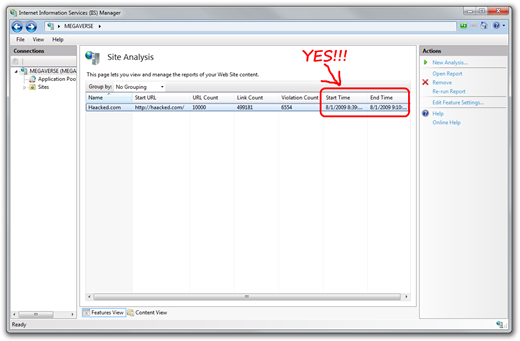
SEO Toolkit ScreenshotThe first time I saw the SEO Toolkit was when Carlos Aguilar gave me a demo a long while ago. Back then it was just something he put together over the weekend. As soon as I saw it I begged him (quite annoyingly I must say) to let me have a private build to try out. Eventually it was released and I was able to run it against Haacked.com to see how much I sucked.

Well it’s a good thing I ran it back in August! This tool stores a local cache of images. Oddly enough, it appends a .txt extension to every cached file.

cached-images No worries! Using a bit of DOS command magic, I was able to strip off the .txt extension from every file (note I ran this from the command line. If you put this in a batch file, you’ll need to double up on the % character).

for /r %x in (*.c) do ren "%x" "%~nx"

That stripped off the extensions. Afterwards I uploaded the images and am now only missing images for 18 blog posts, the posts written in August, September, and October of 2009. Those shouldn’t be too hard to recreate manually (though if you happen to have those images in your browser or RSS cache, I do appreciate you sending them to me! My email at Microsoft is philha)

Looks like I caught a lucky break this time in finding and leveraging the previously undocumented “Back up a website for dummies” feature in the IIS SEO Toolkit. Carlos, I owe you one! :)

UPDATE: If you were wondering why the cached files were stored with a .txt extension appended, Carlos revealed the mystery to me in an email.

Oh I forgot to explain that silly thing we do with file extensions is a “naïve-silly attempt” to reduce the accident of double-clicking a javascript, exe, or let the shell try to display ‘malign image’ that might come from external sites. Since in theory we consider that a ‘private’ cache we decided to do this silly trick to prevent any funky games with somebody generating an ‘brittney-spears-nude-picture.jpg.exe’ with the icon of a JPG file that lured someone into running it.

Agreed its pretty silly, but it was a simple ‘cheesy security feature’ easy to add for our ‘hidden cache’.

Basically it helps protect the double-click happy folks out there from hurting themselves accidentally.

What others have said

Requesting Gravatar... Klaus Graefensteiner Dec 14, 2009 11:23 PM
# re: How the IIS SEO Toolkit Saved My Butt
Restoring a backup works as well.:-)
Requesting Gravatar... Ian Roke Dec 15, 2009 1:01 AM
# re: How the IIS SEO Toolkit Saved My Butt
I am so glad you were able to restore your blog and being so open about what you have had to go through this past week.

I am certainly more assiduous with my backup strategy thanks to the troubles you have gone through.
Requesting Gravatar... Andrei Ignat Dec 15, 2009 1:06 AM
# re: How the IIS SEO Toolkit Saved My Butt
It's a imaginative use for IIS SEO Toolkit.
But - did you think now about backup the data by ftp (such as, with filezilla command line ?)
Requesting Gravatar... DevCowbiy Dec 15, 2009 5:17 AM
# re: How the IIS SEO Toolkit Saved My Butt
The below does command would've word
rename *.txt *.
Requesting Gravatar... Ruddy Santos Dec 15, 2009 7:43 AM
# re: How the IIS SEO Toolkit Saved My Butt
Just sent you all the old postings I had
from Outlook.

Ruddy
Requesting Gravatar... Steve Nutt Dec 15, 2009 7:57 AM
# re: How the IIS SEO Toolkit Saved My Butt
Great post but you did not include a link to the IIS SEO Toolkit - which interests me. Does it help you optimize pages that are protected by Forms Authentication ?
Requesting Gravatar... haacked Dec 15, 2009 10:25 AM
# re: How the IIS SEO Toolkit Saved My Butt
@DevCowBoy I didn't think that would work recursively.
Requesting Gravatar... haacked Dec 15, 2009 10:27 AM
# re: How the IIS SEO Toolkit Saved My Butt
@Steve Nutt, Doh! I updated the post with the link. I also added a bit more detail on why they append the .txt suffix.
Requesting Gravatar... CarlosAg Dec 15, 2009 10:33 AM
# re: How the IIS SEO Toolkit Saved My Butt
Here is the link to get the SEO Toolkit in case you are interested: http://www.iis.net/expand/SEOToolkit
Requesting Gravatar... Jonas Stawski Dec 15, 2009 10:34 AM
# re: How the IIS SEO Toolkit Saved My Butt
"DOS Command magic"?!?!?!?! Dude, where's your Microsoft in you? You need to advocate PowerShell...
Requesting Gravatar... Matt Dec 15, 2009 11:09 AM
# re: How the IIS SEO Toolkit Saved My Butt
I have to agree with Jonas, I'm disappointed you didn't use powershell. DOS command windows are for losers.
Requesting Gravatar... Carlos Dec 15, 2009 11:45 AM
# re: How the IIS SEO Toolkit Saved My Butt
I was going to suggest this: http://web.archive.org/web/*/http://haacked.com but because of their updates policy the content is not going to be there YET.

Carlos
Requesting Gravatar... wife Dec 15, 2009 1:37 PM
# re: How the IIS SEO Toolkit Saved My Butt
THANK GOODNESS! It's been a bit tense on the home front these days! ; )
Requesting Gravatar... Gary Cox Dec 15, 2009 1:43 PM
# re: How the IIS SEO Toolkit Saved My Butt
I would just like to regurgitate your header "You've been Haacked and you like it"!! A successful backup is a restoreable backup. Lessons learned and we all move on; hopefully not making that mistake again.
Requesting Gravatar... haacked Dec 15, 2009 3:30 PM
# re: How the IIS SEO Toolkit Saved My Butt
@Jonas ok, what's the command in Powershell then?
Requesting Gravatar... BCS Dec 15, 2009 4:39 PM
# re: How the IIS SEO Toolkit Saved My Butt
I seem to have some of the images in my FF cache. What's still missing?
Requesting Gravatar... haacked Dec 15, 2009 5:04 PM
# re: How the IIS SEO Toolkit Saved My Butt
@BCS Images from my posts in October.
Requesting Gravatar... rohn smith Dec 16, 2009 3:32 AM
# re: How the IIS SEO Toolkit Saved My Butt
Hi it is realy remarkeble moment for you so yo can get your blog back.
Requesting Gravatar... Mike Portson Dec 16, 2009 4:53 AM
# re: How the IIS SEO Toolkit Saved My Butt
This SEO toolkit looks like something that really could be handy, but is it necessary? I have a problem with that - there are so many programs, tools, applications, add-ons etc, that sometimes I don't know what should I use and what shouldn't I use to make my web presence, my traffic and my earnings better.
Requesting Gravatar... double_deuce Dec 16, 2009 7:23 AM
# re: How the IIS SEO Toolkit Saved My Butt
wow, you should play lotto.
I have had nightmares like this realizing that the ISP backups are as good as no backup since the formats are usually obscure or loose structure.
Requesting Gravatar... IT support kent Mar 15, 2010 1:50 AM
# re: How the IIS SEO Toolkit Saved My Butt
Thanks for providing such useful information. I really appreciate your professional approach.
Requesting Gravatar... Business Network Kent Mar 15, 2010 1:55 AM
# re: How the IIS SEO Toolkit Saved My Butt
Me and my friend were arguing about an issue similar to this! Now I know that I was right. ! Thanks for the information you post.

What do you have to say?

(will show your gravatar)
Please add 1 and 6 and type the answer here: