ASP.NET MVC 2 Custom Validation

UPDATE: I’ve updated this post to cover changes to client validation made in ASP.NET MVC 2 RC 2.

This is the third post in my series ASP.NET MVC 2 Beta and its new features.

  1. ASP.NET MVC 2 Beta Released (Release Announcement)
  2. Html.RenderAction and Html.Action
  3. ASP.NET MVC 2 Custom Validation

In this post I will cover validation.

storage.canoe No, not that kind of validation, though I do think you’re good enough, you’re smart enough, and doggone it, people like you.

Rather, I want to cover building a custom validation attribute using the base classes available in System.ComponentModel.DataAnnotations. ASP.NET MVC 2 has built-in support for data annotation validation attributes for doing validation on a server. For details on how data annotations work with ASP.NET MVC 2, check out Brad’s blog post.

But I won’t stop there. I’ll then cover how to hook into ASP.NET MVC 2’s client validation extensibility so you can have validation logic run as JavaScript on the client.

Finally I will cover some of changes we still want to make for the release candidate.

Of course, the first thing I need is a contrived scenario. Due to my lack of imagination, I’ll build a PriceAttribute that validates that a value is greater than the specified price and that it ends in 99 cents. Thus $20.00 is not valid, but $19.99 is valid.

Here’s the code for the attribute:

public class PriceAttribute : ValidationAttribute {
  public double MinPrice { get; set; }
    
  public override bool IsValid(object value) {
    if (value == null) {
      return true;
    }
    var price = (double)value;
    if (price < MinPrice) {
      return false;
    }
    double cents = price - Math.Truncate(price);
    if(cents < 0.99 || cents >= 0.995) {
      return false;
    }
       
    return true;
  }
}

Notice that if the value is null, we return true. This attribute is not intended to validate required fields. I’ll defer to the RequiredAttribute to validate whether the value is required or not. This allows me to place this attribute on an optional value and not have it show an error when the user leaves the field blank.

We can test this out quickly by creating a view model and applying this attribute to the model. Here’s an example of the model.

public class ProductViewModel {
  [Price(MinPrice = 1.99)]
  public double Price { get; set; }

  [Required]
  public string Title { get; set; }
}

And let’s quickly write a view (Index.aspx) that will display an edit form which we can use to edit the product.

<%@ Page Language="C#" Inherits="ViewPage<ProductViewModel>" %>

<% using (Html.BeginForm()) { %>

  <%= Html.TextBoxFor(m => m.Title) %>
    <%= Html.ValidationMessageFor(m => m.Title) %>
  <%= Html.TextBoxFor(m => m.Price) %>
    <%= Html.ValidationMessageFor(m => m.Price) %>
    
    <input type="submit" />
<% } %>
   

Now we just need a controller with two actions, one which will render the edit view and the other which will receive the posted ProductViewModel. For the sake of demonstration, these methods are exceedingly simple and don’t do anything useful really.

[HandleError]
public class HomeController : Controller {
  public ActionResult Index() {
    return View();
  }

  [HttpPost]
  public ActionResult Index(ProductViewModel model) {
    return View(model);
  }
}

We haven’t enabled client validation yet, but let’s see what happens when we view this page and try to submit some values.
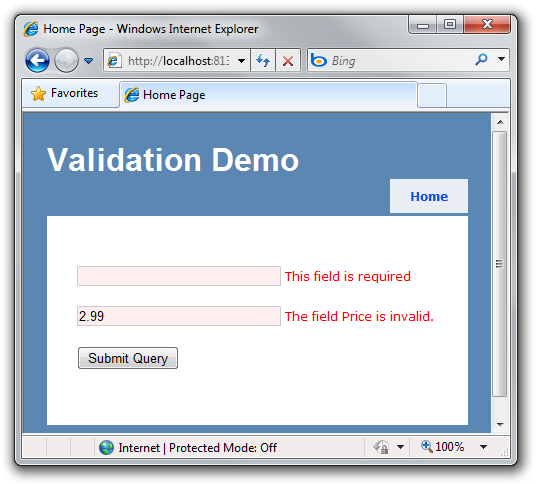
price-invalid

As expected, it posts the form to the server and we see the error messages.

Making It Work In The Client

Great, now we have it working on the server, but how do we get this working with client validation?

The first step is to reference the appropriate scripts. In Site.master, I’ve added the following two script references.

<script src="/Scripts/MicrosoftAjax.js" type="text/javascript"></script>
<script src="/Scripts/MicrosoftMvcAjax.js" type="text/javascript"></script>
<script src="/Scripts/MicrosoftMvcValidation.js" type="text/javascript"
></script>

The next step is to enable client validation for the form by calling EnableClientValidation before we call BeginForm. Under the hood, this sets a flag in the new FormContext which lets the BeginForm method know that client validation is enabled. That way, if you set an id for the form, we’ll know which ID to use when hooking up client validation. If you don’t, the form will render one for you.

<%@ Page Language="C#" Inherits="ViewPage<ProductViewModel>" %>

<% Html.EnableClientValidation(); %>
<% using (Html.BeginForm()) { %>

  <%= Html.TextBoxFor(m => m.Title) %>
    <%= Html.ValidationMessageFor(m => m.Title) %>
  <%= Html.TextBoxFor(m => m.Price) %>
    <%= Html.ValidationMessageFor(m => m.Price) %>
    
    <input type="submit" />
<% } %>
   

If you try this now, you’ll notice that the Title field validates on the client, but the Price field doesn’t. We need to take advantage of the validation extensibility available to hook in a client validation function for the price validation attribute we wrote earlier.

The first step is to write a ModelValidator associated with the attribute. Since the attribute is a data annotation, I can simply derive from DataAnnotationsModelValidator<PriceAttribute> like so.

public class PriceValidator : DataAnnotationsModelValidator<PriceAttribute> 
{
  double _minPrice;
  string _message;

  public PriceValidator(ModelMetadata metadata, ControllerContext context
    , PriceAttribute attribute)
    : base(metadata, context, attribute) 
  {
    _minPrice = attribute.MinPrice;
    _message = attribute.ErrorMessage;
  }

  public override IEnumerable<ModelClientValidationRule>
GetClientValidationRules() { var rule = new ModelClientValidationRule { ErrorMessage = _message, ValidationType = "price" }; rule.ValidationParameters.Add("min", _minPrice); return new[] { rule }; } }

The method GetValidationRules returns an array of ModelClientValidationRule instances. Each of these instances represents metadata for a validation rule that is written in JavaScript and will be run in the client. This is purely metadata at this point and the array will get converted into JSON and emitted in the client so that client validation can hook up all the correct rules.

In this case, we only have one rule and we are calling its validation type “price”. This fact will come into play later.

The next step is for us to now register this validator. Since we wrote this as a Data Annotations validator, we can register it in Application_Start as demonstrated by the following code snippet. If you you’re using another model validation provider such as the one for the Enterprise Library’s Validation Block, it might have its own means of registration.

protected void Application_Start() {
  RegisterRoutes(RouteTable.Routes);
  DataAnnotationsModelValidatorProvider
    .RegisterAdapter(typeof(PriceAttribute), typeof(PriceValidator));
}

At this point, we still need to write the actual JavaScript validation logic as well as the hookup to the JSON metadata. For the purposes of this demo, I’ll put the script inline with the view.

<script type="text/javascript">
  Sys.Mvc.ValidatorRegistry.validators["price"] = function(rule) {
    // initialization code can go here.
    var minValue = rule.ValidationParameters["min"];

    // we return the function that actually does the validation 
    return function(value, context) {
      if (value > minValue) {
        var cents = value - Math.floor(value);
        if (cents >= 0.99 && cents < 0.995) {
          return true; /* success */
        }
      }

      return rule.ErrorMessage;
    };
  };
</script>

Now when I run the demo, I can see validation take effect as I tab out of each field. Note that to get the required field validation to fire, you’ll need to type something in the field and then clear it before tabbing out.

Let’s pause for a moment and take a deeper look at what’s going on the code above. At a high level, we’re adding a client validator to a dictionary of validators using the key “price”. You may recall that “price” is the validation type we defined when writing the PriceValidator. That’s how we hook up this client function to the server validation attribute.

You’ll notice that the function we add to the validators itself returns a function which does the actual validation. Why is there this seemingly extra level of indirection? Why not simply add a function that does the validation directly to the dictionary?

This approach allows us to run some initialization code at the time the validator is being hooked up to the metadata (as opposed to every time validation occurs). This is helpful if you have expensive initialization logic. The validate method of the object we return in that initialization method may get called multiple times when the form is being validated.

Notice that in this case, the initialization code grabs the min value from the ValidationParameters dictionary. This is the same dictionary created in the PriceValidator class, but now living on the client.

We then run through similar logic as we did in the server side validation code. The difference here is we return null to indicate that no error occurred and we return an array of error messages if an error occurred.

Validation using jQuery Validation?

Client validation in ASP.NET MVC is meant to be extremely extensible. At the core, we emit some JSON metadata describing what fields to validate and what type of validation to perform. This makes it possible to build adapters which can hook up any client validation library to ASP.NET MVC.

For example, if you’re a fan of using jQuery it’s quite easy to use our adapter to hook up jQuery Validation library to perform client validation.

First, reference the following scripts.

<script src="/Scripts/jquery-1.4.1.js" type="text/javascript"></script>
<script src="/Scripts/jquery.validate.js" type="text/javascript"></script>
<script src="/Scripts/MicrosoftMvcJQueryValidation.js" type="text/javascript">
</script>

When we emit the JSON in the page, we define it as part of an array which we declare inline. If you view source you’ll see something like this (truncated for brevity):

<script type="text/javascript"> 
//<![CDATA[
if (!window.mvcClientValidationMetadata) {
  window.mvcClientValidationMetadata = []; 
}
window.mvcClientValidationMetadata.push({
  {"Fields":[{"FieldName":"Title",...,
    "ValidationRules":
      [{"ErrorMessage":"This field is required",...,
"ValidationType":"required"}]}, ...); //]]> </script>

Note the array named window.mvcClientValidationMetadata.

Simply by referencing the MicrosoftMvcJQueryValidation script, you’ve hooked up jQuery validation to that metadata. Both of the validation adapter scripts look for the existence of the special array and consumes the JSON within the array.

How about a demo?

And before I forget, here’s a demo application demonstrating the attribute described in this post.

What others have said

Requesting Gravatar... andrei ignat Nov 19, 2009 2:24 PM
# re: ASP.NET MVC 2 Custom Validation
awesome
However, dataannotation have a no-use dynamic scenario: for your example, modifying from min 1.99 to 2.99 requires recompiling
Can you post about dynamic validation?
Requesting Gravatar... Phil Nov 19, 2009 3:40 PM
# re: ASP.NET MVC 2 Custom Validation
A scenario I never see is a validator that hits the database to check the name is unique, say if the user is registering and you require a unique username. Anyone know of any good examples for MVC 1 or 2?
Requesting Gravatar... Ali Nov 19, 2009 4:19 PM
# re: ASP.NET MVC 2 Custom Validation
wish we could pass validation logic through parameter (like min value) and don't duplicate this codes in client JS .
if there was a converter to convert validation logic we wrote in Attribute ( double cents = price - Math.Truncate(price);
if(cents < 0.99 || cents >= 0.995) {
return false;
}
) and covert it to client JS ( if (value > minValue) {
var cents = value - Math.floor(value);
if (cents >= 0.99 && cents < 0.995) {
return null;
}
may be this was possible
Requesting Gravatar... Tomas Nov 19, 2009 5:50 PM
# re: ASP.NET MVC 2 Custom Validation
I kinda like what I see, but I must admit I already see a couple of weeknesses here:

1) If I didn't completely misunderstand the concepts, this approach still requires me to duplicate the validation logic. Hooking up server-side and client-side validation to each other isn't really as easy as it should unless the validation logic is only written once.

2) The syntax with
ViewContext.FormContext.ClientValidationFunction = "..."
is unnessecarily verbose. Can't the function name just be an (optional) input parameter to the call to Html.EnableClientValidation(), with the MicrosoftAjax version as default?
Requesting Gravatar... Alper Ozcetin Nov 19, 2009 6:01 PM
# re: ASP.NET MVC 2 Custom Validation
@Phil;
public class UniqueNameAttribute : ValidationAttribute
{
public override bool IsValid(object value)
{
string str = (string)value;
if (String.IsNullOrEmpty(str))
return true;

using (XDataContext vt = new XDataContext())
{
return !(vt.Users.Where(x => x.Username.Equals(str)).Any());
}
}
}
Requesting Gravatar... Alper Ozcetin Nov 19, 2009 6:02 PM
# re: ASP.NET MVC 2 Custom Validation
Is there a way of making comparisons with DataAnnotations natively?
Requesting Gravatar... Piers Nov 19, 2009 6:03 PM
# re: ASP.NET MVC 2 Custom Validation
When I looked at Creating a wizard using Data Annotations one of the issues I had was that you didn't provide a way to validate an entire Model and populate the ModelState with errors... the TryUpdateModel method only checked for errors related to the variables being passed in with the request. This meant "cross screen" validation errors were not picked up and I had to resort to calling Validator.TryValidateObject, then manually adding errors to the ModelState using ModelState.AddModelError. However, this approach also had issues... it didn't deal with complex objects and the ValidatorResults returned by TryValidateObject don't indicate which attribute had caused the problem.

Could you consider a future override of TryUpdateModel that validated the entire object graph?
Requesting Gravatar... alberto Nov 19, 2009 6:20 PM
# re: ASP.NET MVC 2 Custom Validation
Please, add globalization support. We need custom error messages in multiple languages.
Requesting Gravatar... Ali Nov 19, 2009 8:01 PM
# re: ASP.NET MVC 2 Custom Validation
don't forget to add this line of code to Aplication_Start method in global.asax.cs or your custom validation wont work (client side)

DataAnnotationsModelValidatorProvider.RegisterAdapter(typeof(PriceAttribute), typeof(PriceValidator));
Requesting Gravatar... John Nov 19, 2009 8:33 PM
# re: ASP.NET MVC 2 Custom Validation
Obviously, to illustrate the functionality, you need to pick a simplistic example.

However, my wishlist coincides with Andrei on this. I'm more likely to find a scenario where rules are data driven or role based. A salesrep might have a 2.99 minimum, where as a salesmanager would have a 2.49 minimum. Likewise, in 2009 it might be 2.99 where as in 2010 it might be 3.49.
Requesting Gravatar... John Nov 19, 2009 9:37 PM
# re: ASP.NET MVC 2 Custom Validation
What about validation for forms that are "hijacked" by Ajax? Say you have a Dinners Home Page with a bunch of stuff, including a list of dinners and an "Add Dinner" link. The Add Dinner link opens a Create Dinner dialog, whose form action is hijacked.

When you click Save in the Create Dinner Dialog, you'd use $.ajax to post the new dinner to Dinners/Create. You'd need to refresh the Dinners List, so you'd return PartialView(dinnerList).

The success parameter in the $.ajax method is where you'd determine what to do with the successful results. The error paramter is where you'd normally put an error handling function, but this is only called if you throw an error.
Requesting Gravatar... Dan A Nov 19, 2009 9:42 PM
# re: ASP.NET MVC 2 Custom Validation
So far I think this feature is a let down. It does the same thing as Steve Sanderson's xVal but in a more clunky way with all the same roadblocks.

The most important feature to me is the ability to return a tokenized error message from a resource file, similar to what Validation Application Block has. The sample here doesn't appear to even have customizable messages at all.

Also, why is Ajax needed? Can't the server figure out what needs generated before its writes the page? The whole point of client-side scripting is so that I don't have to talk to the server again.

Side note: You're server-side example image says the Price is invalid when it appears to be valid based on the rules you described above it (ends in 99 and is greater than 1.99).
Requesting Gravatar... Jamie Nov 19, 2009 10:16 PM
# re: ASP.NET MVC 2 Custom Validation
This is related to the "workaround" for installing this beta on a computer with VS2010 Beta 2. Instead of a complete install, is there an easy way to get hold of just the MVC beta DLLs and do a straight-up "browse to file" type of reference to them? I understand that method wouldn't have any spiffy tooling, but at least we could play with the real code. Some of us don't use the spiffy tooling anyway.
Requesting Gravatar... Raj Kaimal Nov 19, 2009 11:29 PM
# re: ASP.NET MVC 2 Custom Validation
I would rather have the server return the validation error (ie. no js validation) than repeat my validation logic in two places.
Requesting Gravatar... Validation of Nested Types Nov 20, 2009 12:55 AM
# re: ASP.NET MVC 2 Custom Validation
I have a viewmodel for Contact, which has a nested type Address.
Address type has required fields AddressLine1, ZipCode, City, State.

Is there any way to annotate Contact viewmodel, so that the address fields get validated as required only if Address property of Contact is marked required?
Requesting Gravatar... Justin Stuparitz Nov 20, 2009 1:24 AM
# re: ASP.NET MVC 2 Custom Validation
Great post. How can I use data annotations at the class level? Say I want to validate two properties against each other?
Requesting Gravatar... Haacked Nov 20, 2009 1:54 AM
# re: ASP.NET MVC 2 Custom Validation
@Ali, thanks! I'll correct my post.

@Dan, you can customize the error messages by using the ErrorMessage property of the attribute. If you download the sample, you'll see I do that.

Or you can pull the error message from the resource file. Looks like I should write a follow-up that covers that.

@Justin I'll post a follow-up that covers that.

@Tomas, @Raj thanks for the feedback. Yes there's a bit of duplication here. It's certainly possible to just have the client call back to the server and we'll post an example of a remote validator soon. However, the point of client validation is often to serve as a fast "First line of defense". Having simple validation rules call back to the server kind of defeats that purpose, so I'd only do that for validation that absolutely requires the server to perform validation.

I know there are techniques out there for automatically converting IL or C# to JavaScript and you could try employing them. I don't think we're ready to try and incorporate that into the framework as I'm not sure about the fidelity of such translations. So for now, I don't see how to get around the duplication.

Often though, the validation logic on the client can be simpler than on the server since it truly is just a "first pass" validation designed to help the user and not meant to be the actual gatekeeper if that makes sense.
Requesting Gravatar... Peter.O Nov 20, 2009 2:31 AM
# re: ASP.NET MVC 2 Custom Validation
Somehow, the following 2 lines are not working the same way for my version. Am almost sure I have the beta version:

method: GetClientValidationRules()

ErrorMessage = _message; // compile error .. has no setter.
ValidationType = "price" // doesn't take string.
Requesting Gravatar... Zachary Scott Nov 20, 2009 2:37 AM
# re: ASP.NET MVC 2 Custom Validation
This is the meat and potatoes that drives us to your blog (as well as your humor.) :)

This is really good stuff. I am really interested in how you validate a price when a customer changes the rules dynamically, i.e., exactly what andrei ignat asked the very first feedback.

I would think that rules beyond validating primitive values and hard wired uniqueness would need to persist outside of code. Obviously relational integrity would work well this way, but I wouldn't want to keep a sale price ending in .99 rule embedded in code.

I am eager to see examples of this dynamic validation at the client side and how it fits in a repository.
Requesting Gravatar... Austin Nov 20, 2009 4:23 AM
# re: ASP.NET MVC 2 Custom Validation
Phil, thanks for the examples. I'm in the same boat with a lot of people and would prefer server-side validation only to having to duplicate efforts.

One thing I'd like to see in the future are some examples of Partial Views and with Data Annotations validation. I would think my scenario would be pretty common but I have not found many examples using it.

I have some common forms that may appear on many different pages, and I use partial views for them. If I'm not using Ajax, my controller has the issue of not knowing which View to return. So to get around this I feel like I'm forced to use ajax and return partial views. I was able to get the custom validators to work with Ajax.BeginForm() to a limited extent... but it'd be nice to see some working examples.

Thanks for the updates - loving MVC!
Requesting Gravatar... Evan Larsen Nov 20, 2009 5:28 AM
# re: ASP.NET MVC 2 Custom Validation
Love it! thanks again for an awsome post. I learned a lot from this.. now I just need to incorporate it into my app. This is exactly what I was looking for.

as andrei ignat posted, i too would love to see how you can do dynamic validation..

as you posted "I know there are techniques out there for automatically converting IL or C# to JavaScript and you could try employing them."
Really? can you please point me to some, I would like to test them out and see how feasable they would be for simple validations like date/price ranges and maybe CC number algorithms.

Thanks again
Requesting Gravatar... Haacked Nov 20, 2009 6:39 AM
# re: ASP.NET MVC 2 Custom Validation
@Peter Does the downloadable solution I linked to not compile? Are you running ASP.NET MVC 2 Beta?

@Andrei, @Zachary, @Austin, @Evan Thanks for the suggestion. I'll describe that in my follow-up.

However, for the time being, note that the IsValid method of your validation attribute could dynamically get the min value by querying the database rather than using the attribute value. Nothing stopping it from doing that.
Requesting Gravatar... Jack Mathews Nov 20, 2009 7:07 AM
# re: ASP.NET MVC 2 Custom Validation
Id like to see a simple scenario where i can use this to validate two form fields Password and Confirm Password match each other.

So far I haven't seen that this makes this scenario very easy to accomplish.

Requesting Gravatar... Alastair Smith Nov 20, 2009 7:45 AM
# re: ASP.NET MVC 2 Custom Validation
This is quite a good idea - I like the concept of decorating my data with the validation rules - but it causes problems with unit testing. Using this validation approach, I cannot easily test the code paths in my controller actions that deal with invalid data, because when the methods are called directly (not via the MVC framework), the ModelState.IsValid property is always true.

Is there a recommended workaround for this, or have I missed something?
Requesting Gravatar... Haacked Nov 20, 2009 12:27 PM
# re: ASP.NET MVC 2 Custom Validation
@Alastair Smith, Brad Wilson has a great post that about data annotations where he also covers testing.

To test the code paths in your controller action that deals with invalid data, populate the modelstate yourself.

Requesting Gravatar... Ignat Andrei Nov 20, 2009 12:41 PM
# re: ASP.NET MVC 2 Custom Validation
@Phil
Thank you for the tip with IsValid . I did not observe that!
Requesting Gravatar... Sergejus Nov 21, 2009 12:21 AM
# re: ASP.NET MVC 2 Custom Validation
The more I see how MUCH work client side validation involves, the more I'm thinking to go with the pseudo client side validation aka executing serverside method via Ajax, validating input and returning errors via Ajax as well...

Is it any build-in validator for this?
Requesting Gravatar... Alastair Smith Nov 21, 2009 5:54 AM
# re: ASP.NET MVC 2 Custom Validation
@Phil Thanks for the pointer :-)
Requesting Gravatar... Kjartan Nov 21, 2009 5:00 PM
# re: ASP.NET MVC 2 Custom Validation
Hi,

When I used 3.5SP1 i was told I couldn't use CustomValidationAttribute to the full extent, however i was told in a post the CustomValidationAttribute was working in 4.0. Here is how I try to use it in 4.0, but the ValidationContext is null. Any ideas why:

public class MyViewModel
{
public Contact MyContact { get; set; }
}

public class Contact
{
[CustomValidation(typeof(CustomValidator), "ValidateContact")]
public string Username { get; set; }
}

public class CustomValidator {
public static ValidationResult ValidateContact(object value, ValidationContext ctx)
{
// We want the object instance here
var test = ctx.ObjectInstance;

return ValidationResult.Success;
}
}

It would be great if we could get the Contact instance in the ctx.ObjectInstance, that way we could also perform comparison validation with other properties in the object.


Requesting Gravatar... Vijay Santhanam Nov 22, 2009 4:20 AM
# re: ASP.NET MVC 2 Custom Validation
What about IoC injection for attributes and Validators?
I'm seeing a terrible pattern with some MVC features. You guys are ignoring IoC for some things (like ModelBinderAttribute in v1).

Validators (especially) contain business logic and should be injectable without having to access a singleton IoC accessor.

Requesting Gravatar... born2code Nov 22, 2009 1:36 PM
# re: ASP.NET MVC 2 Custom Validation
Trying to follow the code by starting with Brad's post and latest MVC 2 does not work.
basically the "Data Annotations Model Binder Sample" on Codeplex does not work with MVC 2. Stackflow shows that i am not the only one having problems. I am working my way through the errors one at a time but would be nice to either update the project on codeplex or just give me the new bits to reference.

here is one of the issues i am having (though the fix on stackoverflow did not fix for me):
stackoverflow.com/.../this-property-setter-is-o...

thanks.
Requesting Gravatar... Raj Dec 14, 2009 2:09 PM
# re: ASP.NET MVC 2 Custom Validation
Fantastic, I like the built-in client validation stuff. I currently use xVal to support both server side and client side and this will get rid of the xVal.
Thanks.
Requesting Gravatar... Miha Markič Dec 14, 2009 8:57 PM
# re: ASP.NET MVC 2 Custom Validation
Someone already mentioned but there was no answer.
Method EnableClientValidation() works only on root model, not on "submodels" linked through properties.
Here is an example, if you have:
class RootModel {
public Address MyAddress { get; set; }
}

class Address {
public string StreetName { get; set; }
}

and you bind to MyAddress.StreetName in the view, like
TextBox("StreetName", Model.MyAddress.StreetName);

Then EnableClientValidation() won't pick validation rules. This means that all models have to be flat to work by default. And this is not very elegant IMO.
Perhaps one way would be to pass the proper object to EnableClientValidation() like:
EnableClientValidation(Model.MyAddress);

Any thoughts?
Requesting Gravatar... ace Dec 16, 2009 6:37 PM
# re: ASP.NET MVC 2 Custom Validation
Great article, is it possible to use EnableClientValidation with a html form tag e.g <form name="test" action="asd"> instead of Html.BeginForm. I found that the Client validation stops working when i try to use the html form tag.
Requesting Gravatar... John C Dec 19, 2009 12:56 AM
# re: ASP.NET MVC 2 Custom Validation
Demo App link is dead after the site outtage...any chance of getting it back?
Requesting Gravatar... John C Dec 19, 2009 3:51 AM
# re: ASP.NET MVC 2 Custom Validation
Thanks for the great post! Just one question - how do I make the custom validation javascript work with the Jquery validator? It says the Sys object is not found (I assume its part of the MicrosoftMvcValidation.js?
Requesting Gravatar... Simon W Dec 19, 2009 12:10 PM
# broken in MVC2 RC1
Hi Phil. Looks like in RC1 the MicrosoftAjax.js file is required for MicrosoftMvcValidation.js because of its dependency on Type.

Easy fix obviously but easy to slip through testing I guess. I made a SO post here.

stackoverflow.com/...
Requesting Gravatar... Quentin Sarafinchan Dec 21, 2009 3:23 PM
# re: ASP.NET MVC 2 Custom Validation
If I understand this correctly, I could create say 4 custom attributes that I apply to each field. Then as each attribute is called it could check a database of meta data and the validation could then be done in a dynami fashion.

for example I could create a CheckRequired attribute and that could check a meta data table to see if its required, and if it is and the field is empty then raise an exception.

I don't think my approach would work well with client side validation though.
Requesting Gravatar... Hennadiy Kurabko Dec 25, 2009 11:24 PM
# re: ASP.NET MVC 2 Custom Validation
Excellent post! But, Phil, why you didn't describe how to manually add some validation rules? Because, in some cases validations attributes can't solve all the requirements. I do some research in this area, and saw that it is possible: MVC 2.0 Client validation exposed
Requesting Gravatar... sandy Dec 27, 2009 11:07 AM
# re: ASP.NET MVC 2 Custom Validation
Hi,

How to validate non-mandatory numeric field(i.e., the entered data is numeric or not) in MVC2?

How to use the Resource files for the languages in MVC2.

Thank you
Requesting Gravatar... Bart Jan 04, 2010 4:59 AM
# re: ASP.NET MVC 2 Custom Validation
Hi,

I'm currently facing following issue using data annotations:

Structure of the project:
SampleApp.UI
> Model
> Controllers
> Views

SampleApp.Business
> Domain > Classes with data annotation attributes
> Data

Question:
- How to have a shared resource files for both UI & Business layer which I can use with the data annotation attribute:
Sample: [Required(ErrorMessageResourceType = typeof(GlobalResources.ModelValidation), ErrorMessageResourceName = "NameRequired")]

Thanks in advance!
Bart
Requesting Gravatar... Adrian Grigore Jan 12, 2010 8:16 PM
# re: ASP.NET MVC 2 Custom Validation
Hi Phil,

First thanks for the insightful article.

Right now I am still using ASP.NET MVC 1 and a mixture of xVal and some custom written code for validation. This allows me even to implement remote client-side validation rules as I have described at devermind.com/...


I was wondering what would be the best way to implement remote client-side validation in ASP.NET MVC 2? Obviously I would have to use custom validation rules, but is there some equivalent to the remote validator that comes with jquery.validate in ASP.NET MVC 2's remote validation scripts?

Thanks,

Adrian
Requesting Gravatar... Tom Jan 13, 2010 6:14 PM
# re: ASP.NET MVC 2 Custom Validation
Phil,
I understand the post is talking about Beta 2, however since there isn't really any update for MVC 2 RC, users will likely follow this walkthrough when coding with the RC.
The client side validation will not work if you just reference the two Asp.Net Mvc Ajax libraries you have listed, you will also need to reference the MicrosoftMvcValidation.js file.
Lost some hair on that one,
Tom
Requesting Gravatar... Miguel Madero Jan 15, 2010 9:03 PM
# re: ASP.NET MVC 2 Custom Validation
@John,

I think that to do the DataDriven validation you can expose the metadata based on it. As you can see, we're getting the ControllerContext as a constrcutor parameter. This makes me thing (you might have to test it), that we'll have a new instance of the DataAnnotationsModelValidator per controller (or per attribute, which would still be good for your scenario) and the GetValidationRules methods will get called for each attribute it finds in the model.

Being that case, you can check the user role and return the metadata that applies for them instead of from some values defined at compile time in the attribute from somewhere in the Database (or cached) from any configuration source you define.
Requesting Gravatar... Miguel Madero Jan 15, 2010 9:25 PM
# re: ASP.NET MVC 2 Custom Validation
@Raj,

I see your point on DRY and although I think it's an important principle, I'd go for User Experience in this case. Also it has other benefits, as performance, reducing server hits, bandwidth usage, etc.

The attributes that ship OOB like Required will probably cover an 80% of the scenarios. There's a big percentage that could be done with a really simple JS and a tiny bit that depends on the DB and can only be done server side or requires some complex logic and generating (or coding) the JS would just be too hard.

A sweet spot would be go generate the JavaScript for the simple custom validations. We can use something like ScriptSharp to generate to compile or C# into JS or some sort of Fluent interface that could be translated into JavaScript:

public override ValidationRule IsValid(object value) {
value.NotNull
.As<double>
.Check(v=>v>MinPrice)
.Truncate(value).
.Check(cents=>cents>0.99 || cents < 0.995)
}

MinPrice would be a property of the Attribute that will be emmited as Json and could be read by the generated JS, no need to create a "Rule" that exposes the data from the attrbiute.
The ValidationRule could add some extra metadata (e.g. retrrvied from the DB as @John mentioned).
There're some functions simple to translate like Not null or the lamda expression to check for min price, however we need to write the following Extension method to extend our langage to provide a Math.Truncate that can be consumed by C# and JS.

public class Truncate : ValidationSyntax<double>
{
public override IValidationSyntax<double> GetSyntax(IValidationSyntax<double> validationSyntax){
return new InlineValidationSyntax<double>(x=>Math.Truncate(validationSyntax.Value), "Math.floor(value)");
}
}
Requesting Gravatar... Mohammad Jan 19, 2010 5:05 AM
# re: ASP.NET MVC 2 Custom Validation
Hi Phil,

I'm using MVC R2 in VS 2008. However, Sys.Mvc.ValidatorRegistry does not contain "get_creator" method in the version of the scripts I have, which comes from latest version of MVC, or I'm missing out something!

Please advice.

Thanks in advance,
Mohammad.

By the way, the demo project download link is not working.
Requesting Gravatar... Mohammad Jan 19, 2010 5:06 AM
# re: ASP.NET MVC 2 Custom Validation
Sorry, I meant "get_creators" method.

Mohammad
Requesting Gravatar... haacked Jan 19, 2010 5:15 AM
# re: ASP.NET MVC 2 Custom Validation
I need to update this post. It applies to the Beta, not the RC.
Requesting Gravatar... DannyB Jan 25, 2010 1:43 AM
# re: ASP.NET MVC 2 Custom Validation
I've been looking around for a solution to a validation problem and have been unable find one. We have a Phone model that has three fields for area code, prefix, and line. Each one has a StringLength and RegularExpression attributes. I don't want to have three different error messages when validating the phone. Is there a way to create a validator for both server- and client-side validation that just checks that the existing validators are valid? For example, if any of the existing DataAnnotation validators has an error for any of the fields then the custom validator fails and shows its message.
Requesting Gravatar... Billy Porter Feb 09, 2010 9:00 PM
# re: ASP.NET MVC 2 Custom Validation
Like Mohammad, I'm trying to do this in RC 2, where is the documentation for this? "get_creators" does not exist in RC.
Requesting Gravatar... Rick Anderson Feb 11, 2010 7:23 AM
# re: ASP.NET MVC 2 Custom Validation
@Phil >>A scenario I never see is a validator that hits the database to check the name is unique, say if the user is registering and you require a unique username. Anyone know of any good examples for MVC 1 or 2?

I wrote an example that does exactly that. See Custom Remote Client Validation code.msdn.microsoft.com/.../ProjectReleases.aspx
Requesting Gravatar... Kieron Lanning Feb 18, 2010 5:39 AM
# re: ASP.NET MVC 2 Custom Validation
Thanks for the update...time for a quick question...?

Do you have an example of how I would go about saying one of two fields (a valid e-mail address and/ or a phone number) have to be filled in correctly on both the server and client side?

Thanks,
Kieron
Requesting Gravatar... Billy Porter Feb 18, 2010 6:19 AM
# re: ASP.NET MVC 2 Custom Validation
Tanks for the update!
Requesting Gravatar... Claudio Duranti Feb 22, 2010 4:32 PM
# re: ASP.NET MVC 2 Custom Validation
Hi Phil,
I've tried to build a custom validation (both server/client) using DataAnnotations but IE7 hangs (it seems in an endless loop) when field validation is supposed to take place. In Firefox it works as expected. I've found the same problem and a solution here: http://forums.asp.net/t/1515784.aspx?PageIndex=2 but I don't know if it is a bug, or if it will be addressed in some future versions.
I don't know if you knew about it.

Fixing MicrosoftMvcValidation.js myself is safe or can have some impacts I can't predict?

Thanks in advance.

P.S. Forget my poor English
Requesting Gravatar... El Guapo Mar 01, 2010 11:54 AM
# re: ASP.NET MVC 2 Custom Validation
This works nicely for "Html.BeginForm" but I found this doesnt work completely with "Ajax.BeginForm". The validation messages appear, but the form can still be submitted anyway (at which point the server blows chunks due to validation error). Am I missing something? Anybody get this to work?

Requesting Gravatar... El Guapo Mar 02, 2010 2:36 AM
# re: ASP.NET MVC 2 Custom Validation
I fixed the problem I noted above by using this code in the onBegin callback:

function onBegin(ajaxContext) {
var errs = Sys.Mvc.FormContext.getValidationForForm(this).validate('submit');
if ((errs && errs.length)) {
return false;
}

return true;
}
Requesting Gravatar... abhishek Mar 07, 2010 6:26 PM
# re: ASP.NET MVC 2 Custom Validation
how to use client side validation in Ajax.BeginForm
Requesting Gravatar... Josh W. Apr 06, 2010 3:16 AM
# re: ASP.NET MVC 2 Custom Validation
Any update for the Sys.Mvc not being defined or null? Im using the most recent version of MVC and would like to get this going. The inline script that you put in your view doesn't work with error:
Microsoft JScript runtime error: 'Sys.Mvc.ValidatorRegistry.validators' is null or not an object

I dug around to find that Sys.Mvc is registered in MicrosoftAjax.js - included this file - but still no go. Unsure how to proceed.
Requesting Gravatar... Walter Johnson Apr 14, 2010 4:40 AM
# re: ASP.NET MVC 2 Custom Validation
I've recently come across the idea of validating the data using data annotations within the model and I'm looking forward to reducing the amount of code in my controllers/libraries that deal with just validation alone.

However, I am concerned about testing these attributes and making sure that they're doing the right things. I see in a previous comment that you reference one of Brad Wilson's posts in which he suggests that the proper way of testing that your attributes work is by running a series of Integration tests. However, I'd much rather run a series of Unit tests (i.e. test whether or not the validation attribute can handle itself) rather than attempt to simulate several posts to the rendered form.

Do you have any suggestions or resources I could look into?

Thank you for your time. Your information on MVC has been invaluable to getting up and running with this excellent framework for ASP.NET.
Requesting Gravatar... Jimmy Apr 19, 2010 5:32 PM
# re: ASP.NET MVC 2 Custom Validation
Do you have an example of how I would go about saying one of two fields (a valid e-mail address and/ or a phone number) have to be filled in correctly on both the server and client side?


I'm also interested in this. If I follow the "PropertiesMustMatchAttribute" example (from VS2010 MVC2 default project), I can't get client side to work. If I follow this example, I can't get server side to work cos IsValid only gives you the particular item and nothing else.
Requesting Gravatar... Walter Johnson Apr 24, 2010 9:02 AM
# re: ASP.NET MVC 2 Custom Validation
I found an answer to my own question. Unit Testing Custom Data Annotations.
Requesting Gravatar... Luciano Apr 26, 2010 9:19 PM
# re: ASP.NET MVC 2 Custom Validation
Is possible that Phil creates much validation with clienside, in MVC futures? becouse is very difficult create the 2 way. thanks
Requesting Gravatar... Tom DuPont May 04, 2010 4:37 AM
# re: ASP.NET MVC 2 Custom Validation
Great feature and great article, thanks Phil!

However, I do have one minor complaint regarding the MVC 2 client side validation: Out of the box, it only uses the Microsoft AJAX libraries. I love MVC, but for client side my current project is using ExtJS, and I really didn't want to include two complete JavaScript frameworks in one website.

For anyone who is interested, there is a way to use the MVC client side validation with ExtJS: Ext.ux.MvcFormValidator.

Enjoy! ~Tom
Requesting Gravatar... Tar May 06, 2010 3:02 AM
# re: ASP.NET MVC 2 Custom Validation
Hi Phil, is there any way to add or remove the custom validator attribute dynamically?? Using your model as example:

public class ProductViewModel {
[Price(MinPrice = 1.99)]
public double Price { get; set; }

[Required]
public string Title { get; set; }
}
Lets say you have two strongly-typed Views A and B, and both Views are going to use the ProductViewModel to fill a form, but View B doesnt need the [Price(MinPrice = 1.99)] validation for the Price property, is any way to remove or add custom validation attributes to the model dynamically??
Requesting Gravatar... Mohammad May 25, 2010 3:31 AM
# re: ASP.NET MVC 2 Custom Validation
I've created a Custom Validation at the Class Level since I need to do regex validation for Postal Code based on the selected Country.

The wiring up works fine, however ModelState error dictionary has key as "" (i.e. empty string) for error associated with Class Level Custom Validation.
I wonder am I missing setting an attribute or something , in order to this feature work and have a key other than empty string in the Error collection of ModelState?

Thanks,
Mohammad
Requesting Gravatar... Gabe Sumner May 31, 2010 11:16 AM
# re: ASP.NET MVC 2 Custom Validation
From what I can see, there is absolutely no way to programmatically trigger client-side validation or do an isValid() check.

See the following post:

www.phpvs.net/...

The usefulness of this client-side validation quickly broke down for me. :(
Requesting Gravatar... Gabe Sumner May 31, 2010 12:39 PM
# re: ASP.NET MVC 2 Custom Validation
When using MicrosoftMvcJQueryValidation it looks like I can't interrupt form submission. See the following code:

// When the form is submitted...
$("#MyForm").submit(function () {
// The following line is completely ignored when using MicrosoftMvcJQueryValidation
return false;
});
Requesting Gravatar... Kashif Baig Jun 08, 2010 11:55 PM
# re: ASP.NET MVC 2 Custom Validation
Am interested to know how to hook up client script that acts as a compare validator for two input values.
Requesting Gravatar... Dominic Aug 24, 2010 3:55 PM
# re: ASP.NET MVC 2 Custom Validation
Hello,

the Sys.Mvc.ValidatorRegistry.validators only work for Attributes whose AttributeTarget is property.
Please can you provide a sample for AttributeTargets.Class?

Regards,
Dominic
Requesting Gravatar... jweiswu Oct 30, 2010 11:06 PM
# re: ASP.NET MVC 2 Custom Validation
This web is not use.I just want to know,the "[PropertiesMustMatch("NewPassword", "ConfirmPassword", ErrorMessage = "new password and old password misMatch!")] . how to use this. email me ,thinks!
Requesting Gravatar... PS Jan 05, 2011 3:12 PM
# re: ASP.NET MVC 2 Custom Validation
Thanks for the nice example could u pls mention what all changes are required for MVC3?
Requesting Gravatar... dcolumbus Jan 13, 2011 2:21 AM
# re: ASP.NET MVC 2 Custom Validation
This is a great example. Fantastic for Custom Validation on a single field.

Is there a way to pass in the entire Model? I'm in despereate need of being able to validate multiple parts of the model.
Requesting Gravatar... Sven Feb 22, 2011 6:23 PM
# re: ASP.NET MVC 2 Custom Validation
This is now quite an old post about MVC 2 from 2009, and I am wondering if there is now with MVC 3 (or other validation frameworks) a better solution for avoiding the duplication that above was commented by "Ali Nov 20, 2009 12:19 AM" ?

(BTW, the readers of this blog that is also interested in this question can also watch out the new thread I crated at stackoverflow.com/...
)
Requesting Gravatar... mjormy May 12, 2011 1:38 AM
# ASP.NET MVC 2 Custom Validation
I need to validate some fiels similar to the dni, which have some rules and the process of the validation is about the data itself not the format (can't use regular expressions)..
I used to do the process and send a boolean if the data is correct, how can i do that on mvc???
Requesting Gravatar... vishal patwardhan Oct 03, 2011 5:58 PM
# re: ASP.NET MVC 2 Custom Validation
Great One ! You can find more about client side validation in asp.net mvc 2 and mvc 3 here.
www.vishalpatwardhan.com/...
Requesting Gravatar... Gabriel Balazs Nov 14, 2011 4:56 PM
# re: ASP.NET MVC 2 Custom Validation
The only tutorial about MVC 2 client side validation that actually describes how to introduce custom validation besides the built-in rules, no bullshit. VERY USEFUL!

What do you have to say?

(will show your gravatar)
Please add 3 and 7 and type the answer here: