
Single Project Areas With ASP.NET MVC 2 Preview 1
UPDATEThis post is now obsolete. Single project areas are a core part of ASP.NET MVC 2.
Preview 1 of ASP.NET MVC 2 introduces the concept of Areas. Areas provide a means of dividing a large web application into multiple projects, each of which can be developed in relative isolation. The goal of this feature is to help manage complexity when developing a large site by factoring the site into multiple projects, which get combined back into the main site before deployment. Despite the multiple projects, it’s all logically one web application.
One piece of feedback I’ve already heard from several people is that they don’t want to manage multiple projects and simply want areas within single project as a means of organizing controllers and views much like I had it in my prototype for ASP.NET MVC 1.0.
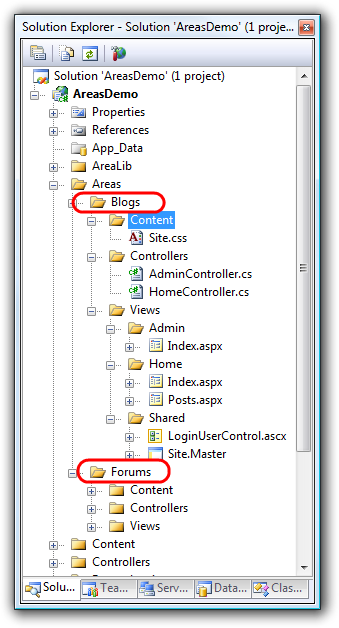
Well the bad news is that the areas layout I had in that prototype doesn’t work right out of the box. The good news is that it is very easy to enable that scenario. All of the components necessary are in the box, we just need to tweak the installation slightly.
We’ve added a few area specific properties to
VirtualPathProviderViewEngine, the base class for our
WebFormViewEngine and others. Properties such as
AreaViewLocationFormats allow specifying an array of format strings
used by the view engines to locate a view. The default format strings
for areas doesn’t match the structure that I used before, but it’s not
hard for us to tweak things a bit so it does.
The approach I took was to simply create a new view engine that had the area view location formats that I cared about and inserted it first into the view engines collection.
public class SingleProjectAreasViewEngine : WebFormViewEngine {
    public SingleProjectAreasViewEngine() : this(
        new[] {
            "~/Areas/{2}/Views/{1}/{0}.aspx",
            "~/Areas/{2}/Views/{1}/{0}.ascx",
            "~/Areas/{2}/Shared/{0}.aspx",
            "~/Areas/{2}/Shared/{0}.ascx"
        },
        null,
        new[] {
            "~/Areas/{2}/Views/{1}/{0}.master",
            "~/Areas/{2}/Views/Shared/{0}.master",
        }
        ) {
    }

    public SingleProjectAreasViewEngine(
            IEnumerable<string> areaViewLocationFormats,
            IEnumerable<string> areaPartialViewLocationFormats,
            IEnumerable<string> areaMasterLocationFormats) : base() {
        this.AreaViewLocationFormats = areaViewLocationFormats.ToArray();
        this.AreaPartialViewLocationFormats = (areaPartialViewLocationFormats ??
            areaViewLocationFormats).ToArray();
        this.AreaMasterLocationFormats = areaMasterLocationFormats.ToArray();
    }
}
The constructor of this view engine simply specifies different format
strings. Here’s a case where I wish the Framework had a String.Format
method that efficiently worked with named
formats.
This sample is made slightly more complicated by the fact that I have another constructor that accepts all these formats. That makes it possible to change the formats when registering the view engine if you so choose.
In my web.config file, I then registered this view engine like so:
protected void Application_Start() {
    RegisterRoutes(RouteTable.Routes);
    ViewEngines.Engines.Insert(0, new SingleProjectAreasViewEngine());
}
Note that I’m inserting it first so it takes precedence. I could have cleared the collection and added this as the only one, but I wanted the existing areas format for multi-project solutions to continue to work just in case. It’s really your call.
Now I can register my area routes using a new MapAreaRoute extension method.
public static void RegisterRoutes(RouteCollection routes) {
    routes.IgnoreRoute("{resource}.axd/{*pathInfo}");

    routes.MapAreaRoute("Blogs", "blogs_area",
        "blog/{controller}/{action}/{id}",
        new { controller = "Home", action = "Index", id = "" },
        new string[] { "SingleProjectAreas.Areas.Blogs.Controllers" });

    routes.MapAreaRoute("Forums",
        "forums_area",
        "forum/{controller}/{action}/{id}",
        new { controller = "Home", action = "Index", id = "" },
        new string[] { "SingleProjectAreas.Areas.Forums.Controllers" });

    routes.MapAreaRoute("Main", "default_route",
        "{controller}/{action}/{id}",
        new { controller = "Home", action = "Index", id = "" },
        new string[] { "SingleProjectAreas.Controllers" });
}
And I’m good to go. Notice that I no longer have a default route. Instead, I mapped an area named “Main” to serve as the “main” project. The Route URL pattern there is what you’d typically see in the default template.
If you prefer this approach or would like to see both approaches supported, let me know. We are looking at having the single project approach supported out of the box as a possibility for Preview 2.
If you want to see this in action, download the following sample.
Comments
8 responses