
Combining JQuery Form Validation and Ajax Submission with ASP.NET
As I mentioned before, I’m really excited that we’re shipping jQuery with ASP.NET MVC and with Visual Studio moving forward. Just recently, we issued a patch that enables jQuery Intellisense to work in Visual Studio 2008.
But if you’re new to jQuery, you might sit down at your desk ready to take on the web with your knew found JavaScript light saber, only to stare blankly at an empty screen asking yourself, “Is this it?”
See, as exciting and cool as jQuery is, it’s really the vast array of plugins that really give jQuery its star power. Today I wanted to play around with integrating two jQuery plugins – the jQuery Form Plugin used to submit forms asynchronously and the jQuery Validation plugin used to validate input.
Since this is a prototype for something I might patch into Subtext, which still targets ASP.NET 2.0, I used Web Forms for the demo, though what I do here easily applies to ASP.NET MVC.
Here are some screenshots of it in action. When I click the submit button, it validates all the fields. The email field is validated after the input loses focus.
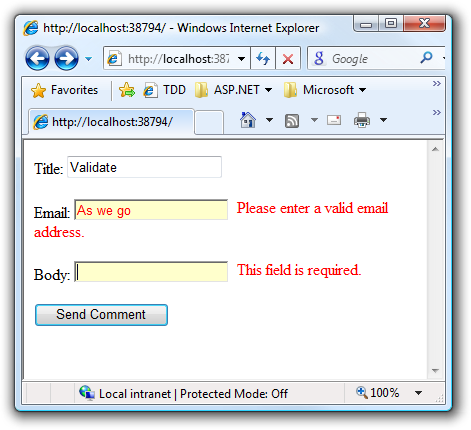
When I correct the data and click “Send Comment”, it will asynchronously display the posted comment.
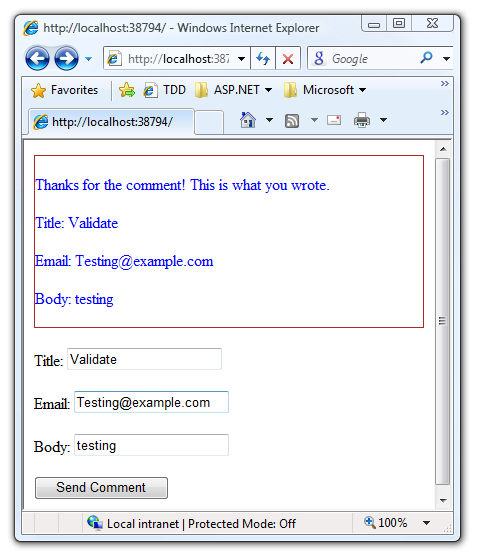
Let’s look at the code to make this happen. Here’s the relevant HTML markup in my Default.aspx page:
<div id="comments" ></div>

<form id="form1" runat="server">
<div id="comment-form">
  <p>
    <asp:Label AssociatedControlID="title" runat="server" Text="Title: " />
    <asp:TextBox ID="title" runat="server" CssClass="required" />
  </p>
  <p>
    <asp:Label AssociatedControlID="email" runat="server" Text="Email: " />
    <asp:TextBox ID="email" runat="server" CssClass="required email" />
  </p>
  <p>
    <asp:Label AssociatedControlID="body" runat="server" Text="Body: " />
    <asp:TextBox ID="body" runat="server" CssClass="required" />
  </p>
  <input type="hidden" name="<%= submitButton.ClientID %>"
    value="Send Comment" />
  <asp:Button runat="server" ID="submitButton"
    OnClick="OnFormSubmit" Text="Send Comment" />
</div>
</form>
I’ve called out a few important details in code. The top DIV is where I will put the response of the AJAX form post. The CSS classes on the elements provide validation meta-data to the Validation plugin. What the heck is that hidden input doing there?
Notice that hidden input that duplicates the field name of the submit
button. That’s the ugly hack part I did. The jQuery Form plugin doesn’t
actually submit the value of the input button. I needed that to be
submitted in order for the code behind to work. When you click on the
submit button, a method named OnFormSubmit gets called in the code
behind.
Let’s take a quick look at that method in the code behind.
protected void OnFormSubmit(object sender, EventArgs e) {
    var control = Page.LoadControl("~/CommentResponse.ascx")
        as CommentResponse;
    control.Title = title.Text;
    control.Email = email.Text;
    control.Body = body.Text;

    var htmlWriter = new HtmlTextWriter(Response.Output);
    control.RenderControl(htmlWriter);
    Response.End();
}
Notice here that I’m just instantiating a user control, setting some properties of the control, and then rendering it to the output stream. I’m able to access the values in the submitted form by accessing the ASP.NET controls.
This is sort of like the Web Forms equivalent of ASP.NET MVC’s partial
rendering
ala the return PartialView() method. Here’s the code for that user
control.
<%@ Control Language="C#" CodeBehind="CommentResponse.ascx.cs"
    Inherits="WebFormValidationDemo.CommentResponse" %>
<div style="color: blue; border: solid 1px brown;">
    <p>
        Thanks for the comment! This is what you wrote.
    </p>
    <p>
        <label>Title:</label> <%= Title %>
    </p>
    <p>
        <label>Email:</label> <%= Email %>
    </p>

    <p>
        <label>Body:</label> <%= Body %>
    </p>
</div>
Along with its code behind.
public partial class CommentResponse : System.Web.UI.UserControl {
    public string Title { get; set; }
    public string Email { get; set; }
    public string Body { get; set; }
}
Finally, let’s look at the script in the head section that ties this all together and makes it work.
<script src="scripts/jquery-1.2.6.min.js"></script>
<script src="scripts/jquery.validate.js"></script>
<script src="scripts/jquery.form.js"></script>
<% if (false) { %>
<script src="scripts/jquery-1.2.6-vsdoc.js"></script>
<% } %>
<script>
    $(document).ready(function() {
        $("#<%= form1.ClientID %>").validate({
            submitHandler: function(form) {
                jQuery(form).ajaxSubmit({
                    target: "#comments"
                });
            }
        });
    });
</script>
The if(false) section is for the jQuery intellisense, which only
matters to me at design time, not runtime.
What we’re doing here is getting a reference to the form and calling the validate method on it. This sets up the form for validation based on validation meta data stored in the CSS classes for the form inputs. It’s possible to do this completely external, but one nice thing about this approach is now you can style the fields based on their validation attributes.
We then register the ajaxSubmit method of the jQuery Form plugin as
the submit handler for the form. So when the form is valid, it will use
the ajaxSubmit method to post the form, which posts it asynchronously.
In the arguments to that method, I specify the #comments selector as
the target of the form. So the response from the form submission gets
put in there.
As I mentioned before, the hidden input just ensures that ASP.NET runs its lifecycle in response to the form post so I can handle the response in the button’s event handler. In ASP.NET MVC, you’d just point this to an action method instead and not worry about adding the hidden input.
In any case, play around with these two plugins as they provide way more rich functionality than what I covered here.
Comments
17 responses