
HTTP Debugging Using Reverse Proxies And Port Forwarders
 I’m
currently working on an interesting project to develop a series of HTTP
services used by games running on the RIM Blackberry. These services
will enable players to compete against one another (though not in real
time) in various games and see high scores, challenge friends, etc….
It brings a social aspect to gaming on your blackberry device.
I’m
currently working on an interesting project to develop a series of HTTP
services used by games running on the RIM Blackberry. These services
will enable players to compete against one another (though not in real
time) in various games and see high scores, challenge friends, etc….
It brings a social aspect to gaming on your blackberry device.
The games are written in Java and I’m using a Blackberry emulator for testing the interaction between the game and the services. I’m running the service at localhost on my local machine to allow me to step through the debugger when necessary.
With all these web requests and response shuttling back and forth between the game and the service, it’d be nice to be able to debug that HTTP traffic using a network analyzer like Fiddler.
What Is Fiddler?
If you’re not familiar with Fiddler, it acts as a local HTTP Proxy on port 8888 allowing you to inspect HTTP traffic between your an application and a web application (even one running at localhost). WinINET-based applications (such as Internet Explorer) automatically use Fiddler when its running. For other applications, you need to configure the application to use Fiddler as a proxy.
It’s immensely useful when debugging web services and weird problems with web applications.
It Wasn’t Working For Me
Unfortunately, I ran into an annoying problem. The emulator is not a WinINET-based application nor does it allow configuring a proxy, thus Fiddler was not reporting any traffic.
Configuring Fiddler as a Reverse Proxy
Fortunately, I found instructions on the Fiddler site that shows you how to configure Fiddler as a Reverse Proxy.
A reverse proxy sits in front of your webserver and forwards requests on to your webserver. Thus the application doesn’t need to be configured to use it. All I had to do was ask the developers to change the application to make requests for port 8888 (I’ll explain later why I couldn’t just set up a HOSTS file entry).
I then added a rule to forward requests for localhost port 8888 to localhost port 80 like so:
if (oSession.host.toLowerCase() == “localhost:8888”)
oSession.host = “localhost:80”;
Unfortunately, this didn’t work, creating some weird infinite loop when I would make a request to localhost:8888. To rectify this, I added an entry to the HOSTS file to map the hostname MOBILE to the ip address 127.0.0.1. Fiddler apparently doesn’t work as a simple port forwarder (I’ve got a solution for that, keep reading).
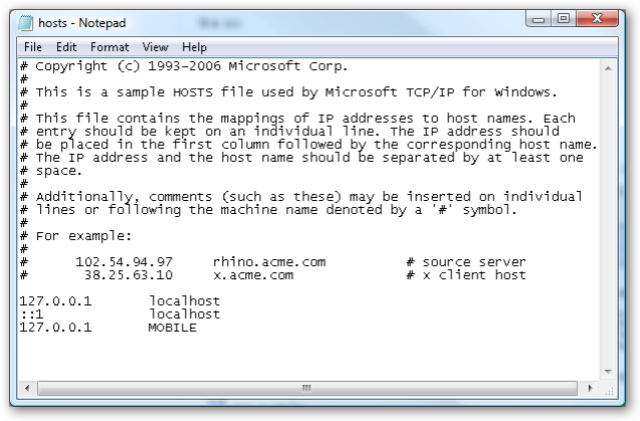
I then updated the custom rule in Fiddler to route requests for mobile:8888 to port 80 of the localhost and again asked the developers to change the url encoded in the app (I don’t have the source for the client app).
if (oSession.host.toLowerCase() == “mobile:8888”)
oSession.host = “localhost:80”;
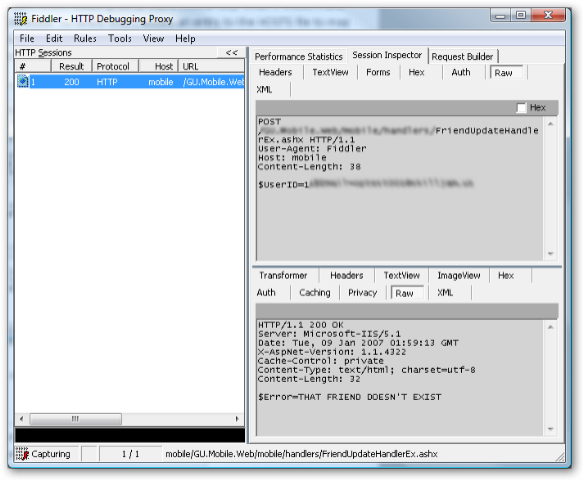
Now I can monitor requests from the emulator to localhost using Fiddler. One benefit of using Fiddler is that I can replay requests tweaking form values and such.
Dealing With Hard-Coded URLs
In the most recent build of the game, the game developers accidentally changed the hard-coded URL to point back to the QA environment. For the sake of this example, suppose it is http://mobile.example.com/.
Rather than asking them once again to change it, I decided to try and work around this. I added the QA server hostname to the HOSTS file just like I did with MOBILE before, pointing it to localhost. I then had to change IIS on my machine to run on a different port, since I planned to configure TcpTrace to listen in on port 80. I chose the perennial favorite alternate port for IIS, port 8080. and used TcpTrace to listen on port 80 and forward requests to port 8080.
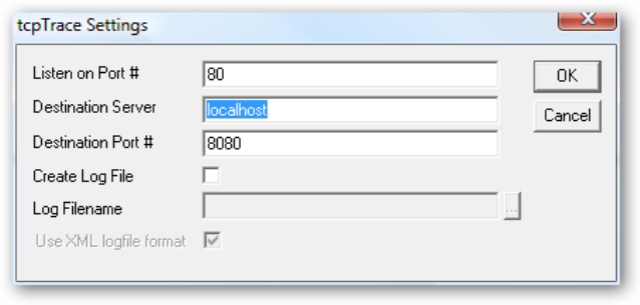
This allowed me to view the HTTP traffic back and forth between the emulator and the web service again using TcpTrace. Unfortunately, I could not get Fiddler to work in this setup, so I lost some of the ability to tweak and replay requests. This ended up being fine since the latest build is meant for final testing.
The following are some useful resources for HTTP debugging.
Comments
0 responses