
Using Embedded Resources for Client Script Blocks in ASP.NET
A while ago Patrick Cauldwell highlighted a wonderful technique of using embedded resources for unit testing with external files.
Fully on board with Pat, I’ve applied that technique to client script blocks when building web controls and ASP.NET pages.
How often have you written (or had to deal with) crap like this.
string script = "<script language=\"javascript\">"
  + "function SomeFunction(someParam)" + Environment.NewLine
  + "{" + Environment.NewLine
  + "    alert(’Man, this sucks!’);" + Environment.NewLine
  + "}" + Environment.NewLine
  + "</script>";
A preferred approach is to have your client script code in a separate file. For web controls, I generally have a folder named Resources that contains a folder named Scripts. I’ll add my client script files there as embedded resources. In figure 1 below, you can see that I have two script files in my project.
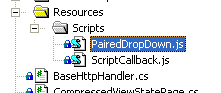
Figure 1 Script files.
To make sure these files are compiled as embedded resources, I select the files and set the build action to embedded resource in the Properties window as in figure 2.
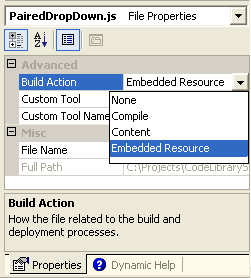
Figure 2 Build Action = Embedded Resource.
Now when I need to display these scripts in a page, I can use the following code which makes use of my handy dandy ScriptHelper class.
if(!Page.IsClientScriptBlockRegistered("PairedDropDownHandler"))
{
  string script = ScriptHelper.UnpackScript("PairedDropDown.js");
  Page.RegisterClientScriptBlock("PairedDropDownHandler", script);
}
The contents of my embedded script files do not contain the <script> tags. I leave that responsibility to my ScriptHelper class so that these script files can be used as stand alone script files as well. The code for my script helper class is below.
/// <summary>
/// Utility class for extracting embedded scripts.
/// </summary>
/// <remarks>
/// Uses a naming convention. All scripts should be placed
/// in the Resources\Scripts folder. The scriptName is just
/// the filename of the script.
/// </remarks>
public static class ScriptHelper
{
  /// <summary>
  /// Returns the contents of the embedded script as
  /// a stringwrapped with the start / end script tags.
  /// </summary>
  /// <param name="scriptName">FileName of the script.</param>
  /// <returns>Contents of the script.</returns>
  public static string UnpackScript(string scriptName)
  {
    string language = "javascript";
    string extension = Path.GetExtension(scriptName);

    if(0 == string.Compare(extension, ".vbs", true
      , CultureInfo.InvariantCulture))
    {
      language = "vbscript";
    }

    return UnpackScript(scriptName, language);
  }

  public static string UnpackScript(string scriptName, string scriptLanguage)
  {
    return "<script language=\"Javascript\">"
      + Environment.NewLine
      + UnpackEmbeddedResourceToString("Resources.Scripts." + scriptName)
      + Environment.NewLine
      + "</script>";
  }

  // Unpacks the embedded resource to string.
  static string UnpackEmbeddedResourceToString(string resourceName)
  {
    Assembly executingAssembly = Assembly.GetExecutingAssembly();
    Stream resourceStream = executingAssembly
      .GetManifestResourceStream(typeof(ScriptHelper), resourceName);
    using(StreamReader reader = new StreamReader(resourceStream, Encoding.ASCII))
    {
      return reader.ReadToEnd();
    }
  }
}
You’ll be seeing this ScriptHelper class again when I highlight some
controls you might find useful. If you’re already using ASP.NET 2.0 (aka
Whidbey), there’s an even better way to handle client
files.
UPDATE: I just realized I was using code from a StringHelper class I
wrote. I updated that bit to inline the simple functionality.
Comments
8 responses